Of course. This is a fundamental and very important concept in Java. Let's break it down.
The Short Answer
In Java, when you declare a String variable and initialize it to null, it means:
The variable does not point to any object in memory.
It's essentially an empty reference, a placeholder that holds nothing.
Detailed Explanation
What null Represents
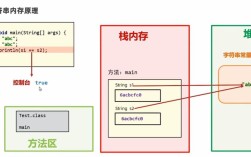
Think of a variable as a label on a box. The box itself is the object in memory, and the label is the variable.
String myString = "Hello";: You've created aStringobject containing "Hello" in memory, and the labelmyStringis now stuck on that box.String myString = null;: You've created a label calledmyString, but you haven't put it on any box. It's just a label floating in the air, not associated with anything.
This state is represented by the literal null.
The Danger: NullPointerException
The most critical rule about null is:
You cannot call methods or access fields on a
nullreference.
Attempting to do so will cause a runtime error called a NullPointerException (often abbreviated as NPE). This is one of the most common errors in Java.

Example of a NullPointerException:
public class NullExample {
    public static void main(String[] args) {
        // The variable 'text' is declared but not assigned a String object.
        // It holds the value null.
        String text = null;
        // This line will cause a NullPointerException
        System.out.println(text.length()); // CRASH!
    }
}
Why it crashes:
- The JVM looks at the variable
textand sees it'snull. - It tries to execute the
.length()method on whatevertextis pointing to. - Since
textpoints to nothing, there is no object to run the.length()method on. - The program panics and throws a
NullPointerException, terminating the execution of that method.
Common Scenarios Where null Occurs
Uninitialized Variables (Local Variables)
For local variables (variables inside a method), Java requires you to initialize them before use. The compiler will catch this.
public void myMethod() {
    // String name; // This line will cause a COMPILE ERROR
    // System.out.println(name); // Error: variable name might not have been initialized
    String name = "Alice"; // This is correct
}
Default Values for Object References (Instance and Class Variables)
If you declare an instance variable (inside a class, but not inside a method) or a static variable, Java automatically initializes it to null if you don't provide a value.
public class Car {
    // This instance variable is automatically initialized to null by Java.
    String model;
    public void printModel() {
        // This will cause a NullPointerException at runtime if printModel()
        // is called on a Car object where model was never set.
        System.out.println("Model: " + model.length());
    }
}
// In another class:
public class Main {
    public static void main(String[] args) {
        Car myCar = new Car();
        myCar.printModel(); // CRASH! because myCar.model is null
    }
}
Method Returning null
A method might be designed to return an object but sometimes has no valid object to return. In this case, it returns null.
public class User {
    private String name;
    public User(String name) {
        this.name = name;
    }
}
public class UserService {
    // This method might find a user, or it might not.
    public User findUserById(String id) {
        // Imagine a database query here...
        if (id.equals("123")) {
            return new User("John Doe");
        } else {
            // User not found, so we return null.
            return null;
        }
    }
}
API Calls
Many methods from Java's built-in libraries or third-party libraries can return null to indicate the absence of a value.
// getSystemProperty returns null if the property doesn't exist.
String path = System.getProperty("java.home.nonexistent.property");
System.out.println(path); // Prints "null"
Best Practices: How to Handle null
The Classic if Check
The most straightforward way is to check for null before using the variable.
String text = null;
if (text != null) {
    System.out.println("Length is: " + text.length());
} else {
    System.out.println("The string is null, cannot get length.");
}
Modern Java Solutions (Java 8+)
Modern Java provides more elegant ways to handle null safely.
a) Objects.requireNonNull()
This is useful for validating method arguments or object state. It throws a NullPointerException with a custom message if the object is null, failing fast.
public void setUserName(String name) {
    // This will throw an NPE immediately if name is null, with a clear message.
    this.name = Objects.requireNonNull(name, "User name cannot be null");
}
b) Optional<T> (The Best Practice)
Optional is a container object that may or may not contain a non-null value. It forces you to explicitly handle the "absence" case, preventing NullPointerExceptions at runtime.
import java.util.Optional;
public class UserService {
    public Optional<User> findUserById(String id) {
        // Instead of returning null, return an empty Optional.
        if (id == null || id.equals("invalid")) {
            return Optional.empty();
        }
        return Optional.of(new User("Jane Doe"));
    }
}
// How to use it:
public class Main {
    public static void main(String[] args) {
        UserService service = new UserService();
        Optional<User> userOpt = service.findUserById("invalid");
        // The .ifPresent() method only runs if the Optional contains a value.
        userOpt.ifPresent(user -> {
            System.out.println("Found user: " + user.getName());
        });
        // Or, get a default value if it's empty.
        User user = service.findUserById("invalid").orElse(new User("Default User"));
        System.out.println("User is: " + user.getName());
    }
}
Summary
| Concept | Description | Example |
|---|---|---|
String myString = null; |
Declares a reference variable that does not point to any object. | String name = null; |
NullPointerException |
A runtime error that occurs when you try to use a method or field on a null reference. |
name.length(); (when name is null) |
Handling null |
Always check for null before using a variable that might be null. |
if (name != null) { ... } |
| Modern Approach | Use Optional to explicitly represent the absence of a value, making your code safer and clearer. |
Optional<String> optName = ...; |