Of course! Here is a comprehensive guide to the Java HashMap API, covering its core concepts, most important methods, internal workings, and best practices.
What is a HashMap?
A HashMap is part of Java's Collections Framework and implements the Map interface. It stores data as key-value pairs.
Key Characteristics:
- Key-Value Storage: Each element in a
HashMapis aMap.Entryobject, which consists of a key and a value (e.g.,name: "Alice"). - Fast Operations: It provides constant-time complexity, O(1), for basic operations like
put(),get(), andremove(), on average. This makes it extremely efficient for lookups. - Unordered: It does not maintain any order of its elements. The iteration order is not guaranteed and can change over time.
- Allows One
nullKey: You can have at most onenullkey. However, you can have multiplenullvalues. - Non-Synchronized: It is not thread-safe. If multiple threads access a
HashMapconcurrently and at least one of them modifies it structurally, it must be synchronized externally.
How to Create and Initialize a HashMap
import java.util.HashMap;
import java.util.Map;
public class HashMapExample {
    public static void main(String[] args) {
        // 1. Create an empty HashMap with default initial capacity (16) and load factor (0.75)
        Map<String, Integer> ages = new HashMap<>();
        // 2. Create a HashMap with an initial capacity
        Map<String, Integer> bigAges = new HashMap<>(100);
        // 3. Create a HashMap with an initial capacity and load factor
        //    Load factor is a measure of how full the map is allowed to get before
        //    its internal capacity is increased.
        Map<String, Integer> customAges = new HashMap<>(50, 0.85f);
        // 4. Initialize with values (Java 9+)
        Map<String, Integer> employeeAges = Map.of(
            "Alice", 30,
            "Bob", 45,
            "Charlie", 25
        );
        // Note: Map.of() creates an *immutable* map. You cannot add or remove elements from it.
        // For a mutable map, use the constructor with a Map:
        Map<String, Integer> mutableEmployeeAges = new HashMap<>(employeeAges);
    }
}
Core API Methods (The "Cheat Sheet")
Here are the most frequently used methods, categorized by their function.
Adding and Updating Elements
| Method | Description | Example |
|---|---|---|
V put(K key, V value) |
Associates the specified value with the specified key. If the key already exists, its value is updated. Returns the old value or null if the key was new. |
ages.put("David", 40); |
void putAll(Map<? extends K, ? extends V> m) |
Copies all of the mappings from the specified map to this map. | ages.putAll(employeeAges); |
V putIfAbsent(K key, V value) |
Associates the value with the key only if the key is not already associated with a value. Returns the current value (existing or new). | ages.putIfAbsent("Alice", 99); // Does nothing, Alice already exists |
Retrieving Elements
| Method | Description | Example |
|---|---|---|
V get(Object key) |
Returns the value to which the specified key is mapped, or null if this map contains no mapping for the key. |
int age = ages.get("Alice"); // age is 30 |
V getOrDefault(Object key, V defaultValue) |
Returns the value for the key, or defaultValue if the key is not found. (Avoids null checks) |
int age = ages.getOrDefault("Eve", -1); // age is -1 |
boolean containsKey(Object key) |
Returns true if this map contains a mapping for the specified key. |
boolean hasAlice = ages.containsKey("Alice"); // true |
boolean containsValue(Object value) |
Returns true if this map maps one or more keys to the specified value. |
boolean hasForty = ages.containsValue(40); // true |
int size() |
Returns the number of key-value mappings in this map. | System.out.println(ages.size()); // e.g., 3 |
boolean isEmpty() |
Returns true if this map contains no key-value mappings. |
System.out.println(ages.isEmpty()); // false |
Removing Elements
| Method | Description | Example |
|---|---|---|
V remove(Object key) |
Removes the mapping for the specified key if present. Returns the value that was removed, or null if no mapping existed. |
ages.remove("Bob"); |
boolean remove(Object key, Object value) |
Removes the entry for the specified key only if it is currently mapped to the specified value. Returns true if removed. |
ages.remove("Alice", 30); // Removes Alice if her age is 30 |
Views of the Map
These methods return "views" of the map, meaning they reflect changes made to the original map.

| Method | Description | Example |
|---|---|---|
Set<K> keySet() |
Returns a Set view of the keys contained in this map. |
for (String name : ages.keySet()) { ... } |
Collection<V> values() |
Returns a Collection view of the values contained in this map. |
for (int age : ages.values()) { ... } |
Set<Map.Entry<K, V>> entrySet() |
Returns a Set view of the mappings contained in this map. This is the most common way to iterate. |
for (Map.Entry<String, Integer> entry : ages.entrySet()) { ... } |
Iterating Over a HashMap
Map<String, Integer> ages = new HashMap<>();
ages.put("Alice", 30);
ages.put("Bob", 45);
ages.put("Charlie", 25);
// 1. Iterate over keys
System.out.println("Keys:");
for (String name : ages.keySet()) {
    System.out.println(name);
}
// 2. Iterate over values
System.out.println("\nValues:");
for (Integer age : ages.values()) {
    System.out.println(age);
}
// 3. Iterate over key-value pairs (Most common and useful)
System.out.println("\nKey-Value Pairs:");
for (Map.Entry<String, Integer> entry : ages.entrySet()) {
    String name = entry.getKey();
    int age = entry.getValue();
    System.out.println(name + " is " + age + " years old.");
}
// 4. Using Java 8 forEach (Modern and concise)
System.out.println("\nUsing Java 8 forEach:");
ages.forEach((name, age) -> System.out.println(name + " is " + age + " years old."));
Internal Working Principle: Hashing and Buckets
The magic behind a HashMap's speed is its use of a hash table.
-
Hashing: When you call
map.put(key, value), theHashMapcalculates an integer value called a hash code from the key using itshashCode()method. This hash code determines the "bucket" where the entry will be stored. -
Buckets: A
HashMapinternally maintains an array of "buckets". The hash code is used to find the index of the bucket in this array.index = hashcode % array_length. -
Collision Handling: What if two different keys produce the same hash code (or hash to the same bucket index)? This is called a collision.
HashMaphandles this using a technique called chaining. Each bucket is a linked list (or a balanced tree in Java 8+ for many collisions) of all entries that hash to that bucket.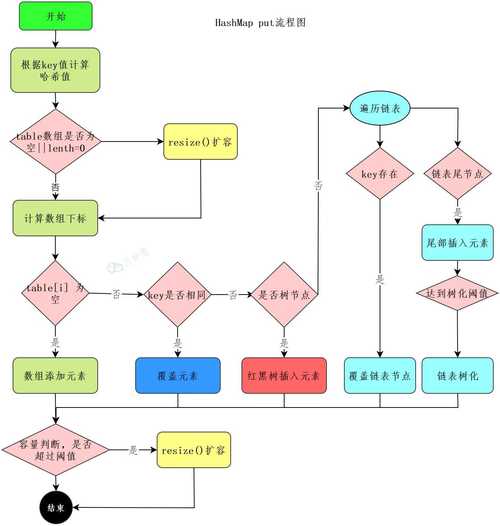 (图片来源网络,侵删)
 -
equals()andhashCode()Contract: For aHashMapto work correctly, the key object must properly implement bothequals()andhashCode().hashCode(): Must return the same integer for the same object during a single execution of the application.equals(Object obj): Defines object equality.- Contract: If two objects are equal (
a.equals(b)istrue), they must have the same hash code (a.hashCode() == b.hashCode()). The reverse is not required.
Important Related Classes
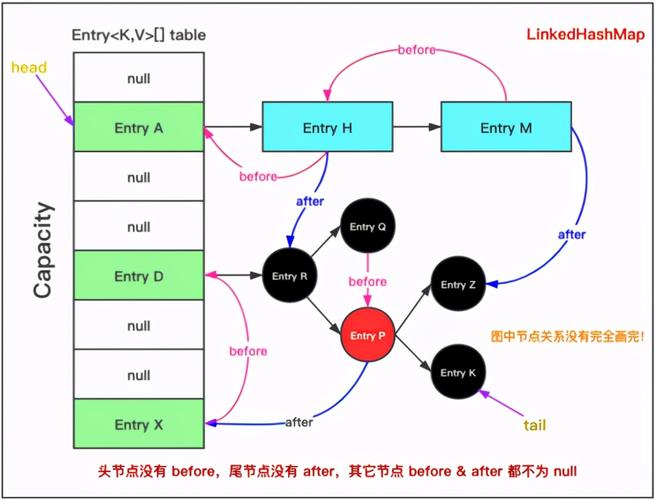
LinkedHashMap: ExtendsHashMapand maintains the insertion order of elements. It's slightly slower thanHashMapbut provides predictable iteration order.TreeMap: ImplementsSortedMapand stores its elements in a red-black tree. It keeps its keys in a sorted order (either natural order or a customComparator). Operations are O(log n).Hashtable: An older, legacy class. It's similar toHashMapbut is synchronized (thread-safe). Because of this synchronization overhead, it's generally slower thanHashMap. It also does not allownullkeys or values.
Best Practices
-
Choose the Right Key Type: Use immutable objects as keys (e.g.,
String,Integer, wrapper classes). If the key changes after being put into the map, theHashMapwill not be able to find it because its hash code will have changed, leading to a "lost" entry. -
Implement
equals()andhashCode(): If you create your own custom class to be used as a key, you must correctly override bothequals()andhashCode()according to the contract. -
Be Aware of Performance: For a very large number of entries that hash to the same bucket, performance can degrade to O(n). This is rare with a good
hashCode()implementation but can happen. Java 8+ improves this by converting a bucket's linked list into aTreeMapif it gets too long, bringing performance back to O(log n) for that bucket. -
Use
getOrDefault(): It's cleaner and safer than a manualget()followed by anullcheck.// Instead of this: Integer age = ages.get("Eve"); if (age == null) { age = 0; } // Do this: Integer age = ages.getOrDefault("Eve", 0); -
Thread Safety: If you need a thread-safe
HashMap, consider:- Using
Collections.synchronizedMap(new HashMap<>()). - Using
ConcurrentHashMap(fromjava.util.concurrent), which is optimized for concurrent access and is generally the preferred choice in multi-threaded environments.
- Using