Of course! Here is a comprehensive guide to using Protocol Buffers (Protobuf) with Java, covering everything from setup to advanced features.

What is Protocol Buffers?
Protocol Buffers (often abbreviated as Protobuf) is a language-neutral, platform-neutral, extensible mechanism for serializing structured data. Think of it as a more efficient, smaller, and faster alternative to XML, JSON, or other text-based formats.
Key Advantages:
- Compact: Binary format is much smaller than text-based formats like JSON.
- Fast: Serialization and deserialization are extremely fast.
- Strongly-Typed: The schema (
.protofile) defines the data structure, which prevents many common errors. - Code Generation: You define your data structure once in a
.protofile, and the Protobuf compiler generates the necessary, type-safe Java classes for you.
Step 1: Setting Up Your Environment
You need two main things:
- The Protobuf Compiler (
protoc): This tool reads your.protofile and generates the source code. - The Protobuf Java Libraries: These contain the runtime needed to use the generated classes in your application.
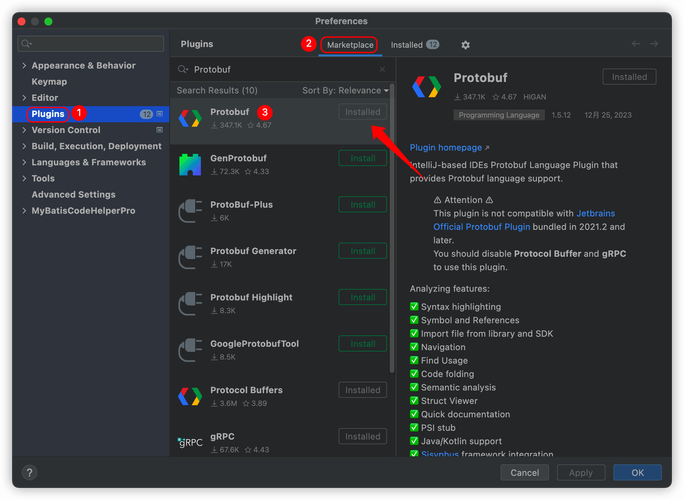
Install the Protobuf Compiler (protoc)
For macOS (using Homebrew):
brew install protobuf
For Linux (Debian/Ubuntu):
sudo apt update
sudo apt install protobuf-compiler
For Windows:
Download the pre-compiled binaries from the official GitHub releases page. Add the bin directory to your system's PATH.
Verify Installation: Open a terminal and run:
protoc --version
# Should output something like: libprotoc 3.21.12
Add the Protobuf Java Library to Your Project
You'll use Maven or Gradle to manage dependencies. The library provides the runtime classes needed to serialize and deserialize messages.

For Maven (pom.xml):
<dependencies>
    <dependency>
        <groupId>com.google.protobuf</groupId>
        <artifactId>protobuf-java</artifactId>
        <version>3.25.1</version> <!-- Use the latest version -->
    </dependency>
</dependencies>
For Gradle (build.gradle or build.gradle.kts):
// build.gradle
dependencies {
    implementation 'com.google.protobuf:protobuf-java:3.25.1' // Use the latest version
}
Step 2: Define Your Data Structure in a .proto File
This is the core of using Protobuf. Create a file, for example, user.proto, and define your message structure.
src/main/proto/user.proto
// Syntax specification, always required for newer versions.
syntax = "proto3";
// Package name helps prevent class name conflicts.
// The generated Java classes will be in the 'com.example.tutorial' package.
package com.example.tutorial;
// Option to generate Java code. The output directory is relative to your project's build setup.
option java_package = "com.example.tutorial";
option java_outer_classname = "UserData";
// Define a message, which is like a class in Java.
message User {
  // Fields are numbered (1, 2, 3...). These numbers are permanent and should not be changed.
  // Field numbers 1-15 take one byte to encode, so use them for the most common fields.
  int32 id = 1;        // Integer type
  string name = 2;     // String type
  string email = 3;    // String type
  // You can define nested messages
  message Address {
    string street = 1;
    string city = 2;
    int32 zip_code = 3;
  }
  // Using the nested message as a field type
  Address address = 4;
  // 'repeated' is like a List or ArrayList in Java
  repeated string phone_numbers = 5;
}
Key Concepts in the .proto file:
syntax = "proto3";: Specifies the version of the syntax. Protobuf 3 is the current standard.message: Defines a structured data record. This is the equivalent of a class or struct.- Field Types:
int32,int64,string,bool,float,double, etc. - Field Numbers: The unique numeric identifier for each field. This is the most critical part. Changing a field number will break compatibility with any existing serialized data.
- Field Rules:
- Singular (default): A well-formed message can have zero or one of this field. (e.g.,
name,id). repeated: The field can be repeated any number of times (including zero). This maps to aListin Java. (e.g.,phone_numbers).
- Singular (default): A well-formed message can have zero or one of this field. (e.g.,
package: Used to prevent name clashes in different projects.option java_package: Specifies the Java package for the generated classes.option java_outer_classname: Specifies the name of the top-level Java class that will contain all the other generated classes (e.g.,User,Addresswill be nested static classes insideUserData).
Step 3: Generate the Java Code
Now, use the protoc compiler to turn your .proto file into Java source code.
For Maven Users
Maven has a fantastic plugin that automates this. Add this to your pom.xml inside the <build> section:
<build>
  <extensions>
    <extension>
      <groupId>kr.motd.maven</groupId>
      <artifactId>os-maven-plugin</artifactId>
      <version>1.7.0</version>
    </extension>
  </extensions>
  <plugins>
    <plugin>
      <groupId>org.xolstice.maven.plugins</groupId>
      <artifactId>protobuf-maven-plugin</artifactId>
      <version>0.6.1</version>
      <configuration>
        <protocArtifact>com.google.protobuf:protoc:${protobuf.version}:exe:${os.detected.classifier}</protocArtifact>
        <pluginId>grpc-java</pluginId>
      </configuration>
      <executions>
        <execution>
          <goals>
            <goal>compile</goal>
            <goal>test-compile</goal>
          </goals>
        </execution>
      </executions>
    </plugin>
  </plugins>
</build>
Then, run the build:
mvn clean compile
The generated Java files will appear in target/generated-sources/protobuf/java/.
For Gradle Users
Gradle also has a great plugin. Add this to your build.gradle file:
plugins {
    id 'com.google.protobuf' version '0.9.4' // Use a recent version
    id 'java'
}
group = 'com.example'
version = '1.0-SNAPSHOT'
repositories {
    mavenCentral()
}
dependencies {
    implementation 'com.google.protobuf:protobuf-java:3.25.1'
}
protobuf {
    protoc {
        // The artifact spec for the Protobuf Compiler
        artifact = 'com.google.protobuf:protoc:3.25.1'
    }
    // Generates the Java code for the proto files
    generateProtoTasks {
        all().each { task ->
            task.builtins {
                java {
                    option 'java_package=com.example.tutorial'
                    option 'java_outer_classname=UserData'
                }
            }
        }
    }
}
// To make the generated source files available to your IDE
sourceSets {
    main {
        java {
            srcDir 'build/generated/source/proto/main/java'
        }
    }
}
Then, run the build:
gradle build
The generated files will be in build/generated/source/proto/main/java/.
Step 4: Use the Generated Java Classes
The compiler creates several classes. The most important ones are:
UserData.java: The outer class.UserData.User.java: The class for yourUsermessage.UserData.Address.java: The class for your nestedAddressmessage.
Here’s a complete Java example showing how to create, serialize, and deserialize a User object.
UserDemo.java
import com.example.tutorial.UserData;
import java.io.FileInputStream;
import java.io.FileOutputStream;
import java.io.IOException;
import java.util.Arrays;
public class UserDemo {
    public static void main(String[] args) {
        // 1. Create a User object and populate it
        UserData.User user = UserData.User.newBuilder()
                .setId(123)
                .setName("John Doe")
                .setEmail("john.doe@example.com")
                .addPhoneNumbers("555-1234")
                .addPhoneNumbers("555-5678")
                .setAddress(UserData.User.Address.newBuilder()
                        .setStreet("123 Main St")
                        .setCity("Anytown")
                        .setZipCode(12345)
                        .build())
                .build();
        System.out.println("--- Created User ---");
        System.out.println(user);
        System.out.println();
        // 2. Serialize the User object to a byte array
        // This is the efficient binary representation
        byte[] serializedData = user.toByteArray();
        System.out.println("--- Serialized Data (Byte Array) ---");
        System.out.println("Size: " + serializedData.length + " bytes");
        // System.out.println(Arrays.toString(serializedData)); // For debugging
        System.out.println();
        // 3. Write the serialized data to a file
        try (FileOutputStream output = new FileOutputStream("user.dat")) {
            output.write(serializedData);
            System.out.println("--- Wrote serialized data to user.dat ---");
        } catch (IOException e) {
            e.printStackTrace();
        }
        System.out.println();
        // 4. Read the byte array from the file
        byte[] fileData;
        try (FileInputStream input = new FileInputStream("user.dat")) {
            fileData = input.readAllBytes();
        } catch (IOException e) {
            e.printStackTrace();
            return;
        }
        // 5. Deserialize the byte array back into a User object
        try {
            UserData.User deserializedUser = UserData.User.parseFrom(fileData);
            System.out.println("--- Deserialized User from file.dat ---");
            System.out.println(deserializedUser);
            System.out.println();
            // 6. Verify the data is the same
            System.out.println("--- Verification ---");
            System.out.println("Are original and deserialized users equal? " + user.equals(deserializedUser));
            System.out.println("Deserialized User Name: " + deserializedUser.getName());
            System.out.println("Deserialized User City: " + deserializedUser.getAddress().getCity());
        } catch (IOException e) {
            e.printStackTrace();
        }
    }
}
Explanation of Key Generated Methods:
User.newBuilder(): Returns a builder pattern object for creating aUserinstance. This is the recommended way..set...(),.add...(): Methods on the builder to set field values..build(): Finalizes the builder and returns an immutableUserinstance..toByteArray(): Serializes the message into a byte array..parseFrom(byte[]): Deserializes a byte array back into a message object..toString(): Provides a human-readable string representation of the message (great for debugging).- Getters: Like
getId(),getName(),getPhoneNumbersList()(forrepeatedfields), etc.
Step 5: Advanced Topics
Handling Unknown Fields
What happens if you deserialize a message that contains a field defined in a newer version of the .proto file that your current code doesn't know about?
Good news: Protobuf handles this gracefully. The unknown fields are simply stored along with the message. If you serialize the message again, the unknown fields are preserved. If you later update your code to include the new field, the previously stored data will be correctly parsed.
Default Values
- Primitives like
int32,boolhave a default of0orfalse. - Strings have a default of an empty string ().
repeatedfields have a default of an empty list.- Message types have a default of a "null" or empty instance.
- Protobuf does not send default values over the wire to save space. If a field is not set, it's as if it has its default value.
JSON Support
Protobuf can also serialize to and from JSON. This is very useful for interoperability with web frontends.
// Serialize to JSON
String json = user.toStringUtf8(); // or userToJson() depending on version
// Deserialize from JSON
UserData.User fromJson = UserData.User.parseFrom(json.getBytes());
You need to add the protobuf-java-util dependency for more advanced JSON features.
<dependency>
    <groupId>com.google.protobuf</groupId>
    <artifactId>protobuf-java-util</artifactId>
    <version>3.25.1</version>
</dependency>