- 准备工作:获取必要的凭证。
- 菜单设计:规划菜单的结构。
- Java 后端开发:编写代码来创建菜单并发送到微信服务器。
- 部署与验证:部署代码并确认菜单创建成功。
第 1 步:准备工作
在开始编码之前,你必须拥有以下信息:
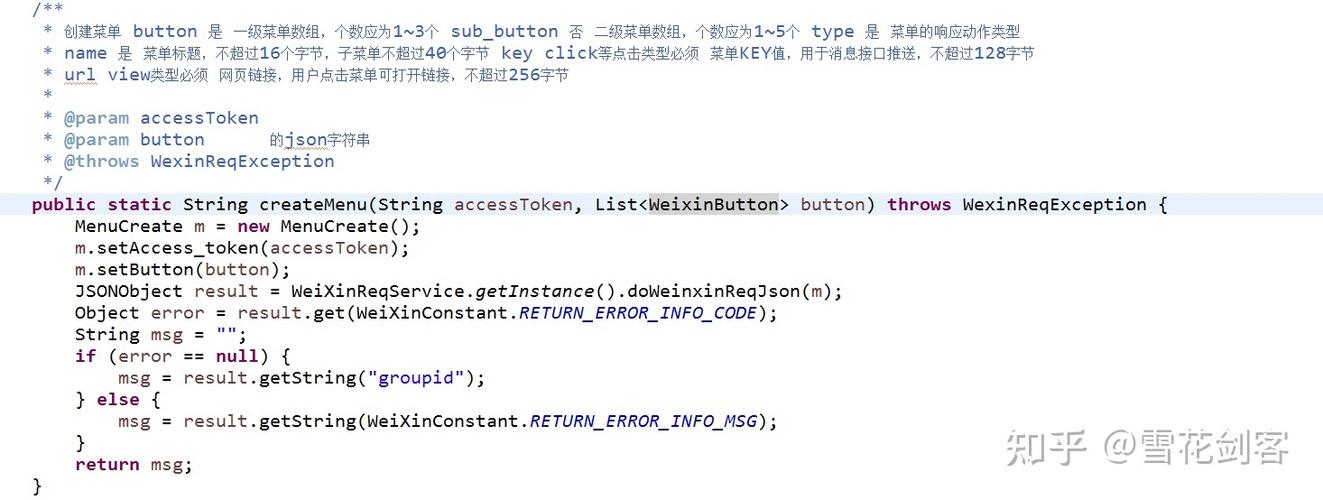
- 公众号类型:必须是 服务号(订阅号没有创建自定义菜单的权限,除非通过认证)。
- 开发者凭证:
- AppID (应用ID):公众号的唯一标识。
- AppSecret (应用密钥):用于获取访问令牌。
- 服务器配置:你已经完成了服务器配置(URL、Token、EncodingAESKey),并且服务器能够正常接收微信服务器的验证请求和事件推送。
第 2 步:菜单设计
自定义菜单有两种类型:个性化菜单 和 默认菜单,我们先从最基础的 默认菜单 开始。
一个菜单由 button 对象组成,button 可以是:
click:点击推事件,用户点击菜单时,微信会推送CLICK事件到开发者服务器,并在消息中附上EventKey(你设置的键值)。view:跳转URL,用户点击菜单时,微信客户端会打开你设置的网页 URL。scancode_push:扫码推事件,用户点击后,客户端将调起扫一扫工具。scancode_waitmsg:扫码带提示,用户点击后,客户端将调起扫一扫工具,扫描结果将带有strMsg字段。pic_sysphoto:系统拍照发图,用户点击后,客户端将调起系统相机,完成拍照后会把相片发送给开发者。pic_photo_or_album:拍照或者相册发图,用户点击后,客户端将弹出选择器,用户可以选择“拍照”或者“从手机相册选择”。pic_weixin:微信相册发图,用户点击后,客户端将调起微信相册,完成选择操作后,将选择的相片发送给开发者。location_select:发送位置,用户点击后,客户端将调起地理位置选择工具,用户选择完毕后,将选择的地理位置发送给开发者。miniprogram:跳转小程序,用户点击后,客户端将打开小程序。
一个菜单项还可以包含一个子菜单 sub_button,sub_button 里的 button 不能再包含子菜单。
示例菜单结构
我们创建一个如下结构的菜单:
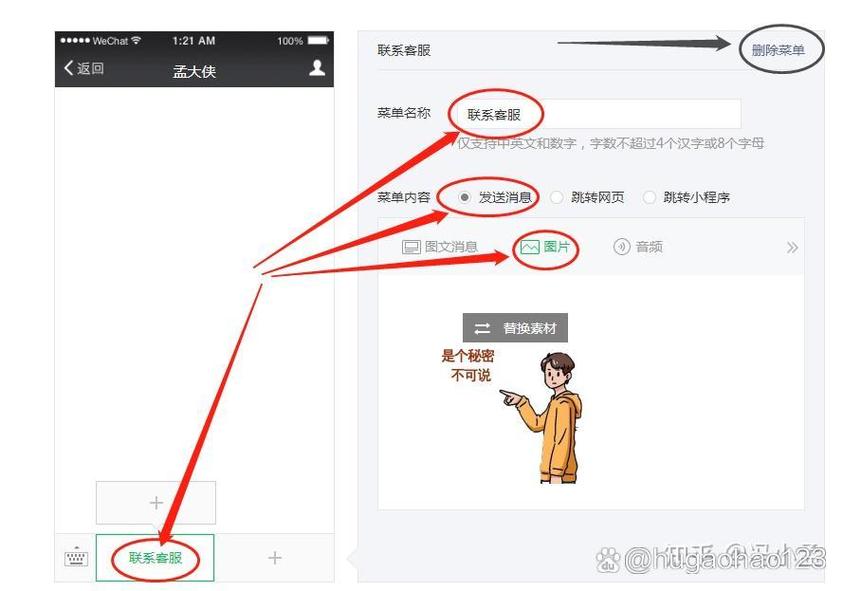
- 首页
click类型,EventKey设为HOME。
- 关于我们
click类型,EventKey设为ABOUT。
- 官方网站
view类型,URL 设为https://www.yourwebsite.com。
对应的 JSON 结构如下:
{
  "button": [
    {
      "type": "click",
      "name": "首页",
      "key": "HOME"
    },
    {
      "type": "click",
      "name": "关于我们",
      "key": "ABOUT"
    },
    {
      "type": "view",
      "name": "官方网站",
      "url": "https://www.yourwebsite.com"
    }
  ]
}
第 3 步:Java 后端开发
我们将使用 Spring Boot 框架来构建一个简单的后端服务,核心任务是:
- 获取
access_token。 - 使用
access_token和菜单 JSON 数据调用微信 API 创建菜单。
1 项目依赖 (pom.xml)
<dependencies>
    <!-- Spring Boot Starter Web -->
    <dependency>
        <groupId>org.springframework.boot</groupId>
        <artifactId>spring-boot-starter-web</artifactId>
    </dependency>
    <!-- 用于发送 HTTP 请求 -->
    <dependency>
        <groupId>org.apache.httpcomponents</groupId>
        <artifactId>httpclient</artifactId>
        <version>4.5.13</version>
    </dependency>
    <!-- JSON 处理库 -->
    <dependency>
        <groupId>com.fasterxml.jackson.core</groupId>
        <artifactId>jackson-databind</artifactId>
    </dependency>
</dependencies>
2 微信服务配置类
创建一个类来存储你的 AppID 和 AppSecret。
// WeChatConfig.java
package com.example.wechat.config;
import org.springframework.boot.context.properties.ConfigurationProperties;
import org.springframework.stereotype.Component;
@Component
@ConfigurationProperties(prefix = "wechat")
public class WeChatConfig {
    private String appId;
    private String appSecret;
    // Getters and Setters
    public String getAppId() {
        return appId;
    }
    public void setAppId(String appId) {
        this.appId = appId;
    }
    public String getAppSecret() {
        return appSecret;
    }
    public void setAppSecret(String appSecret) {
        this.appSecret = appSecret;
    }
}
在 application.properties 中配置:
# application.properties
wechat.app.id=你的AppID
wechat.app.secret=你的AppSecret
3 获取 Access Token
access_token 是调用接口的凭证,有效期为 2 小时,需要缓存起来避免频繁请求。
// AccessTokenService.java
package com.example.wechat.service;
import com.example.wechat.config.WeChatConfig;
import com.fasterxml.jackson.databind.JsonNode;
import com.fasterxml.jackson.databind.ObjectMapper;
import org.springframework.beans.factory.annotation.Autowired;
import org.springframework.stereotype.Service;
import org.apache.http.client.methods.CloseableHttpResponse;
import org.apache.http.client.methods.HttpGet;
import org.apache.http.impl.client.CloseableHttpClient;
import org.apache.http.impl.client.HttpClients;
import org.apache.http.util.EntityUtils;
import org.springframework.cache.annotation.Cacheable;
import java.io.IOException;
@Service
public class AccessTokenService {
    @Autowired
    private WeChatConfig weChatConfig;
    private static final String ACCESS_TOKEN_URL = "https://api.weixin.qq.com/cgi-bin/token?grant_type=client_credential&appid=%s&secret=%s";
    @Cacheable(value = "accessToken", unless = "#result == null")
    public String getAccessToken() throws IOException {
        String url = String.format(ACCESS_TOKEN_URL, weChatConfig.getAppId(), weChatConfig.getAppSecret());
        try (CloseableHttpClient httpClient = HttpClients.createDefault();
             CloseableHttpResponse response = httpClient.execute(new HttpGet(url))) {
            String result = EntityUtils.toString(response.getEntity());
            ObjectMapper mapper = new ObjectMapper();
            JsonNode rootNode = mapper.readTree(result);
            if (rootNode.has("access_token")) {
                return rootNode.get("access_token").asText();
            } else {
                // 处理错误情况
                throw new RuntimeException("获取 access_token 失败: " + rootNode.get("errmsg").asText());
            }
        }
    }
}
注意:这里使用了 @Cacheable 注解,你需要配置一个缓存(如 Caffeine 或 Redis)来存储 access_token,否则每次都会重新获取,如果不想用缓存,可以手动实现一个简单的内存缓存。
4 创建菜单
创建一个服务类来处理菜单的创建逻辑。
// MenuService.java
package com.example.wechat.service;
import com.fasterxml.jackson.databind.ObjectMapper;
import org.springframework.beans.factory.annotation.Autowired;
import org.springframework.stereotype.Service;
import org.apache.http.client.methods.CloseableHttpResponse;
import org.apache.http.client.methods.HttpPost;
import org.apache.http.entity.StringEntity;
import org.apache.http.impl.client.CloseableHttpClient;
import org.apache.http.impl.client.HttpClients;
import org.apache.http.util.EntityUtils;
import java.io.IOException;
@Service
public class MenuService {
    @Autowired
    private AccessTokenService accessTokenService;
    private static final String CREATE_MENU_URL = "https://api.weixin.qq.com/cgi-bin/menu/create?access_token=%s";
    public String createMenu(String menuJson) throws IOException {
        String accessToken = accessTokenService.getAccessToken();
        String url = String.format(CREATE_MENU_URL, accessToken);
        try (CloseableHttpClient httpClient = HttpClients.createDefault()) {
            HttpPost httpPost = new HttpPost(url);
            httpPost.setHeader("Content-Type", "application/json");
            httpPost.setEntity(new StringEntity(menuJson, "UTF-8"));
            try (CloseableHttpResponse response = httpClient.execute(httpPost)) {
                String result = EntityUtils.toString(response.getEntity());
                ObjectMapper mapper = new ObjectMapper();
                // 解析返回结果
                // {"errcode":0,"errmsg":"ok"} 表示成功
                return result;
            }
        }
    }
}
5 创建一个 API 端点来触发菜单创建
我们可以创建一个 REST Controller,通过一个 HTTP 请求来触发菜单的创建,方便测试。
// WeChatController.java
package com.example.wechat.controller;
import com.example.wechat.service.MenuService;
import org.springframework.beans.factory.annotation.Autowired;
import org.springframework.web.bind.annotation.PostMapping;
import org.springframework.web.bind.annotation.RequestMapping;
import org.springframework.web.bind.annotation.RestController;
@RestController
@RequestMapping("/wechat")
public class WeChatController {
    @Autowired
    private MenuService menuService;
    @PostMapping("/menu/create")
    public String createMenu() {
        // 这里直接写死菜单的 JSON 结构
        // 实际项目中,你应该从数据库或配置文件中读取
        String menuJson = "{\n" +
                "  \"button\": [\n" +
                "    {\n" +
                "      \"type\": \"click\",\n" +
                "      \"name\": \"首页\",\n" +
                "      \"key\": \"HOME\"\n" +
                "    },\n" +
                "    {\n" +
                "      \"type\": \"click\",\n" +
                "      \"name\": \"关于我们\",\n" +
                "      \"key\": \"ABOUT\"\n" +
                "    },\n" +
                "    {\n" +
                "      \"type\": \"view\",\n" +
                "      \"name\": \"官方网站\",\n" +
                "      \"url\": \"https://www.yourwebsite.com\"\n" +
                "    }\n" +
                "  ]\n" +
                "}";
        try {
            String result = menuService.createMenu(menuJson);
            return "菜单创建请求已发送,微信服务器返回: " + result;
        } catch (Exception e) {
            return "创建菜单失败: " + e.getMessage();
        }
    }
}
第 4 步:部署与验证
-
启动应用:运行你的 Spring Boot 应用。
-
发送请求:使用 Postman 或 curl 等工具向你的 API 发送一个 POST 请求。
- URL:
http://你的服务器IP:端口/wechat/menu/create - Method:
POST - Body: (可以留空,因为 JSON 是硬编码在 Controller 里的)
curl -X POST http://localhost:8080/wechat/menu/create
- URL:
-
检查结果:
- 如果控制台返回
{"errcode":0,"errmsg":"ok"},说明请求成功。 - 用你的微信扫描公众号的二维码,关注它。
- 在微信聊天界面与公众号对话,点击底部出现的自定义菜单。
- 检查菜单是否按预期显示和响应。
- 如果你配置了
click事件,你的服务器应该能收到微信服务器推送的 XML 格式的消息。
- 如果控制台返回
进阶:个性化菜单
个性化菜单允许你根据用户的标签、地域、语言等信息,向不同用户展示不同的菜单,创建方式与默认菜单类似,但 API 和 JSON 结构略有不同。
- API:
https://api.weixin.qq.com/cgi-bin/menu/addconditional?access_token=ACCESS_TOKEN - JSON 结构: 需要增加一个
matchrule字段来定义匹配规则。
示例 JSON (个性化菜单):
{
  "button": [
    {
      "type": "click",
      "name": "会员专享",
      "key": "MEMBER"
    }
  ],
  "matchrule": {
    "tag_id": "2", // 用户标签ID
    "sex": "1",    // 性别,1为男,2为女
    "country": "中国",
    "province": "广东",
    "city": "广州",
    "client_platform_type": "1", // 客户端版本,1为iOS
    "language": "zh_CN"
  }
}
创建个性化菜单后,默认菜单仍然存在,当一个用户同时满足多个个性化菜单的匹配规则时,优先级高的(创建时间晚的)菜单会被展示。
删除菜单
如果你想删除菜单,可以调用以下 API:
- 删除所有菜单 (包括个性化菜单):
https://api.weixin.qq.com/cgi-bin/menu/delete?access_token=ACCESS_TOKEN - 删除个性化菜单:
https://api.weixin.qq.com/cgi-bin/menu/delconditional?access_token=ACCESS_TOKEN&menuid=MENUID(menuid在创建个性化菜单时,微信会返回给你)
使用 Java 开发微信公众平台自定义菜单的核心流程是:
- 凭证获取:用
AppID和AppSecret换取access_token。 - API 调用:使用
access_token和精心设计的 JSON 数据,通过 HTTP POST 请求调用微信的菜单创建接口。 - 缓存:对
access_token进行缓存至关重要,可以避免请求频率限制。 - 测试:通过模拟请求和真机测试来验证功能。
希望这个详细的教程能帮助你成功实现自定义菜单功能!