Session 是如何管理过期的?
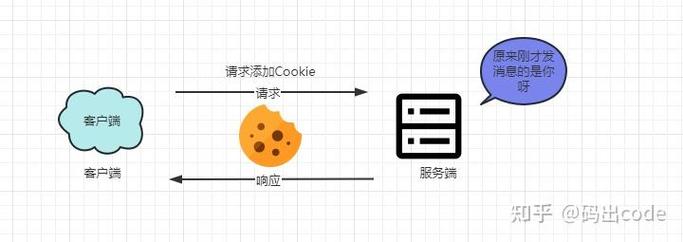
要理解 Session 过期的判断机制,就必须了解 Session 的生命周期,Session 的状态通常存储在服务器上,客户端通过一个名为 JSESSIONID 的 Cookie 来关联服务器上的 Session。

Session 的过期主要有两种方式:
-
被动过期 (服务器端超时):这是最常见的方式,当客户端在一定时间内(30 分钟)没有对该 Session 发送任何请求,服务器就会认为该 Session 已不再活跃,并将其标记为过期,服务器会随后在特定的时间(当服务器内存紧张或 Session 监听器触发时)清理掉这些过期的 Session 对象。
- 这个“一定时间”由
web.xml配置文件中的<session-config>和<session-timeout>标签(单位:分钟)来控制。 - 在 Servlet 3.0+ 中,也可以通过
HttpSession的setMaxInactiveInterval(int interval)方法(单位:秒)在代码中动态设置。
- 这个“一定时间”由
-
主动过期 (手动销毁):开发者可以在代码中显式地调用
session.invalidate()方法来立即销毁 Session,通常用于“安全退出”或“用户注销”功能。
判断 Session 是否过期,本质上就是检查服务器上存储的该 Session 对象是否还存在且有效。
判断 Session 过期的几种方法
根据不同的使用场景(在 Servlet、Filter、JSP 中),有几种常用的方法。
直接获取 Session 并检查其属性(最常用)
这是最直接的方法,你可以尝试从 HttpServletRequest 中获取 HttpSession 对象,然后检查它是否为 null,或者检查一个特定的、你用来标记用户登录状态的属性是否存在。
关键点:
- Session 已经过期,
request.getSession(false)会返回null。 request.getSession()会在 Session 不存在时创建一个新的 Session,这通常不是我们想要的行为,尤其是在判断登录状态时。
示例代码 (在 Servlet 或 Filter 中):

import javax.servlet.http.HttpServletRequest;
import javax.servlet.http.HttpSession;
public class SessionCheckUtil {
    // 假设我们用 "user" 这个属性来标记用户已登录
    private static final String USER_ATTRIBUTE = "user";
    /**
     * 检查 Session 是否存在且用户已登录
     * @param request HttpServletRequest 对象
     * @return true: Session 有效且用户已登录; false: Session 无效或用户未登录
     */
    public static boolean isSessionValid(HttpServletRequest request) {
        // 使用 getSession(false) 来避免在 Session 不存在时创建新 Session
        HttpSession session = request.getSession(false);
        // 1. 首先检查 Session 对象本身是否存在
        if (session == null) {
            System.out.println("Session 已过期或不存在。");
            return false;
        }
        // 2. 检查 Session 中是否存在用户登录信息
        //    这是一个更精确的判断,防止 Session 存在但用户信息已丢失的情况
        Object user = session.getAttribute(USER_ATTRIBUTE);
        if (user == null) {
            System.out.println("Session 存在,但用户信息已丢失。");
            return false;
        }
        System.out.println("Session 有效,用户: " + user);
        return true;
    }
}
在 Filter 中进行全局拦截(推荐用于权限控制)
这是一种更优雅、更符合“关注点分离”原则的方法,你可以创建一个 Filter,对所有需要登录才能访问的 URL 进行拦截,并在 Filter 中统一检查 Session 的有效性。
工作流程:
- 客户端发送请求到受保护的资源(如
/dashboard,/profile)。 - 请求先经过
LoginCheckFilter。 Filter调用SessionCheckUtil.isSessionValid(request)进行判断。- 如果有效,则放行 (
chain.doFilter(request, response))。 - 如果无效,则重定向到登录页面 (
response.sendRedirect("login.jsp"))。
示例代码 (Filter):
import javax.servlet.*;
import javax.servlet.annotation.WebFilter;
import javax.servlet.http.HttpServletRequest;
import javax.servlet.http.HttpServletResponse;
import java.io.IOException;
@WebFilter(urlPatterns = {"/dashboard", "/profile", "/protected/*"})
public class LoginCheckFilter implements Filter {
    @Override
    public void doFilter(ServletRequest request, ServletResponse response, FilterChain chain)
            throws IOException, ServletException {
        HttpServletRequest req = (HttpServletRequest) request;
        HttpServletResponse res = (HttpServletResponse) response;
        // 使用我们上面创建的工具类进行检查
        if (SessionCheckUtil.isSessionValid(req)) {
            // Session 有效,放行请求
            chain.doFilter(request, response);
        } else {
            // Session 无效,重定向到登录页面
            System.out.println("访问被拒绝,Session 无效,重定向到登录页。");
            res.sendRedirect(req.getContextPath() + "/login.jsp");
        }
    }
    // 其他 Filter 方法...
}
在 JSP 中使用 EL 表达式(用于页面显示)
在 JSP 页面中,你经常需要根据用户的登录状态来显示不同的内容(显示“欢迎,张三”或“请登录”)。
示例代码 (JSP):
<%@ page contentType="text/html;charset=UTF-8" language="java" %>
<%@ page isELIgnored="false" %>
<html>
<head>首页</title>
</head>
<body>
    <h1>欢迎来到我们的网站</h1>
    <%-- 使用 EL 表达式判断 sessionScope 中是否存在 user 对象 --%>
    <%-- ${sessionScope.user} 会尝试从 session 中获取 "user" 属性 --%>
    <%-- session 过期或 user 属性不存在,表达式结果为 null,条件为 false --%>
    <c:if test="${not empty sessionScope.user}">
        <p>欢迎您, ${sessionScope.user.name}! <a href="<c:url value='/logout'/>">安全退出</a></p>
    </c:if>
    <c:if test="${empty sessionScope.user}">
        <p><a href="<c:url value='/login.jsp'/>">请登录</a></p>
    </c:if>
</body>
</html>
注意:
<%@ page isELIgnored="false" %>确保了 JSP 容器会处理 EL 表达式,需要引入 JSTL 核心标签库<%@ taglib uri="http://java.sun.com/jsp/jstl/core" prefix="c" %>。
最佳实践与注意事项
-
配置合理的超时时间:
- 在
web.xml中设置一个合理的全局超时时间。<session-config> <session-timeout>30</session-timeout> <!-- 30分钟 --> </session-config>
- 对于某些关键操作(如修改密码),可以临时通过
session.setMaxInactiveInterval(300)将超时时间缩短到 5 分钟,操作结束后再恢复。
- 在
-
不要在 Session 中存储敏感信息:
Session 存储在服务器内存中,虽然相对安全,但仍需防范内存泄露和序列化攻击,绝不要将密码、信用卡号等明文敏感信息存入 Session,可以只存一个用户 ID 或 Token,然后通过 ID 去数据库查询详细信息。
-
妥善处理客户端 Cookie:
- 默认情况下,
JSESSIONIDCookie 是基于会话的(浏览器关闭即失效),如果需要“记住我”功能,需要将 Cookie 的max-age设置为一个较大的值(7天),这时,你需要在服务端实现一个更复杂的机制来验证这个长期有效的 Cookie 是否仍然对应一个有效的 Session。
- 默认情况下,
-
使用
getSession(false):- 再次强调,在检查 Session 是否存在时,始终优先使用
request.getSession(false),以避免无意中创建一个空的新 Session,这可能会导致逻辑混乱和安全漏洞。
- 再次强调,在检查 Session 是否存在时,始终优先使用
-
清理资源:
- 在
HttpSessionListener的sessionDestroyed方法中,执行一些清理工作,从在线用户列表中移除该用户、关闭数据库连接等。
import javax.servlet.http.HttpSessionEvent; import javax.servlet.http.HttpSessionListener; public class MySessionListener implements HttpSessionListener { @Override public void sessionCreated(HttpSessionEvent se) { System.out.println("Session 创建: " + se.getSession().getId()); } @Override public void sessionDestroyed(HttpSessionEvent se) { System.out.println("Session 销毁: " + se.getSession().getId()); // 在这里进行清理工作 // OnlineUserManager.removeUser(se.getSession().getId()); } } - 在
完整示例:登录与 Session 过期处理
这是一个简单的登录流程,展示了如何创建 Session、使用 Filter 检查以及处理过期。
登录 Servlet (LoginServlet.java)
import javax.servlet.ServletException;
import javax.servlet.annotation.WebServlet;
import javax.servlet.http.HttpServlet;
import javax.servlet.http.HttpServletRequest;
import javax.servlet.http.HttpServletResponse;
import javax.servlet.http.HttpSession;
import java.io.IOException;
@WebServlet("/login")
public class LoginServlet extends HttpServlet {
    protected void doPost(HttpServletRequest request, HttpServletResponse response) throws ServletException, IOException {
        String username = request.getParameter("username");
        String password = request.getParameter("password");
        // 简单的硬编码验证,实际项目中应查询数据库
        if ("admin".equals(username) && "password".equals(password)) {
            // 登录成功,创建 Session 并存入用户信息
            HttpSession session = request.getSession();
            session.setAttribute("user", new User(username)); // 假设有一个 User 类
            response.sendRedirect("dashboard.jsp");
        } else {
            // 登录失败,返回登录页并提示错误
            request.setAttribute("error", "用户名或密码错误");
            request.getRequestDispatcher("login.jsp").forward(request, response);
        }
    }
}
登录页面 (login.jsp)
<%@ page contentType="text/html;charset=UTF-8" language="java" %>
<html>
<head>登录</title>
</head>
<body>
    <h2>用户登录</h2>
    <%-- 显示错误信息 --%>
    <c:if test="${not empty error}">
        <p style="color:red;">${error}</p>
    </c:if>
    <form action="<c:url value='/login'/>" method="post">
        用户名: <input type="text" name="username"><br>
        密码:   <input type="password" name="password"><br>
        <input type="submit" value="登录">
    </form>
</body>
</html>
受保护页面 (dashboard.jsp)
<%@ page contentType="text/html;charset=UTF-8" language="java" %>
<%@ taglib uri="http://java.sun.com/jsp/jstl/core" prefix="c" %>
<html>
<head>控制面板</title>
</head>
<body>
    <h1>控制面板</h1>
    <p>欢迎, ${sessionScope.user.username}!</p>
    <a href="<c:url value='/logout'/>">退出登录</a>
</body>
</html>
退出 Servlet (LogoutServlet.java)
import javax.servlet.ServletException;
import javax.servlet.annotation.WebServlet;
import javax.servlet.http.HttpServlet;
import javax.servlet.http.HttpServletRequest;
import javax.servlet.http.HttpServletResponse;
import javax.servlet.http.HttpSession;
import java.io.IOException;
@WebServlet("/logout")
public class LogoutServlet extends HttpServlet {
    protected void doGet(HttpServletRequest request, HttpServletResponse response) throws ServletException, IOException {
        HttpSession session = request.getSession(false);
        if (session != null) {
            session.invalidate(); // 手动销毁 Session
        }
        response.sendRedirect("login.jsp");
    }
}
LoginCheckFilter (如前所述)
这个 Filter 会保护 /dashboard 和 /profile,当用户未登录时访问这些页面,会被自动重定向到 login.jsp。
判断 Java Session 是否过期,核心是 request.getSession(false) 和 检查 Session 内的关键属性,对于权限控制,使用 Filter 进行统一拦截是最佳实践,理解 Session 的生命周期和配置,并结合客户端的 Cookie 处理,可以构建出健壮、安全的 Web 应用。