Of course! In Python, there isn't a built-in method called foreach for sets. Instead, you achieve the same goal using a simple for loop, which is the standard and most "Pythonic" way to iterate over any collection, including sets.

Here’s a complete guide covering the different ways to iterate over a set, from the most common to more advanced techniques.
The Standard for Loop (The "foreach" equivalent)
This is the most direct and common way to loop through every item in a set. The order of iteration is not guaranteed, as sets are inherently unordered collections (in Python versions < 3.7, and officially unordered in 3.7+).
# Define a set of fruits
fruits = {"apple", "banana", "cherry", "orange"}
print("Iterating over the set using a for loop:")
for fruit in fruits:
    print(f"I like {fruit}s")
# Example Output (order may vary):
# Iterating over the set using a for loop:
# I like apples
# I like oranges
# I like cherries
# I like bananas
How it works: The for fruit in fruits: statement assigns each element from the fruits set to the variable fruit, one by one, for each iteration of the loop.
Accessing Index and Value with enumerate()
If you need both the index and the value of each item, you can use the built-in enumerate() function. This is useful when you need to know the position of an item, even though the set itself is unordered.

fruits = {"apple", "banana", "cherry"}
print("Iterating with index and value:")
for index, fruit in enumerate(fruits):
    # Note: The index is based on the iteration order, not a set index
    print(f"Index {index}: {fruit}")
# Example Output (order may vary):
# Iterating with index and value:
# Index 0: cherry
# Index 1: banana
# Index 2: apple
Using a for Loop to Modify a Set (The Safe Way)
You cannot add or remove items from a set while you are iterating over it directly. This will raise a RuntimeError: set changed size during iteration.
To modify a set, you should iterate over a copy of the set.
numbers = {1, 2, 3, 4, 5, 6, 7, 8, 9, 10}
# WRONG: This will cause an error!
# for number in numbers:
#     if number % 2 == 0:
#         numbers.remove(number) # RuntimeError!
# CORRECT: Iterate over a copy
print("Original set:", numbers)
for number in list(numbers): # list(numbers) creates a copy
    if number % 2 == 0:
        numbers.remove(number)
print("Modified set (only odd numbers):", numbers)
# Original set: {1, 2, 3, 4, 5, 6, 7, 8, 9, 10}
# Modified set (only odd numbers): {1, 3, 5, 7, 9}
Why this works: list(numbers) creates a new list containing all the elements of the set. The for loop then iterates over this new list, while the original numbers set can be safely modified.
Advanced: Using map() for a Functional Approach
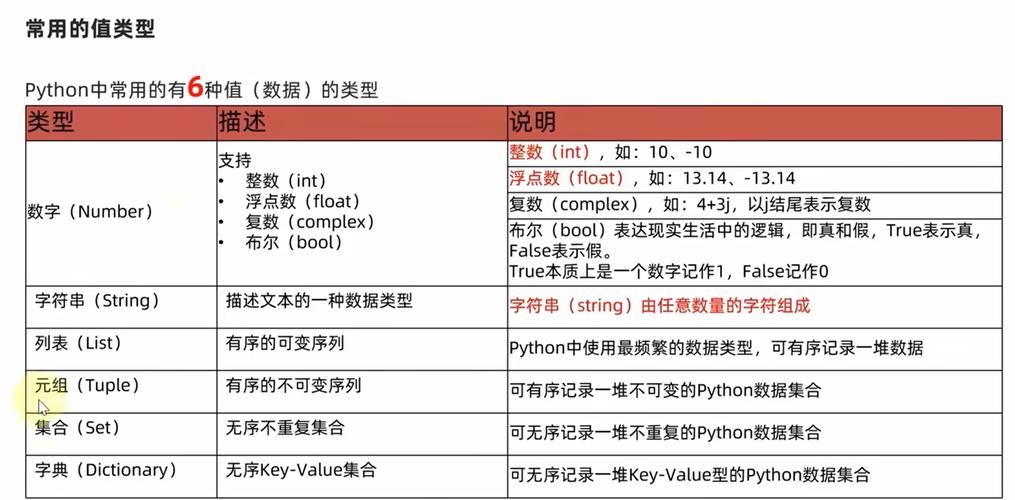
The map() function applies a given function to every item of an iterable (like a set). It returns a map object, which you can convert to a list or another set.
This is less common for simple printing but is very useful for transforming data.
# A set of numbers
numbers = {1, 2, 3, 4, 5}
# Define a function to square a number
def square(n):
    return n * n
# Use map() to apply the function to every item
squared_numbers_map = map(square, numbers)
# Convert the map object to a list or a set to see the results
squared_numbers_list = list(squared_numbers_map)
squared_numbers_set = set(map(square, numbers))
print("Original set:", numbers)
print("Result as a list:", squared_numbers_list)
print("Result as a set:", squared_numbers_set)
# Output:
# Original set: {1, 2, 3, 4, 5}
# Result as a list: [1, 4, 9, 16, 25] (order may vary)
# Result as a set: {1, 4, 9, 16, 25}
Advanced: Using a Set Comprehension
A set comprehension is a concise and highly efficient way to create a new set by iterating over an existing one and applying a condition. It's like a for loop on a single line.
# A set of numbers
numbers = {1, 2, 3, 4, 5, 6, 7, 8, 9, 10}
# Create a new set containing only the squares of the even numbers
even_squares = {x * x for x in numbers if x % 2 == 0}
print("Original set:", numbers)
print("New set of even squares:", even_squares)
# Output:
# Original set: {1, 2, 3, 4, 5, 6, 7, 8, 9, 10}
# New set of even squares: {4, 64, 16, 100, 36}
Summary: Which Method to Use?
| Method | Use Case | Example |
|---|---|---|
for item in my_set: |
The standard, most common way. Use this for simple iteration, printing, or performing an action on each item. | for fruit in fruits: print(fruit) |
for i, item in enumerate(my_set): |
When you need both the index and the value of each item. | for i, val in enumerate(my_set): print(f"{i}: {val}") |
for item in list(my_set): |
When you need to modify the set (add/remove items) while iterating. | for item in list(my_set): my_set.discard(item) |
map(function, my_set) |
For a functional programming style to transform all items in the set. | set(map(str.upper, my_set)) |
{... for item in my_set ...} |
To create a new set by filtering and/or transforming items from an existing one. | {x*2 for x in my_set if x > 5} |
For 99% of cases, the simple for loop is exactly what you're looking for when you think "foreach".