在 Python 中,读取文件流(filestream)通常指的是打开一个文件并读取其内容,Python 提供了多种方式来读取文件,包括逐行读取、读取全部内容、按块读取等,以下是几种常见的方法:
(图片来源网络,侵删)
使用 open() 函数(标准方式)
open() 是 Python 中最基础的文件操作函数,返回一个文件对象(流)。
基本语法
file_object = open(file_path, mode, encoding=None)
file_path:文件路径(可以是相对路径或绝对路径)。mode:打开文件的模式,如:'r':只读(默认)。'w':只写(会覆盖文件)。'a':追加写入。'rb'/'wb':二进制模式(用于非文本文件)。
encoding:指定文件编码(如'utf-8')。
示例:逐行读取
with open('example.txt', 'r', encoding='utf-8') as file:
    for line in file:
        print(line.strip())  # 去除行尾的换行符
示例:读取全部内容
with open('example.txt', 'r', encoding='utf-8') as file:
    content = file.read()
    print(content)
示例:按块读取(适合大文件)
chunk_size = 1024  # 每次读取 1KB
with open('large_file.txt', 'r', encoding='utf-8') as file:
    while True:
        chunk = file.read(chunk_size)
        if not chunk:
            break
        print(chunk, end='')  # 避免重复换行
使用 with 语句(推荐)
with 语句会自动管理文件资源,确保文件在操作完成后正确关闭(即使发生异常)。
with open('example.txt', 'r') as file:
    content = file.read()
    print(content)
读取二进制文件(如图片、视频)
使用 'rb' 模式打开文件,并以字节形式读取:
with open('image.png', 'rb') as file:
    binary_data = file.read()
    # 处理二进制数据...
使用 io 模块的高级功能
io 模块提供了更灵活的文件操作方式,
(图片来源网络,侵删)
io.StringIO:内存中的文本流。io.BytesIO:内存中的二进制流。
示例:从内存中的文本流读取
import io
text_stream = io.StringIO("Hello, world!")
content = text_stream.read()
print(content)  # 输出: Hello, world!
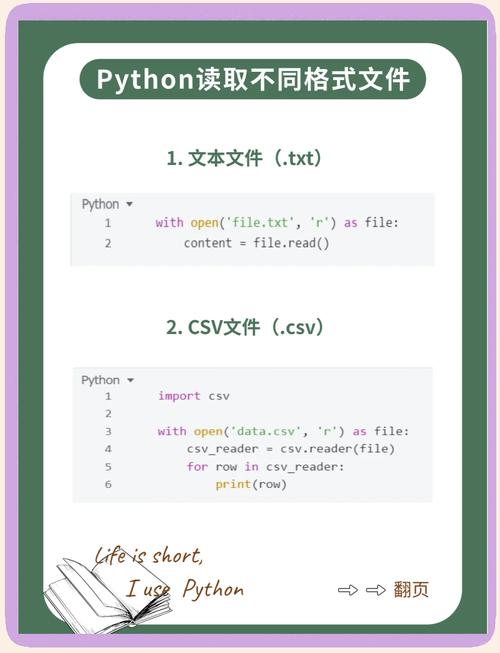
读取 CSV 或 JSON 文件
CSV 文件
import csv
with open('data.csv', 'r', encoding='utf-8') as file:
    csv_reader = csv.reader(file)
    for row in csv_reader:
        print(row)
JSON 文件
import json
with open('data.json', 'r', encoding='utf-8') as file:
    data = json.load(file)
    print(data)
异步读取文件(Python 3.5+)
使用 asyncio 和 aiofiles 库进行异步文件读取:
import asyncio
import aiofiles
async def read_file():
    async with aiofiles.open('example.txt', 'r') as file:
        content = await file.read()
        print(content)
asyncio.run(read_file())
| 需求 | 方法 |
|---|---|
| 逐行读取 | for line in file: |
| 读取全部内容 | file.read() |
| 按块读取(大文件) | file.read(chunk_size) |
| 二进制文件 | open(file, 'rb') |
| 自动关闭文件 | with open(...) as file: |
| 内存流 | io.StringIO / io.BytesIO |
| 结构化数据(CSV/JSON) | csv.reader / json.load |
| 异步读取 | aiofiles |
根据具体需求选择合适的方法,推荐优先使用 with 语句和逐行读取以避免内存问题。
(图片来源网络,侵删)