Of course! Let's break down Java Spring Beans from the ground up, covering what they are, why they're important, how to create them, and best practices.
What is a Spring Bean? (The Core Concept)
At its simplest, a Spring Bean is an object that is:
- Instantiated, Assembled, and Managed by the Spring IoC (Inversion of Control) Container.
- A key component of your application that the Spring framework is aware of.
Think of the Spring IoC Container as a factory or a big box that holds all the important objects (beans) your application needs to run. Instead of you creating these objects with new MyObject() in your code, you let Spring create and manage them for you.
Key Characteristics:
- Managed by the Container: You don't control its lifecycle directly. Spring does.
- Dependency Injection (DI): Beans can have their dependencies (other objects they need to work) "injected" into them by the container. This is a core feature of the framework.
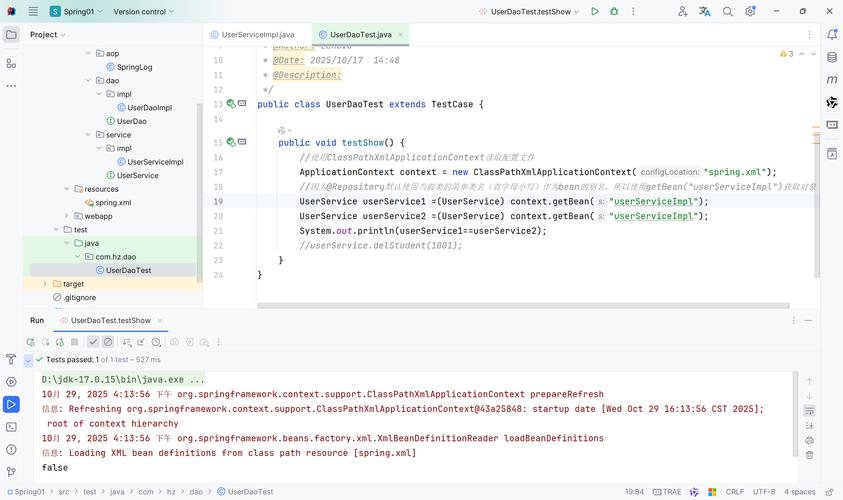
- Singleton by Default: By default, the Spring Container creates only one instance of a bean and reuses it for every request. This is great for performance and managing state.
Why Use Spring Beans? (The Benefits)
You might ask, "Why go through all this trouble instead of just using new?" The benefits are significant, especially for complex applications:
| Benefit | Description |
|---|---|
| Loose Coupling | Beans don't need to know how to find or create their dependencies. They just receive them. This makes your code much easier to test and maintain. |
| Centralized Configuration | You define how your application is wired together in one or more configuration files (XML, Java annotations, or Java code). Changing a dependency is a matter of changing the configuration, not the code. |
| Easy Testing | Because your beans are decoupled, you can easily test them in isolation. You can "mock" (fake) their dependencies and test just the bean's logic. |
| Lifecycle Management | Spring manages the entire lifecycle of a bean, from creation to destruction. It can call custom initialization and destruction methods, which is very powerful. |
| AOP (Aspect-Oriented Programming) | You can apply cross-cutting concerns like logging, security, or transaction management to beans without cluttering the business logic code. |
| Powerful Ecosystem | Being a Spring Bean is the "golden ticket" to using other Spring features like Spring Data (for databases), Spring Security (for authentication), and Spring MVC (for web apps). |
How to Create a Spring Bean (The "How-To")
There are three primary ways to define a bean in modern Spring Boot applications.
Method 1: Using Annotations (Most Common)
This is the simplest and most popular approach, especially with Spring Boot.
Step 1: Annotate your class.
You use the @Component annotation to mark a class as a Spring Bean. Spring will automatically detect it during a component scan.
import org.springframework.stereotype.Component;
@Component
public class MySimpleService {
    public String doSomething() {
        return "Hello from MySimpleService!";
    }
}
Step 2: Tell Spring where to scan for components.
In your main application class, use the @ComponentScan annotation. By default, it scans the package of the main class and all its sub-packages.
import org.springframework.boot.SpringApplication;
import org.springframework.boot.autoconfigure.SpringBootApplication;
import org.springframework.context.annotation.ComponentScan;
@SpringBootApplication // This is a meta-annotation that includes @ComponentScan
@ComponentScan("com.example.myapp") // Optional: specify a base package if not in the same as the main class
public class MyApplication {
    public static void main(String[] args) {
        SpringApplication.run(MyApplication.class, args);
    }
}
Specialized Annotations: Spring provides more specific annotations that are semantically better and enable additional features.
| Annotation | Use Case | Example |
|---|---|---|
@Service |
For business logic layer classes. It's a specialization of @Component. |
@Service public class UserService { ... } |
@Repository |
For data access layer classes (e.g., DAOs). It enables exception translation for Spring Data. | @Repository public class UserRepository { ... } |
@Controller |
For Spring MVC web controllers that handle HTTP requests. | @RestController public class GreetingController { ... } |
@Configuration |
For classes that define Spring beans programmatically (see Method 3). | @Configuration public class AppConfig { ... } |
Method 2: Using Java Configuration (Recommended for Complex Configurations)
This approach uses Java classes to define beans. It's type-safe and very powerful.
Step 1: Create a configuration class.
Annotate a class with @Configuration.
Step 2: Define a bean method.
Create a method inside the configuration class and annotate it with @Bean. The return value of this method becomes a bean in the Spring Container.
import org.springframework.context.annotation.Bean;
import org.springframework.context.annotation.Configuration;
@Configuration
public class AppConfig {
    // This method defines a bean named "myComplexService"
    @Bean
    public MyComplexService myComplexService() {
        // You can configure the bean here before returning it
        MyComplexService service = new MyComplexService();
        service.setConfigValue("some-config");
        return service;
    }
}
When the Spring container starts, it will execute this method and register the returned object as a bean.
Method 3: Using XML Configuration (Legacy)
This was the original way to configure Spring. It's still supported but is now considered legacy in favor of Java-based configuration.
beans.xml (in src/main/resources)
<?xml version="1.0" encoding="UTF-8"?>
<beans xmlns="http://www.springframework.org/schema/beans"
       xmlns:xsi="http://www.w3.org/2001/XMLSchema-instance"
       xsi:schemaLocation="http://www.springframework.org/schema/beans
                           http://www.springframework.org/schema/beans/spring-beans.xsd">
    <!-- This defines a bean named "myLegacyService" -->
    <bean id="myLegacyService" class="com.example.myapp.MyLegacyService">
        <property name="someProperty" value="some-value" />
    </bean>
</beans>
You would then tell Spring to load this XML file, usually in your main application class:
import org.springframework.context.annotation.Configuration;
import org.springframework.context.annotation.ImportResource;
@Configuration
@ImportResource("classpath:beans.xml")
public class LegacyAppConfig {
    // ...
}
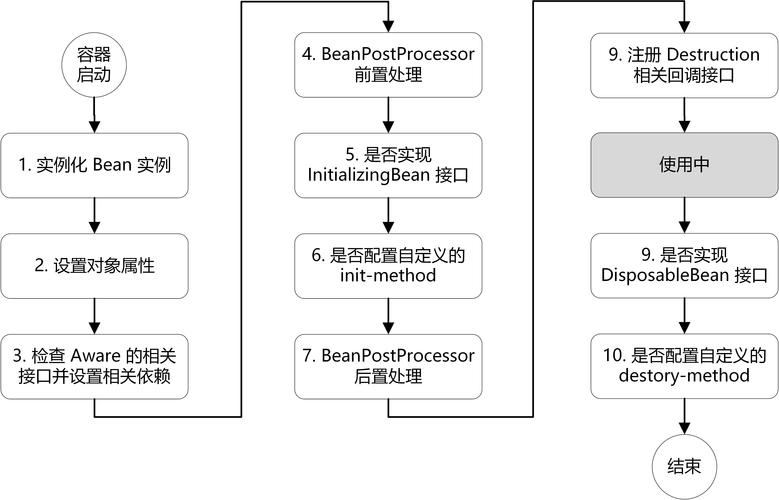
The Lifecycle of a Spring Bean
Understanding the bean lifecycle is crucial for knowing when you can perform certain actions.
- Instantiation: The Spring container creates an instance of the bean class (e.g., via
new MyService()). - Populate Properties (Dependency Injection): The container injects the values for properties (dependencies) that were specified in the configuration.
- Initialization: If the bean implements the
InitializingBeaninterface or has a custom@PostConstructmethod, the container calls this method after properties have been set. This is where you can perform any setup logic. - Ready for Use: The bean is now fully initialized and is available to be used by other parts of the application.
- Destruction: When the Spring container is shut down, if the bean implements the
DisposableBeaninterface or has a custom@PreDestroymethod, the container calls this method. This is where you can perform cleanup logic (e.g., closing a database connection).
Bean Scopes (Controlling the Number of Instances)
By default, all beans are singletons, meaning only one instance is created and shared across the entire application. You can change this behavior using the @Scope annotation.
| Scope | Description | When to Use |
|---|---|---|
singleton |
(Default) One instance per Spring Container. | Most service, repository, and configuration classes. |
prototype |
A new instance is created every time the bean is requested. | Stateful objects, or objects that are expensive to create but are not thread-safe. |
request |
One instance per HTTP web request. | Only valid in a web-aware Spring context. |
session |
One instance per HTTP web session. | Only valid in a web-aware Spring context. |
Example:
import org.springframework.context.annotation.Scope;
import org.springframework.stereotype.Component;
@Component
@Scope("prototype")
public class PrototypeService {
    // A new instance of this class will be created every time it's injected.
}
Summary
| Concept | Key Takeaway |
|---|---|
| What is it? | An object managed by the Spring IoC Container. |
| Why use it? | For loose coupling, easy testing, centralized configuration, and powerful features. |
| How to create? | Use annotations like @Component, @Service, @Repository (most common), or @Bean in a @Configuration class. |
| Lifecycle? | Instantiation -> DI -> Initialization (@PostConstruct) -> Use -> Destruction (@PreDestroy). |
| Scope? | singleton (default) vs. prototype (new instance each time). |