Of course! This is a fundamental topic in Java. Here's a comprehensive breakdown of List and Vector, covering their relationship, differences, and when to use each.
The Big Picture: List vs. Vector
Listis an Interface. It defines a contract for a collection that maintains an ordered sequence of elements and allows duplicates. You cannot create an instance of an interface likenew List().Vectoris a Class. It is a concrete implementation of theListinterface. It was one of the original collection classes in Java 1.0 and is part of the Java Collections Framework.
Think of it like this: List is the "blueprint" for a sequence of items, and Vector is one specific "house" built from that blueprint. There are other houses too, like ArrayList and LinkedList.
List (The Interface)
List is one of the core interfaces in the Java Collections Framework, located in the java.util package.
Key Characteristics of List:
- Ordered: Elements are stored in the order they are inserted. You can access elements by their integer index (position), starting from 0.
- Allows Duplicates: You can have multiple elements that are equal to each other in the list.
- Allows Null Elements: You can add
nullvalues to aList.
Common Methods (defined in the List interface):
add(E element): Appends the element to the end of the list.add(int index, E element): Inserts the element at the specified position.get(int index): Returns the element at the specified position.set(int index, E element): Replaces the element at the specified position.remove(int index): Removes the element at the specified position.remove(Object o): Removes the first occurrence of the specified element.size(): Returns the number of elements in the list.isEmpty(): Returnstrueif the list contains no elements.contains(Object o): Returnstrueif the list contains the specified element.
How to Use List (Best Practice):
You should always program to the interface, not the implementation. This means you declare your list variable as a List but instantiate it with a specific class like ArrayList.
import java.util.ArrayList;
import java.util.List;
public class ListExample {
    public static void main(String[] args) {
        // Best Practice: Declare as List, instantiate as ArrayList
        List<String> names = new ArrayList<>();
        names.add("Alice");
        names.add("Bob");
        names.add("Charlie");
        names.add("Alice"); // Duplicate is allowed
        System.out.println("List: " + names); // Output: [Alice, Bob, Charlie, Alice]
        System.out.println("Element at index 1: " + names.get(1)); // Output: Bob
        System.out.println("Size of list: " + names.size()); // Output: 4
        names.remove(0); // Removes "Alice"
        System.out.println("List after removal: " + names); // Output: [Bob, Charlie, Alice]
    }
}
Vector (The Class)
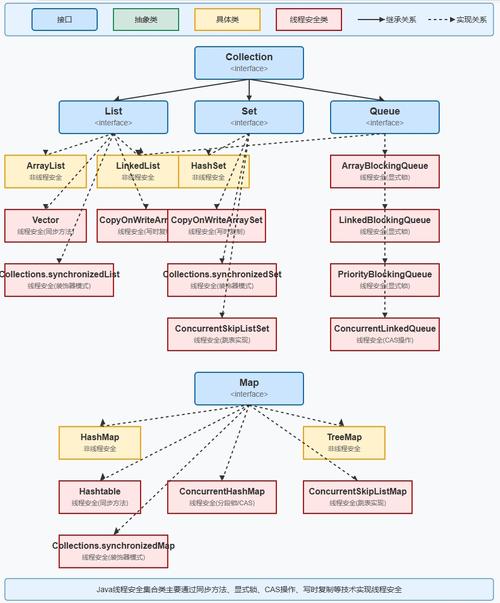
Vector is a legacy class from Java 1.0. It was retrofitted to implement the List interface in Java 1.2 when the Collections Framework was introduced.
Key Characteristics of Vector:
- Synchronized (Thread-Safe): This is the most important feature of
Vector. Every method that modifies or accesses theVector(likeadd(),get(),remove()) is marked with thesynchronizedkeyword. This means that only one thread can execute a method on aVectorobject at a time. - Resizable Array: Internally,
Vectoruses a dynamic array, similar toArrayList. - Legacy Methods:
Vectorhas some methods that are not part of theListinterface, inherited from its older days. The most notable ones are:addElement(E obj): Equivalent toadd(E element).elementAt(int index): Equivalent toget(int index).firstElement(),lastElement(): Get the first or last element.capacity(): Returns the current capacity of the internal array (the size it can grow to before needing to resize).ensureCapacity(int minCapacity): Manually increases the capacity of theVector.
How to Use Vector:
import java.util.Vector;
import java.util.List; // You can still use the List interface type
public class VectorExample {
    public static void main(String[] args) {
        // You can declare it as a Vector...
        Vector<String> tasks = new Vector<>();
        // ...or as a List (still pointing to a Vector object)
        // List<String> tasks = new Vector<>();
        tasks.add("Task 1");
        tasks.add("Task 2");
        System.out.println("Vector: " + tasks);
        System.out.println("Capacity: " + tasks.capacity()); // Shows initial capacity (often 10)
        System.out.println("Element at index 0: " + tasks.elementAt(0)); // Legacy method
    }
}
Key Differences: List vs. Vector
| Feature | List (Interface) |
Vector (Class) |
|---|---|---|
| Type | An interface that defines a contract. | A concrete class that implements List. |
| Thread Safety | Not inherently thread-safe. Implementations like ArrayList are not synchronized. |
Thread-safe by default. All public methods are synchronized. |
| Performance | Generally faster for single-threaded applications because there's no overhead from synchronization. | Slower in single-threaded applications due to the overhead of acquiring and releasing locks on every method call. |
| Legacy | Part of the modern Java Collections Framework (since Java 1.2). | A legacy class from Java 1.0. |
| Growth Mechanism | Depends on the implementation (e.g., ArrayList grows by 50% when full). |
The capacity is incremented by an optional capacity increment. If not specified, it doubles in size (like ArrayList). |
| API | Standard List interface methods. |
Has standard List methods plus legacy methods (addElement, elementAt, etc.). |
When to Use What?
Use List (via ArrayList or LinkedList) for:
- Almost all modern, single-threaded applications.
- When you need a fast, flexible, and standard collection.
- When thread safety is not a requirement, or you will handle synchronization yourself in another way (e.g., using
Collections.synchronizedList()orCopyOnWriteArrayList).
ArrayList is the default choice for a List when you need fast random access and don't need to insert/delete elements from the middle frequently.
Use Vector for:
- Very few cases in modern Java.
- When you need a simple, thread-safe list and cannot or do not want to use other, more modern concurrency utilities.
- In legacy codebases where it's already being used.
Important Consideration: Even though Vector is thread-safe, it's often considered a poor choice for modern concurrent applications. Its "synchronize-on-each-method" approach can lead to poor performance under high contention. Modern Java provides better alternatives for thread-safe collections:
Collections.synchronizedList(new ArrayList<>()): Wraps anArrayListto make it thread-safe. You must manually synchronize on the list when iterating over it.CopyOnWriteArrayList: A highly efficient thread-safe list when you have many readers and few writers. It creates a new copy of the underlying array for every modification.ConcurrentLinkedQueue: A high-performance, non-blocking queue for multi-threaded scenarios.
Summary
List |
Vector |
|
|---|---|---|
| What it is | An interface for ordered collections. | A concrete, thread-safe implementation of List. |
| Use Case | The standard, go-to choice for most situations. | A legacy, thread-safe option; avoid in new code. |
| Performance | Faster (non-synchronized). | Slower due to synchronization overhead. |
| Modern Alternative | ArrayList, LinkedList |
CopyOnWriteArrayList, Collections.synchronizedList() |
Final Advice: Start with a List<String> myList = new ArrayList<>();. Only consider Vector if you are maintaining old code or have a very specific, simple reason to use a legacy, synchronized collection. For new concurrent code, always prefer modern alternatives over Vector.