Of course! Let's break down what char c char means in Java.
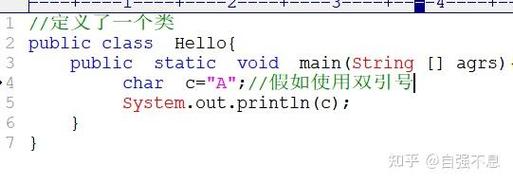
First, a quick correction: The correct syntax to declare a char variable in Java is:
char c;
or
char c = 'a';
char c char is not valid Java syntax. It looks like you might be trying to declare a char variable named c and then immediately do something else with it.
Let's break down the correct parts of that statement.
char - The Data Type
char is a primitive data type in Java used to store a single character.
- Size: It occupies 2 bytes of memory.
- Purpose: It's designed to hold any character from the Unicode character set. This means it can store letters (like 'A', 'z'), digits (like '1', '9'), symbols (like '$', '@'), or special characters (like '\n', '\t').
- Representation: Characters in Java are enclosed in single quotes ().
c - The Variable Name
c is simply the name we are giving to our variable. You could name it anything that follows Java's naming rules (e.g., firstNameChar, symbol, myChar). It's a very common convention to use c for a character variable.
Examples of Correct char Usage
Here are several ways you can use the char data type.
Example 1: Basic Declaration and Initialization
This is the most straightforward way to declare and assign a value to a char variable.
public class CharExample {
    public static void main(String[] args) {
        // Declare a char variable named 'initial'
        char initial;
        // Assign a value to it
        initial = 'J';
        // Declare and initialize in one line
        char grade = 'A';
        // Print the values to the console
        System.out.println("Initial: " + initial); // Output: Initial: J
        System.out.println("Grade: " + grade);     // Output: Grade: A
    }
}
Example 2: Storing Different Types of Characters
A char can hold more than just letters.
public class CharTypes {
    public static void main(String[] args) {
        char digit = '9';
        char symbol = '@';
        char space = ' ';
        char newline = '\n'; // This is an escape sequence for a new line
        System.out.println("Digit: " + digit);
        System.out.println("Symbol: " + symbol);
        System.out.println("Space: " + (int)space); // Casting to int to see its value
        System.out.println("Newline follows this.");
        System.out.println("The value of newline is: " + (int)newline);
    }
}
Example 3: The Special Case of char and Numbers
This is a very important concept in Java. A char is fundamentally a numeric type. It stores characters using their Unicode code point.
'A'is stored as the integer65.'B'is stored as the integer66.'a'is stored as the integer97.'0'is stored as the integer48.
This means you can perform arithmetic operations on char variables!
public class CharMath {
    public static void main(String[] args) {
        char letter = 'A';
        System.out.println("Original letter: " + letter); // Output: A
        // You can add a number to a char
        char nextLetter = (char) (letter + 1);
        System.out.println("Next letter: " + nextLetter); // Output: B
        // You can cast a number to a char
        char digit = (char) 50; // The Unicode code point for '2' is 50
        System.out.println("Digit from number: " + digit); // Output: 2
    }
}
What You Might Have Meant by char c char
If you saw char c char somewhere, it might be a typo for one of these common patterns:
Possibility 1: Two char declarations
You might have meant to declare two char variables.
// Declaring two char variables on the same line
char c1, c2;
c1 = 'x';
c2 = 'y';
Possibility 2: A char in a loop
A very common pattern is using a char in a for loop to iterate through the alphabet.
// Loop from 'A' to 'Z'
for (char c = 'A'; c <= 'Z'; c++) {
    System.out.print(c + " ");
}
// Output: A B C D E F G H I J K L M N O P Q R S T U V W X Y Z
Possibility 3: A typo for char c = 'c';
You might have accidentally typed a space instead of an equals sign.
Summary: char vs. String
It's crucial not to confuse char with String.
| Feature | char |
String |
|---|---|---|
| Type | Primitive | Object (Reference Type) |
| Content | A single character | A sequence of zero or more characters |
| Syntax | Enclosed in single quotes: 'a' |
Enclosed in double quotes: "hello" |
| Example | char grade = 'A'; |
String message = "Hello World"; |
Example of the difference:
char singleChar = 'A';
String singleCharAsString = "A"; // This is a String object containing one character
System.out.println(singleChar);       // Output: A
System.out.println(singleCharAsString); // Output: A
// You cannot do this:
// singleChar.length(); // Error, char has no methods
// But you can do this:
System.out.println(singleCharAsString.length()); // Output: 1