Of course! Let's dive deep into Java, Sockets, and HTTP. This is a classic topic that's fundamental to understanding how network applications work.
We'll break this down into three parts:
- The Big Picture: How they relate.
- Part 1: Java Sockets - The Low-Level Foundation.
- Part 2: Java HTTP - The High-Level, Convenient Way.
The Big Picture: How They Relate
Think of it like building a house:
- Socket: This is the foundation and the electrical wiring. It's a low-level mechanism that allows two computers to establish a connection and send raw bytes back and forth. It doesn't care what those bytes mean. It just handles the plumbing.
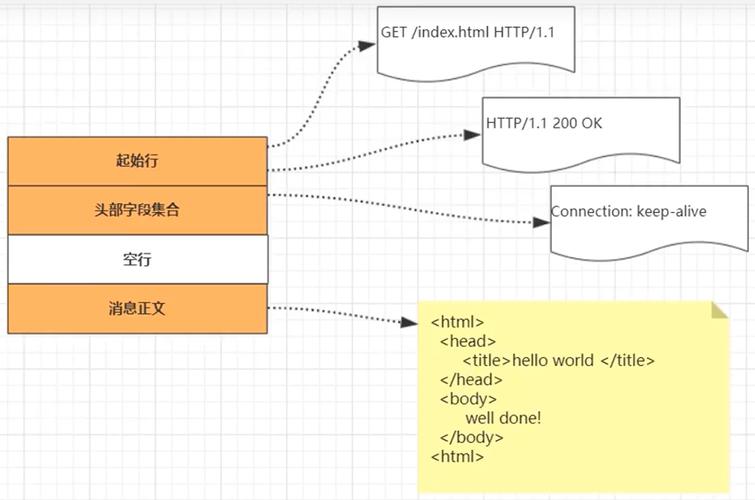
- HTTP (Hypertext Transfer Protocol): This is the language and the rules for the house. It's a protocol that defines a specific format for the messages (requests and responses) that are sent over the socket. For example, an HTTP request looks like this:
GET /index.html HTTP/1.1 Host: www.example.com User-Agent: MyBrowser/1.0 - Java: This is the toolbox and the builder. Java provides classes to create and manage sockets (
Socket,ServerSocket) and, more conveniently, classes that handle the HTTP protocol for you (HttpURLConnection, HttpClient).
Analogy:
- Socket: A raw, direct phone line between two people.
- HTTP: A specific language they agree to speak on that phone line (e.g., "I request this file," "Here is the file you requested").
- Java: The phone and the protocol manual you use to make the call.
You can use the raw phone line (Socket) and speak the language yourself (HTTP), or you can use a special phone (Java's HTTP client) that automatically handles the language for you.
Part 1: Java Sockets (The Low-Level Way)
Here, we'll build a simple "Echo Server" and a client. The server will listen for a connection, and any message it receives from the client, it will send back.
Key Classes:
java.net.ServerSocket: Listens for incoming connections from clients.java.net.Socket: Represents a connection to a client.java.io.InputStream: Reads data from the socket.java.io.OutputStream: Writes data to the socket.
Step 1: The Server (SocketServer.java)
This server will run on localhost (your own machine) on port 6666.
import java.io.BufferedReader;
import java.io.IOException;
import java.io.InputStreamReader;
import java.io.PrintWriter;
import java.net.ServerSocket;
import java.net.Socket;
public class SocketServer {
    public static void main(String[] args) {
        int port = 6666;
        try (ServerSocket serverSocket = new ServerSocket(port)) {
            System.out.println("Server is listening on port " + port);
            // The accept() method blocks until a client connects
            Socket clientSocket = serverSocket.accept();
            System.out.println("Client connected: " + clientSocket.getInetAddress().getHostAddress());
            // Set up streams to read from and write to the client
            PrintWriter out = new PrintWriter(clientSocket.getOutputStream(), true);
            BufferedReader in = new BufferedReader(new InputStreamReader(clientSocket.getInputStream()));
            String inputLine;
            // Read from the client until "exit" is sent
            while ((inputLine = in.readLine()) != null) {
                System.out.println("Received from client: " + inputLine);
                if ("exit".equalsIgnoreCase(inputLine)) {
                    break;
                }
                // Echo the message back to the client
                out.println("Server: " + inputLine);
            }
        } catch (IOException e) {
            System.out.println("Server exception: " + e.getMessage());
            e.printStackTrace();
        }
    }
}
Step 2: The Client (SocketClient.java)
This client will connect to the server and send messages.
import java.io.BufferedReader;
import java.io.IOException;
import java.io.InputStreamReader;
import java.io.PrintWriter;
import java.net.Socket;
import java.net.UnknownHostException;
public class SocketClient {
    public static void main(String[] args) {
        String hostname = "localhost";
        int port = 6666;
        try (Socket socket = new Socket(hostname, port)) {
            System.out.println("Connected to the server");
            // Set up streams to read from and write to the server
            PrintWriter out = new PrintWriter(socket.getOutputStream(), true);
            BufferedReader in = new BufferedReader(new InputStreamReader(socket.getInputStream()));
            BufferedReader stdIn = new BufferedReader(new InputStreamReader(System.in));
            String userInput;
            // Read user input from the console and send it to the server
            while ((userInput = stdIn.readLine()) != null) {
                out.println(userInput);
                System.out.println("Server response: " + in.readLine());
                if ("exit".equalsIgnoreCase(userInput)) {
                    break;
                }
            }
        } catch (UnknownHostException e) {
            System.err.println("Don't know about host " + hostname);
            System.exit(1);
        } catch (IOException e) {
            System.err.println("Couldn't get I/O for the connection to " +
                    hostname);
            System.exit(1);
        }
    }
}
How to Run:
- Compile both files:
javac SocketServer.java SocketClient.java - Run the server in one terminal:
java SocketServer - Run the client in another terminal:
java SocketClient - Type messages in the client terminal and see them echoed back by the server.
Key Takeaway: With sockets, you are responsible for reading and writing raw bytes and defining the protocol (the message format). In this case, we used simple text lines separated by newlines (\n).
Part 2: Java HTTP (The High-Level Way)
Manually implementing the HTTP protocol is tedious. Java provides built-in classes that do it for you. This is what you should use in almost all real-world applications.
There are two main ways to do HTTP in modern Java:
A. HttpURLConnection (The Classic, Built-in Way)
This has been around since Java 1.1. It's a bit clunky but requires no external libraries.
Example: GET Request
import java.io.BufferedReader;
import java.io.IOException;
import java.io.InputStreamReader;
import java.net.HttpURLConnection;
import java.net.URL;
public class HttpURLConnectionExample {
    public static void main(String[] args) throws IOException {
        String urlString = "https://jsonplaceholder.typicode.com/todos/1";
        URL url = new URL(urlString);
        HttpURLConnection connection = (HttpURLConnection) url.openConnection();
        // Set request method
        connection.setRequestMethod("GET");
        // Get the response code
        int responseCode = connection.getResponseCode();
        System.out.println("Response Code: " + responseCode);
        // If the request was successful (200 OK)
        if (responseCode == HttpURLConnection.HTTP_OK) {
            // Read the response
            BufferedReader in = new BufferedReader(
                    new InputStreamReader(connection.getInputStream()));
            String inputLine;
            StringBuilder response = new StringBuilder();
            while ((inputLine = in.readLine()) != null) {
                response.append(inputLine);
            }
            in.close();
            // Print the response
            System.out.println("Response Body:");
            System.out.println(response.toString());
        } else {
            System.out.println("GET request failed");
        }
    }
}
Example: POST Request
import java.io.OutputStream;
import java.net.HttpURLConnection;
import java.net.URL;
import java.nio.charset.StandardCharsets;
public class HttpURLConnectionPostExample {
    public static void main(String[] args) throws Exception {
        String url = "https://jsonplaceholder.typicode.com/posts";
        URL obj = new URL(url);
        HttpURLConnection con = (HttpURLConnection) obj.openConnection();
        // Set request method to POST
        con.setRequestMethod("POST");
        con.setRequestProperty("Content-Type", "application/json; utf-8");
        con.setRequestProperty("Accept", "application/json");
        con.setDoOutput(true); // This is crucial for POST
        // JSON payload
        String jsonInputString = "{\"title\": \"foo\", \"body\": \"bar\", \"userId\": 1}";
        try(OutputStream os = con.getOutputStream()) {
            byte[] input = jsonInputString.getBytes(StandardCharsets.UTF_8);
            os.write(input, 0, input.length);
        }
        // Get the response code
        int responseCode = con.getResponseCode();
        System.out.println("POST Response Code: " + responseCode);
        // You can read the response body here similar to the GET example
    }
}
B. HttpClient (The Modern, Recommended Way)
Introduced in Java 11, HttpClient is a modern, non-blocking, and much more flexible API. It's the future of HTTP in Java.
Example: GET and POST Requests with HttpClient
import java.io.IOException;
import java.net.URI;
import java.net.http.HttpClient;
import java.net.http.HttpRequest;
import java.net.http.HttpResponse;
import java.time.Duration;
public class HttpClientExample {
    public static void main(String[] args) throws IOException, InterruptedException {
        // Create an HttpClient
        HttpClient client = HttpClient.newBuilder()
                .version(HttpClient.Version.HTTP_2)
                .connectTimeout(Duration.ofSeconds(10))
                .build();
        // --- Example 1: GET Request ---
        System.out.println("--- Performing GET Request ---");
        HttpRequest getRequest = HttpRequest.newBuilder()
                .uri(URI.create("https://jsonplaceholder.typicode.com/todos/1"))
                .header("Accept", "application/json")
                .build();
        HttpResponse<String> getResponse = client.send(getRequest, HttpResponse.BodyHandlers.ofString());
        System.out.println("GET Response Status: " + getResponse.statusCode());
        System.out.println("GET Response Body: " + getResponse.body());
        // --- Example 2: POST Request ---
        System.out.println("\n--- Performing POST Request ---");
        String jsonPayload = "{\"title\": \"foo\", \"body\": \"bar\", \"userId\": 1}";
        HttpRequest postRequest = HttpRequest.newBuilder()
                .uri(URI.create("https://jsonplaceholder.typicode.com/posts"))
                .header("Content-Type", "application/json")
                .POST(HttpRequest.BodyPublishers.ofString(jsonPayload))
                .build();
        HttpResponse<String> postResponse = client.send(postRequest, HttpResponse.BodyHandlers.ofString());
        System.out.println("POST Response Status: " + postResponse.statusCode());
        System.out.println("POST Response Body: " + postResponse.body());
    }
}
Summary: Which One Should You Use?
| Feature | Java Sockets (Socket) |
HttpURLConnection |
HttpClient (Java 11+) |
|---|---|---|---|
| Abstraction Level | Low-Level. Manages raw TCP connections. | High-Level. Implements the HTTP protocol. | High-Level. Modern, fluent API for HTTP. |
| Use Case | Learning networking, building custom protocols, performance-critical systems where you need full control. | Simple scripts, legacy code, projects where you can't add external dependencies. | Recommended for all new Java projects. It's modern, efficient, and easy to use. |
| Ease of Use | Hard. You must implement the protocol yourself. | Medium. Clunky API, but gets the job done. | Easy. Clean, fluent, and powerful API. |
| Key Advantage | Ultimate flexibility and control. | No external libraries needed. | Asynchronous support, modern API, non-blocking I/O. |
| Key Disadvantage | Tedious and error-prone. You have to handle everything. | Verbose, synchronous-only, API feels outdated. | Requires Java 11 or newer. |
Final Recommendation:
- For learning: Start with Java Sockets to understand the fundamentals of network communication.
- For production applications: Use
HttpClientif you are on Java 11 or newer. It is the standard, modern way to handle HTTP in Java. - For quick, simple tasks on older Java versions: Use
HttpURLConnection.