Of course! This is a classic and powerful combination for building dynamic web applications. Let's break down each component and then see how they work together.
High-Level Overview
Think of it like a restaurant:
- The User (Browser): This is the customer sitting at a table. They see the menu (the HTML page) and can make requests.
- jQuery: This is the waiter. The waiter takes the customer's order (the user's action, like clicking a button), understands it (simplifies the request), and communicates it to the kitchen. The waiter also brings the food back from the kitchen and serves it to the customer (updates the page).
- AJAX (Asynchronous JavaScript and XML): This is the method the waiter uses. Instead of the customer waiting at the counter for their food (a slow, page reload), the waiter can take the order and then come back with the food when it's ready, allowing the customer to keep doing other things (like looking at the menu). "Asynchronous" is the key word.
- Java (Backend): This is the kitchen. It receives the order from the waiter (the AJAX request), prepares the dish (processes the data, queries a database, etc.), and packages it up to be sent back to the waiter.
jQuery
jQuery is a fast, small, and feature-rich JavaScript library. Its main goal is to make things like HTML document traversal and manipulation, event handling, and animation much simpler with a cross-browser consistent API.
Key jQuery features relevant to AJAX:
- DOM Manipulation: Easily select and change HTML elements (
$("#myDiv").html("New Content");). - Event Handling: Easily respond to user actions (
$("button").click(function() { ... });). - AJAX Helpers: Provides simple functions like
$.ajax(),$.get(), and$.post()to handle server communication.
AJAX (Asynchronous JavaScript and XML)
AJAX is not a programming language or a technology. It's a technique for creating fast and dynamic web pages. It allows a web page to update by exchanging small amounts of data with the server behind the scenes. This means the page doesn't have to reload completely.
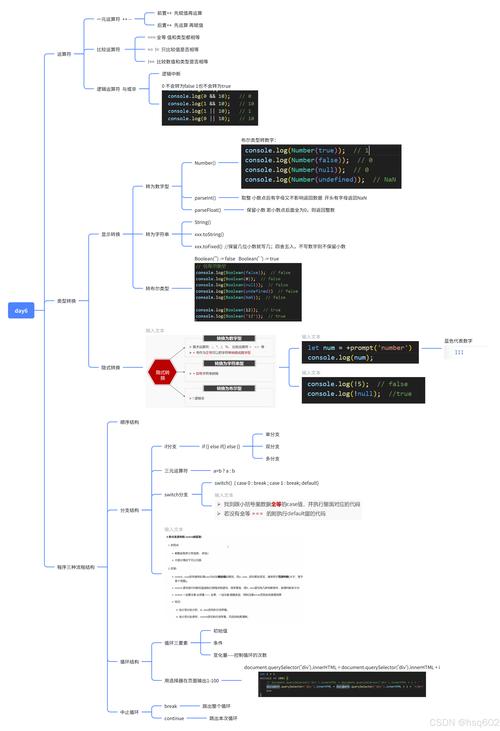
How it works (without jQuery):
- A user action occurs (e.g., clicking a button).
- JavaScript creates an
XMLHttpRequestobject (the "engine" for AJAX). - The JavaScript opens a connection to a server-side script (e.g., a Java Servlet).
- The JavaScript sends a request to the server.
- The server processes the request (using Java) and sends back a response (often in JSON or XML format).
- The JavaScript receives the response and updates a part of the web page, all without a full page reload.
Java (The Backend)
In this context, Java is used on the server to handle the AJAX requests. It's the "brain" that processes the data. Common ways to run Java on a server include:
- Spring Boot: (Highly recommended for modern apps) A very popular framework that makes creating production-ready Java applications incredibly fast. It has excellent built-in support for creating RESTful APIs.
- Jakarta EE (formerly Java EE): A more traditional, comprehensive platform for building large-scale enterprise applications.
- Servlets: The fundamental technology for handling web requests in Java. A simple
HttpServletcan be used to receive an AJAX request and send back a response.
Putting It All Together: A Complete Example
Let's build a simple "Search User" feature.
Goal: A user types a username into a text field and clicks "Search". Without reloading the page, a list of matching users is displayed below.
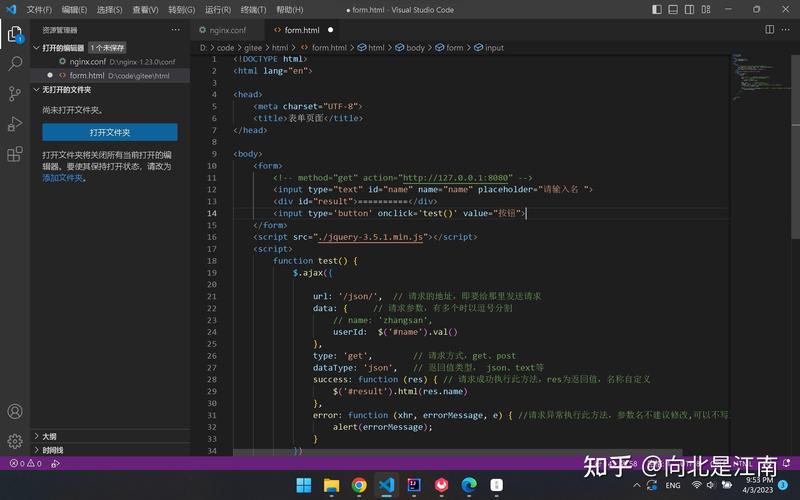
Step 1: The Frontend (HTML & jQuery)
This file contains the user interface and the JavaScript/jQuery logic.
index.html
<!DOCTYPE html>
<html lang="en">
<head>
    <meta charset="UTF-8">AJAX with jQuery and Java</title>
    <!-- Include jQuery from a CDN -->
    <script src="https://code.jquery.com/jquery-3.6.0.min.js"></script>
    <style>
        body { font-family: sans-serif; }
        #userResults { margin-top: 20px; border: 1px solid #ccc; padding: 10px; }
        .user-item { padding: 5px; border-bottom: 1px solid #eee; }
    </style>
</head>
<body>
    <h1>Search for a User</h1>
    <input type="text" id="usernameInput" placeholder="Enter username...">
    <button id="searchButton">Search</button>
    <div id="userResults"></div>
    <script>
        // Wait for the document to be fully loaded before running any jQuery
        $(document).ready(function() {
            // Attach a click event listener to the search button
            $("#searchButton").on("click", function() {
                // Get the username from the input field
                const username = $("#usernameInput").val();
                // Check if the input is not empty
                if (username) {
                    // Make an AJAX GET request to our Java backend
                    $.get("api/users/search", { username: username }, function(data) {
                        // This function is called when the server responds successfully
                        // Clear previous results
                        $("#userResults").empty();
                        // Check if the server returned any data
                        if (data && data.length > 0) {
                            // Loop through the user data and display it
                            data.forEach(function(user) {
                                $("#userResults").append("<div class='user-item'>" +
                                    "ID: " + user.id + ", Name: " + user.name + ", Email: " + user.email +
                                    "</div>");
                            });
                        } else {
                            // Show a message if no users were found
                            $("#userResults").html("<p>No users found.</p>");
                        }
                    })
                    .fail(function(jqXHR, textStatus, errorThrown) {
                        // This function is called if the request fails
                        console.error("Error searching for user:", textStatus, errorThrown);
                        $("#userResults").html("<p>An error occurred. Please try again.</p>");
                    });
                } else {
                    alert("Please enter a username.");
                }
            });
        });
    </script>
</body>
</html>
Step 2: The Backend (Java with Spring Boot)
Here, we create a simple REST endpoint that our jQuery code can call. We'll use Spring Boot because it's so concise.
Add Dependencies (pom.xml)
You'll need spring-boot-starter-web for creating web applications and spring-boot-starter-data-jpa for database interaction, plus an in-memory database like H2.
Create the User Model (User.java)
// A simple POJO (Plain Old Java Object) to represent a user
public class User {
    private long id;
    private String name;
    private String email;
    // Constructors, Getters, and Setters
    public User() {}
    public User(long id, String name, String email) {
        this.id = id;
        this.name = name;
        this.email = email;
    }
    public long getId() { return id; }
    public void setId(long id) { this.id = id; }
    public String getName() { return name; }
    public void setName(String name) { this.name = name; }
    public String getEmail() { return email; }
    public void setEmail(String email) { this.email = email; }
}
Create a Simple Data Repository (UserRepository.java)
This interface provides methods for database operations. Spring Data JPA will automatically implement it for us.
import org.springframework.data.jpa.repository.JpaRepository;
import java.util.List;
public interface UserRepository extends JpaRepository<User, Long> {
    // This method will be automatically implemented to find users by name
    List<User> findByNameContainingIgnoreCase(String name);
}
Create the REST Controller (UserController.java)
This class defines the API endpoint. It handles incoming requests and returns responses.
import org.springframework.beans.factory.annotation.Autowired;
import org.springframework.web.bind.annotation.GetMapping;
import org.springframework.web.bind.annotation.RequestParam;
import org.springframework.web.bind.annotation.RestController;
import java.util.List;
@RestController // Marks this class as a REST controller
public class UserController {
    @Autowired // Injects the UserRepository bean
    private UserRepository userRepository;
    // This method handles GET requests to "/api/users/search"
    @GetMapping("/api/users/search")
    public List<User> searchUsers(@RequestParam("username") String username) {
        // Use the repository to find users whose name contains the search term
        // The search is case-insensitive
        return userRepository.findByNameContainingIgnoreCase(username);
    }
}
How the Flow Works:
- A user opens
index.htmlin their browser. - They type "john" into the input field and clicks "Search".
- The jQuery
$.get()function is triggered. It sends an HTTP GET request tohttp://yourserver:8080/api/users/search?username=john. - The Spring Boot application receives this request. The
UserController.searchUsers("john")method is called. - The
searchUsersmethod callsuserRepository.findByNameContainingIgnoreCase("john"). - The
UserRepositoryqueries the in-memory H2 database for users with names containing "john". - The database returns a list, for example:
[ {id: 1, name: "John Doe", email: "john.doe@example.com"}, {id: 2, name: "Johnny Appleseed", email: "johnny@apple.com"} ]. - Spring Boot automatically converts this Java
List<User>object into a JSON array and sends it back as the HTTP response. - The jQuery
$.get()function's success callback receives this JSON data in thedatavariable. - The JavaScript code then loops through the
dataarray and dynamically builds the HTML to display the results inside the<div id="userResults">. The user sees the results appear instantly on the page.