Of course! The term "randomrange" in Python most likely refers to generating random numbers within a specific range. Python's built-in random module is the standard tool for this.
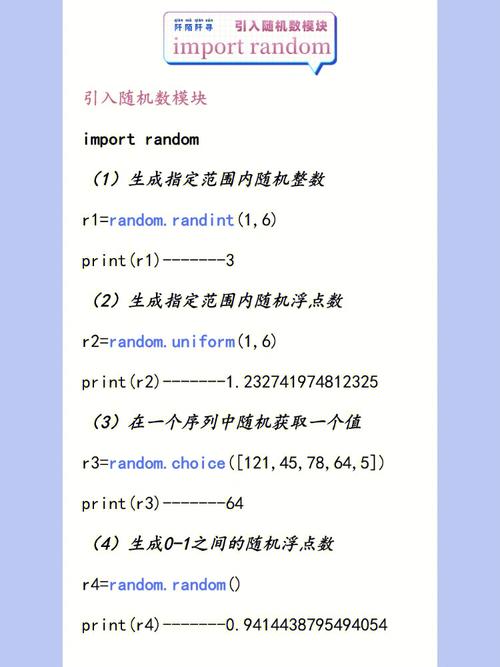
Here’s a complete guide, from the most common function to more advanced options.
The Short Answer: Use random.randint()
If you want a random integer between a minimum and maximum value (inclusive), use random.randint().
import random
# Get a random integer between 1 and 10 (inclusive)
random_number = random.randint(1, 10)
print(f"Your random number is: {random_number}")
Key points for random.randint(a, b):
- It returns an integer
Nsuch thata <= N <= b. - Both the start (
a) and end (b) values are included in the possible outcomes. - You must provide two arguments.
Detailed Breakdown of random Module Functions
The random module has several functions for generating numbers in ranges. Choosing the right one depends on whether you need an integer or a float, and whether the end of the range is inclusive or exclusive.
random.randint(a, b) - Integers (Inclusive Range)
This is the most direct answer to "randomrange". It's perfect for things like rolling a die, picking a random day of the month, or selecting a random item from a list by index.
import random
# Roll a standard 6-sided die
dice_roll = random.randint(1, 6)
print(f"You rolled a: {dice_roll}")
# Get a random day of the month (e.g., for a birthday)
day_of_month = random.randint(1, 31)
print(f"Random day: {day_of_month}")
random.randrange(start, stop[, step]) - Integers (Exclusive Stop)
This function is similar to Python's built-in range() function. It's more flexible but can be confusing for beginners because the stop value is not included in the possible outcomes.
import random
# Get a random integer from 0 up to (but not including) 10
# This is equivalent to random.randint(0, 9)
num1 = random.randrange(10)
print(f"randrange(10): {num1}")
# Get a random integer from 5 up to (but not including) 15
# This is equivalent to random.randint(5, 14)
num2 = random.randrange(5, 15)
print(f"randrange(5, 15): {num2}")
# Get a random even number between 0 and 100
# The 'step' argument skips numbers.
num3 = random.randrange(0, 101, 2) # 101 is used to ensure 100 is a possibility
print(f"Random even number (0-100): {num3}")
When to use randrange vs. randint:
- Use
randint(a, b)for simplicity when you want to include the upper bound. - Use
randrangeif you need the flexibility of thestepargument or if you're already usingrange()in your code.
random.uniform(a, b) - Floating-Point Numbers (Inclusive Range)
If you need a random decimal (float) number, use random.uniform(). Both a and b can be included in the result.
import random
# Get a random float between 1.5 and 5.5
random_float = random.uniform(1.5, 5.5)
print(f"Random float: {random_float}")
# You can also generate negative ranges
temp_celsius = random.uniform(-10.0, 35.0)
print(f"Random temperature: {temp_celsius:.2f} °C") # Formatted to 2 decimal places
Common Use Cases and Examples
Example 1: Simulating a Coin Toss
import random
# 0 for Tails, 1 for Heads
coin_flip = random.randint(0, 1)
if coin_flip == 1:
    print("Heads!")
else:
    print("Tails!")
Example 2: Choosing a Random Element from a List
You can use random.choice() to pick one item from a sequence (like a list or tuple).
import random
names = ["Alice", "Bob", "Charlie", "Diana", "Eve"]
winner = random.choice(names)
print(f"The winner is: {winner}!")
Example 3: Shuffling a List (e.g., for a deck of cards)
To randomize the order of a list, use random.shuffle(). Note that this function modifies the list in-place and returns None.
import random
deck = ["Ace", "King", "Queen", "Jack", "10", "9"]
print(f"Original deck: {deck}")
random.shuffle(deck)
print(f"Shuffled deck: {deck}")
Example 4: Generating Multiple Random Numbers (e.g., for a lottery)
Use a list comprehension with random.randint().
import random
# Generate 6 unique random numbers for a lottery from 1 to 49
# We use a set to automatically handle uniqueness
lottery_numbers = {random.randint(1, 49) for _ in range(6)}
# Convert the set to a sorted list for display
sorted_numbers = sorted(list(lottery_numbers))
print(f"Your lottery numbers are: {sorted_numbers}")
For Cryptographically Secure Randomness
The random module is not suitable for security-sensitive applications like generating passwords, tokens, or security keys. For these purposes, use the secrets module, which is designed to generate unpredictable random numbers from the best available source of entropy.
The secrets module has similar functions: secrets.randbelow(), secrets.randbits(), and secrets.choice().
import secrets
# Generate a secure random integer between 1 and 100
secure_random_number = secrets.randbelow(100) + 1 # randbelow(n) gives 0 to n-1
print(f"Secure random number: {secure_random_number}")
# Generate a secure random 128-bit integer
secure_random_bits = secrets.randbits(128)
print(f"Secure 128-bit number: {secure_random_bits}")
# Securely choose a winner from a list
participants = ["Anna", "Ben", "Chloe", "David"]
secure_winner = secrets.choice(participants)
print(f"The secure winner is: {secure_winner}")
Summary Table
| Function | Type | Range (Inclusive/Exclusive) | Example |
|---|---|---|---|
random.randint(a, b) |
Integer | Inclusive of both a and b |
random.randint(1, 6) (a die roll) |
random.randrange(stop) |
Integer | Exclusive of stop |
random.randrange(10) (0-9) |
random.randrange(start, stop) |
Integer | Exclusive of stop |
random.randrange(5, 15) (5-14) |
random.uniform(a, b) |
Float | Inclusive of both a and b |
random.uniform(1.5, 5.5) |
secrets.randbelow(n) |
Integer | Exclusive of n (0 to n-1) |
secrets.randbelow(100) (for security) |