Of course! Let's dive deep into python random.seed. This is a fundamental concept for anyone working with randomness in Python, especially for debugging, testing, or reproducible research.
What is random.seed()?
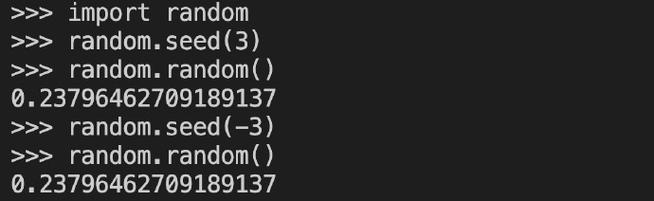
In simple terms, random.seed() is a function that initializes the internal state of the random number generator in Python.
Think of it like this: A computer can't create "truly" random numbers. Instead, it uses a pseudo-random number generator (PRNG). This is an algorithm that produces a sequence of numbers that appears random, but is actually completely deterministic.
The seed is the starting point for this sequence. If you use the same seed, you will get the exact same sequence of "random" numbers every single time.
Why is this Useful? The Key Benefits
-
Reproducibility (The Most Important Reason): This is the primary use case. When you are sharing code, running experiments, or debugging, you need to ensure that the "random" parts of your code behave the same way every time.
 (图片来源网络,侵删)
- Science & Research: If you're running a simulation or a machine learning model, you want to be able to reproduce the exact results to validate your findings.
- Debugging: If your code occasionally fails due to a "random" choice, setting a seed makes the failure happen every time, allowing you to pinpoint the bug.
- Demonstrations: When teaching or showing a script, a fixed seed ensures the audience sees the same output as you.
-
Testing: When writing unit tests, you can use a fixed seed to generate predictable test data. This ensures your tests are reliable and don't fail just because a random number happened to be an outlier.
How to Use random.seed()
The syntax is straightforward.
import random
# Set the seed
random.seed(42)
The seed can be any hashable object, but most commonly it's an integer. Popular choices are 0, 1, 42, or a specific date.
Example: The Power of Reproducibility
Let's see it in action. First, let's run some code without a seed.
import random
print("Without a seed (results will change):")
print(random.random())
print(random.randint(1, 10))
print(random.choice(['apple', 'banana', 'cherry']))
Possible Output 1:
Without a seed (results will change):
0.8444218515250481
7
banana
Possible Output 2 (on a different run or even the same run):
Without a seed (results will change):
0.020258759950586646
3
apple
As you can see, the output is different each time.
Now, let's run the exact same code but with a fixed seed.
import random
# Set the seed BEFORE generating any random numbers
random.seed(123)
print("\nWith a seed (results are fixed):")
print(random.random())
print(random.randint(1, 10))
print(random.choice(['apple', 'banana', 'cherry']))
# Let's run it again with the SAME seed
print("\nRunning again with the same seed:")
random.seed(123) # Reset the seed
print(random.random())
print(random.randint(1, 10))
print(random.choice(['apple', 'banana', 'cherry']))
Output (will be identical every time):
With a seed (results are fixed):
0.052363598850944326
2
banana
Running again with the same seed:
0.052363598850944326
2
banana
Notice how the sequence is identical both times we used random.seed(123). This is the magic of seeding!
A Common Pitfall: When to Set the Seed
A very common mistake is setting the seed inside a loop or function that gets called multiple times. This will reset the random number generator, leading to a non-random or predictable sequence.
Bad Example: Setting the Seed in a Loop
import random
def get_random_number():
    random.seed(10) # WRONG: This resets the generator every time!
    return random.random()
print(get_random_number())
print(get_random_number())
print(get_random_number())
Output:
5714025946899135
0.5714025946899135
0.5714025946899135
This is not what you want! You're getting the same number because you're resetting the generator to its starting point (seed=10) and then taking just the first number from its sequence.
Good Example: Setting the Seed Once
import random
# Set the seed ONCE at the beginning of your program or script
random.seed(10)
def get_random_number():
    # No seed set here. It continues the sequence.
    return random.random()
print(get_random_number())
print(get_random_number())
print(get_random_number())
Output:
5714025946899135
0.4288890546751146
0.5780913011344704
This is correct. The sequence of random numbers is now predictable and reproducible because it started from seed=10 and then progressed naturally.
Global vs. Local State: random vs. random.Random
For most use cases, import random; random.seed(...) is perfectly fine. However, it's important to know that this sets the global random state. This can sometimes cause issues in larger applications where different parts of the code might interfere with each other.
A more robust approach is to create a separate, independent random generator instance.
import random
# Global state (the common way)
random.seed(42)
print(f"Global random: {random.random()}")
# Create an independent random generator instance
my_local_random = random.Random(99)
print(f"Local random:  {my_local_random.random()}")
# The global state is unaffected by the local one
print(f"Global random again: {random.random()}")
Output:
Global random: 0.6394267984578837
Local random:  0.13339009997997514
Global random again: 0.025010755222666936
Using random.Random() is best practice in libraries or complex applications to avoid side effects.
Summary Table
| Method | Use Case | Pros | Cons |
|---|---|---|---|
random.seed(42) |
General purpose, scripts, data science. | Simple, easy to use. | Sets a global state, can cause conflicts in large codebases. |
random.Random(42) |
Libraries, complex applications, multi-threaded code. | Creates an independent generator, no side effects. | Slightly more verbose. |
Final Recommendation
- For most scripts, data analysis, and learning, start your script with
random.seed(some_integer). It will save you countless headaches. - For building libraries or applications where you need to ensure your random functions don't affect other parts of the code, use
random.Random()to create your own private random number generator.