Of course! Let's break down everything you need to know about using MySQL with Python on Linux.

The most common and recommended library for connecting to MySQL from Python is mysql-connector-python. It's the official driver from Oracle, the company that owns MySQL.
Here is a complete guide covering installation, usage, best practices, and troubleshooting.
The Core Library: mysql-connector-python
This is the library you will install and use in your Python scripts to communicate with a MySQL server.
Why mysql-connector-python?
- Official Driver: Maintained by Oracle, ensuring compatibility with the latest MySQL features.
- Pure Python: It's written in Python, which makes it easy to install and cross-platform. (There's also a faster, C-based version called
mysqlclient, which we'll cover later). - Active Development: Regularly updated with bug fixes and new features.
Installation on Linux
There are two main ways to install the library: using a package manager (pip) or installing the system package.
Method A: Using pip (Recommended for Python Projects)
This is the standard way to install Python libraries. It installs the package specifically for your Python environment.
-
Ensure
pipis installed: Most Python installations come withpip. You can check by running:pip --version # Or for Python 3 specifically: pip3 --version
-
Install the library:
# For the current user
pip install mysql-connector-python
# Or for the system-wide Python 3 installation (may require sudo)
sudo pip3 install mysql-connector-python
Method B: Installing from System Repositories (Less Recommended)
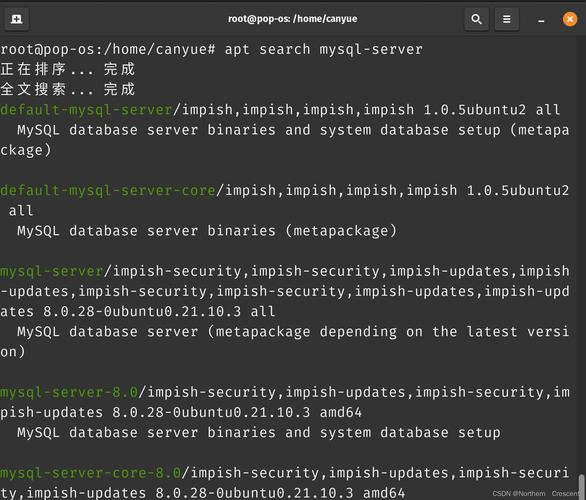
Some Linux distributions (like Debian/Ubuntu) have a package for this. This is generally not recommended because the version in the repository can be very old and may not be compatible with your MySQL server or other Python libraries.
# For Debian/Ubuntu
sudo apt-get update
sudo apt-get install python3-mysql.connector
# For Fedora/CentOS/RHEL
sudo dnf install python3-mysql-connector-python
Warning: The python3-mysql.connector package on Debian/Ubuntu is often outdated. Using pip is almost always the better choice.
A Simple Python Example
This script connects to a MySQL server, creates a database, a table, inserts a record, and then queries it.
Prerequisites:
- You have a MySQL server running on your Linux machine or a remote server.
- You have a MySQL user with privileges (e.g., a user with access on or at least on a specific database).
# simple_mysql_example.py
import mysql.connector
from mysql.connector import Error
def create_connection(host_name, user_name, user_password):
    """Create a database connection to the MySQL server."""
    connection = None
    try:
        connection = mysql.connector.connect(
            host=host_name,
            user=user_name,
            passwd=user_password
        )
        print("Connection to MySQL successful")
        return connection
    except Error as e:
        print(f"The error '{e}' occurred")
        return None
def execute_query(connection, query):
    """Execute a single query."""
    cursor = connection.cursor()
    try:
        cursor.execute(query)
        print("Query executed successfully")
    except Error as e:
        print(f"The error '{e}' occurred")
def fetch_data(connection, query):
    """Fetch data from a query."""
    cursor = connection.cursor()
    try:
        cursor.execute(query)
        result = cursor.fetchall()
        return result
    except Error as e:
        print(f"The error '{e}' occurred")
        return None
# --- Main Execution ---
if __name__ == "__main__":
    # --- Connection Details ---
    # Replace with your MySQL server details
    db_host = "localhost"  # or your server's IP
    db_user = "your_mysql_user"
    db_password = "your_mysql_password"
    # --- 1. Connect to the MySQL Server ---
    # We connect without specifying a database to create one.
    connection = create_connection(db_host, db_user, db_password)
    if connection:
        # --- 2. Create a Database and Use It ---
        create_database_query = "CREATE DATABASE IF NOT EXISTS python_db"
        execute_query(connection, create_database_query)
        # To use a database, you must reconnect specifying it
        connection.database = "python_db"
        # --- 3. Create a Table ---
        create_table_query = """
        CREATE TABLE IF NOT EXISTS users (
            id INT AUTO_INCREMENT PRIMARY KEY,
            name VARCHAR(255) NOT NULL,
            email VARCHAR(255) NOT NULL UNIQUE
        )
        """
        execute_query(connection, create_table_query)
        # --- 4. Insert Data into the Table ---
        insert_user_query = "INSERT INTO users (name, email) VALUES (%s, %s)"
        user_data = ("Alice", "alice@example.com")
        cursor = connection.cursor()
        try:
            cursor.execute(insert_user_query, user_data)
            connection.commit() # Commit the transaction
            print(f"Record inserted successfully with ID: {cursor.lastrowid}")
        except Error as e:
            print(f"The error '{e}' occurred")
            connection.rollback() # Rollback in case of error
        # --- 5. Query Data from the Table ---
        select_users_query = "SELECT * FROM users"
        users = fetch_data(connection, select_users_query)
        if users:
            print("\n--- Users ---")
            for user in users:
                print(f"ID: {user[0]}, Name: {user[1]}, Email: {user[2]}")
        # --- 6. Close the Connection ---
        if connection.is_connected():
            cursor.close()
            connection.close()
            print("\nMySQL connection is closed")
To run this script:
- Save the code as
simple_mysql_example.py. - Replace the placeholder credentials (
your_mysql_user,your_mysql_password). - Run it from your terminal:
python3 simple_mysql_example.py
Best Practices
a) Using Connection Pooling
Creating a new database connection for every request is inefficient. Connection pooling reuses existing connections, which significantly improves performance.
import mysql.connector
from mysql.connector import pooling
# Configure the connection pool
dbconfig = {
    "host": "localhost",
    "user": "your_user",
    "password": "your_password",
    "database": "python_db"
    # You can add pool_name and pool_size here as well
}
# Create a connection pool
try:
    connection_pool = pooling.MySQLConnectionPool(pool_name="mypool", pool_size=5, **dbconfig)
    print("Connection pool created successfully")
except Error as e:
    print(f"Error creating connection pool: {e}")
# Get a connection from the pool
connection = connection_pool.get_connection()
if connection.is_connected():
    cursor = connection.cursor()
    cursor.execute("SELECT * FROM users")
    records = cursor.fetchall()
    for row in records:
        print(row)
    cursor.close()
    connection.close() # Returns the connection to the pool
    print("Connection returned to the pool")
b) Using Environment Variables for Credentials
Never hardcode credentials in your code. Use environment variables to keep them secure.
Install the python-dotenv library:
pip install python-dotenv
Create a file named .env in your project's root directory:
# .env file
DB_HOST=localhost
DB_USER=your_user
DB_PASSWORD=your_password
DB_NAME=python_db
Modify your Python script to load these variables:
import os
from dotenv import load_dotenv
load_dotenv() # Load variables from .env file
db_host = os.getenv("DB_HOST")
db_user = os.getenv("DB_USER")
db_password = os.getenv("DB_PASSWORD")
db_name = os.getenv("DB_NAME")
# ... use these variables in your connection code
Alternative: mysqlclient (For Performance)
If you need the highest possible performance, mysqlclient is an excellent choice. It's a C-based fork of the old MySQLdb library.
Pros:
- Much Faster: Being written in C, it's significantly faster for high-load applications.
- Wider Compatibility: Some older Python frameworks (like older versions of Django) require it.
Cons:
- Harder to Install: It requires development libraries to be installed on your system before you can
pip installit.
Installation Steps for mysqlclient
You must first install the required system dependencies.
For Debian / Ubuntu:
sudo apt-get update
sudo apt-get install python3-dev default-libmysqlclient-dev build-essential
For Fedora / CentOS / RHEL:
sudo dnf install python3-devel mysql-devel
Then, install with pip:
pip install mysqlclient
After installation, you can use it in your code by simply changing the import statement:
# From this:
import mysql.connector
# To this:
import MySQLdb
The API is slightly different, so you would need to adjust your connection and query logic accordingly.
Troubleshooting Common Errors
mysql.connector.errors.InterfaceError: 2003: Can't connect to MySQL server on 'localhost:3306'
- Cause: The MySQL server is not running, or it's not configured to accept connections from your machine.
- Solution:
- Check if MySQL is running:
sudo systemctl status mysql(ormysqld). - If it's not running, start it:
sudo systemctl start mysql. - Ensure the server is listening on
0.0.1(localhost). Check/etc/mysql/mysql.conf.d/mysqld.cnf(or similar) for thebind-addressdirective. It should bebind-address = 127.0.0.1or0.0.0.
- Check if MySQL is running:
mysql.connector.errors.ProgrammingError: 1045 (28000): Access denied for user 'user'@'localhost' (using password: YES)
- Cause: The username or password is incorrect.
- Solution: Double-check your credentials. You can reset the MySQL password for a user if you have root access.
ModuleNotFoundError: No module named 'mysql.connector'
- Cause: The library is not installed in the Python environment you are using.
- Solution: Make sure you are using the correct
pip(e.g.,pip3) and that you installed it for the right Python interpreter. Usewhich python3andwhich pip3to see where they are installed.
ImportError: libmysqlclient.so.21: cannot open shared object file
- Cause: This error occurs with
mysqlclient. It means the C library thatmysqlclientdepends on is not found by the Python interpreter at runtime. - Solution: You likely need to install the
libmysqlclient-dev(Debian/Ubuntu) ormysql-devel(Fedora/CentOS/RHEL) package, as shown in themysqlclientinstallation section. After installing it, you may need to reinstallmysqlclientitself:pip install --force-reinstall mysqlclient.