Of course! Here’s a comprehensive guide to installing and using MySQLdb on a Mac, covering the common issues and modern alternatives.
The Short Answer (TL;DR)
The original MySQLdb library is difficult to install on modern macOS because it requires a C compiler and MySQL headers. The easiest and recommended way to get a MySQLdb-compatible library is to use mysqlclient.
Install mysqlclient using pip:
pip install mysqlclient
Use it in your Python code exactly as you would MySQLdb:
import MySQLdb
# Connect to the database
# Replace with your actual database details
db = MySQLdb.connect(
    host="localhost",
    user="your_username",
    passwd="your_password",
    db="your_database"
)
# Create a cursor object
cursor = db.cursor()
# Execute a query
cursor.execute("SELECT VERSION()")
# Fetch the result
version = cursor.fetchone()
print(f"Database version: {version[0]}")
# Close the connection
cursor.close()
db.close()
The Detailed Guide: Why mysqlclient and How to Install It
Why is MySQLdb a Problem on macOS?
The original MySQLdb package is a wrapper around the C library libmysqlclient. To install it, pip needs to:

- Download the source code.
- Compile the C code.
- Link it against the MySQL header files.
On macOS, especially with Apple Silicon (M1/M2/M3) chips, this process often fails because:
- Missing C Compiler: Xcode Command Line Tools are required but not always installed.
- Missing MySQL Headers: The system doesn't know where to find the necessary C header files (e.g.,
mysql.h). - Architecture Mismatch: The library might be compiled for the wrong CPU architecture (x86_64 vs. arm64).
mysqlclient is a maintained, drop-in replacement that solves these issues by providing pre-compiled binaries for macOS.
Step-by-Step Installation of mysqlclient
Prerequisites
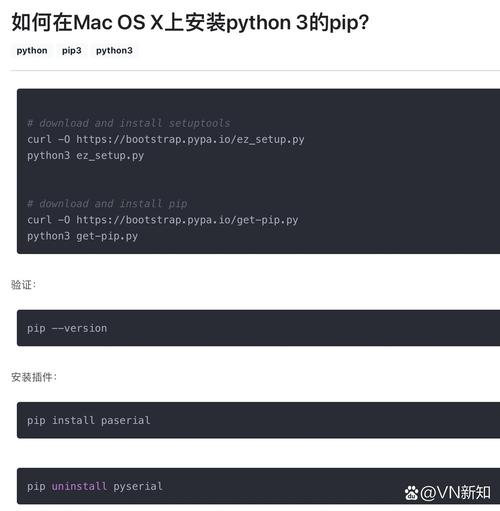
You need to have Python and pip installed. If you use Homebrew to manage Python, this is usually straightforward.
-
Install Python (Recommended via Homebrew): Homebrew makes managing Python and its dependencies much easier.
 (图片来源网络,侵删)
# Install Homebrew if you don't have it /bin/bash -c "$(curl -fsSL https://raw.githubusercontent.com/Homebrew/install/HEAD/install.sh)" # Install Python 3 brew install python
This will install Python 3 and
pip3in a predictable location and link them correctly. -
Install MySQL Server (Optional but Recommended): If you need a local MySQL server to connect to, install it via Homebrew.
brew install mysql
To start the MySQL server and run it in the background:
brew services start mysql
You can then run the secure installation script to set a root password:
mysql_secure_installation
Installation of mysqlclient
Now, with the prerequisites in place, the installation is simple.
-
Ensure you are using the correct pip: It's good practice to use
pip3to ensure you're installing the package for your Python 3 installation.pip3 install mysqlclient
-
Verify the Installation: If the command completes without any errors, the installation was successful. You can test it in a Python interpreter:
>>> import MySQLdb
>>> print(MySQLdb.__version__)
# You should see a version number, e.g., '2.2.0'
If you still encounter an error during installation, it's likely due to a missing compiler or library. Here's how to fix it:
-
Error:
clang: error: unsupported option '-mno-fused-madd'This is a common issue on Apple Silicon. The fix is to install a newer version of Xcode Command Line Tools.softwareupdate --all --install --force
-
Error:
fatal error: mysql.h: No such file or directoryThis means the MySQL headers are missing. If you installed MySQL via Homebrew, the headers are usually in a non-standard location. You can tellpipwhere to find them using environment variables.First, find the path to your MySQL installation:
brew --prefix mysql
# Example output: /opt/homebrew/opt/mysql
Then, install
mysqlclientagain, pointing to that path:# For Apple Silicon Macs (arm64) export LDFLAGS="-L$(brew --prefix mysql)/lib" export CPPFLAGS="-I$(brew --prefix mysql)/include" pip3 install mysqlclient # For Intel Macs (x86_64) export LDFLAGS="-L/usr/local/opt/mysql/lib" export CPPFLAGS="-I/usr/local/opt/mysql/include" pip3 install mysqlclient
Modern Alternatives to MySQLdb
While mysqlclient is the direct replacement, there are other excellent libraries that are often preferred for new projects.
mysql-connector-python (Official Oracle Driver)
This is the official driver from Oracle. It is pure Python, meaning it doesn't require compilation and is very easy to install. It's a robust and well-supported choice.
Installation:
pip3 install mysql-connector-python
Usage:
The API is slightly different from MySQLdb.
import mysql.connector
from mysql.connector import Error
try:
    # Connect to the database
    connection = mysql.connector.connect(
        host='localhost',
        database='your_database',
        user='your_username',
        password='your_password'
    )
    if connection.is_connected():
        db_info = connection.get_server_info()
        print(f"Connected to MySQL Server version {db_info}")
        cursor = connection.cursor()
        cursor.execute("SELECT VERSION()")
        version = cursor.fetchone()
        print(f"Database version: {version[0]}")
except Error as e:
    print(f"Error while connecting to MySQL: {e}")
finally:
    # Closing the connection
    if 'connection' in locals() and connection.is_connected():
        cursor.close()
        connection.close()
        print("MySQL connection is closed")
PyMySQL (Pure Python, Drop-in Replacement)
PyMySQL is another popular, pure-Python implementation of the MySQL client/server protocol. It aims to be a drop-in replacement for MySQLdb and mysqlclient without needing any C libraries.
Installation:
pip3 install pymysql
Usage: You can use it as a direct replacement. Some applications require you to install it as a "patch" first.
import pymysql
import pymysql.cursors
# Connect to the database
connection = pymysql.connect(
    host='localhost',
    user='your_username',
    password='your_password',
    database='your_database',
    cursorclass=pymysql.cursors.DictCursor  # Returns rows as dictionaries
)
try:
    with connection.cursor() as cursor:
        # Create a new record
        sql = "INSERT INTO `users` (`email`, `password`) VALUES (%s, %s)"
        cursor.execute(sql, ('webmaster@python.org', 'very-secret'))
        # connection is not autocommit by default. So you must commit to save
        # your changes.
        connection.commit()
        with connection.cursor() as cursor:
            # Read a single record
            sql = "SELECT `id`, `password` FROM `users` WHERE `email`=%s"
            cursor.execute(sql, ('webmaster@python.org',))
            result = cursor.fetchone()
            print(f"ID: {result['id']}, Password: {result['password']}")
finally:
    connection.close()
Summary: Which One Should You Use?
| Library | Type | Installation | Pros | Cons | Best For |
|---|---|---|---|---|---|
mysqlclient |
C-based | Can be tricky (pip install) |
Drop-in replacement for MySQLdb. Very fast performance. |
Requires compilation, can fail on macOS. | Projects that must use MySQLdb and need the best performance. |
mysql-connector-python |
Pure Python | Very easy (pip install) |
Official Oracle driver. No compilation needed. Well-documented. | Slightly different API from MySQLdb. |
New projects where you want an official, easy-to-install driver. |
PyMySQL |
Pure Python | Very easy (pip install) |
Drop-in replacement. No compilation needed. Actively maintained. | Slightly slower than C-based drivers. | New projects where you want a simple, reliable, drop-in replacement. |
Recommendation for 2025:
- For a direct, hassle-free replacement for
MySQLdb, usemysqlclient. Ifpip install mysqlclientworks, you're good to go. - For any new project, consider using
mysql-connector-pythonorPyMySQL. They are easier to install and maintain, and their performance is more than adequate for most applications.