Of course! Here is a comprehensive guide on using SIFT (Scale-Invariant Feature Transform) with OpenCV in Python.
This guide will cover:
- What is SIFT? (A brief conceptual overview)
- Prerequisites: How to install the necessary libraries.
- Code Examples: From basic feature detection to full image matching.
- Explanation of Key Steps: A breakdown of what each part of the code does.
- Important Note: The patent status of SIFT.
What is SIFT?
SIFT is a powerful computer vision algorithm used to detect and describe local features in images. The key advantage of SIFT is that its features are invariant to scale, rotation, and illumination changes. This makes it extremely useful for tasks like:
- Object Recognition
- Image Stitching (like creating panoramas)
- 3D Modeling
- Tracking objects between video frames
The SIFT algorithm consists of two main steps:
- Key Point Detection: Finding interesting points in the image (corners, blobs, etc.) that are stable and can be reliably detected even if the image changes.
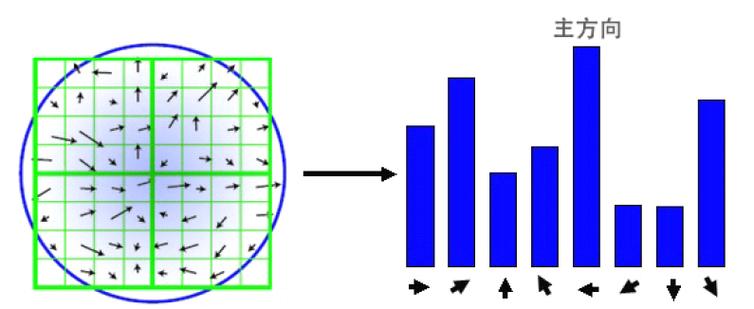
- Key Point Description: For each detected key point, SIFT computes a "descriptor"—a vector of numbers that describes the local image region around that point. This descriptor is what allows you to match the same feature in different images.
Prerequisites
First, you need to install OpenCV and NumPy. The most important part is ensuring you have the version of OpenCV that includes the SIFT algorithm.
Step 1: Install OpenCV and NumPy It's highly recommended to use a virtual environment.
# Create and activate a virtual environment (optional but good practice)
python -m venv venv
source venv/bin/activate  # On Windows: venv\Scripts\activate
# Install the necessary libraries
pip install opencv-python numpy
Important Note on OpenCV Versions:
- OpenCV 2.x: SIFT was included but disabled by default due to patent issues. You had to enable it manually.
- OpenCV 3.x & 4.x: SIFT, SURF, and other patented algorithms were completely removed from the main
opencv-pythonpackage to avoid licensing issues. - OpenCV Contrib: To use SIFT, you must install the
opencv-contrib-pythonpackage, which includes these extra algorithms.
Step 2: Install the Correct OpenCV Version
# Uninstall the standard version if you installed it
pip uninstall opencv-python
# Install the contrib version
pip install opencv-contrib-python
Now you are ready to use SIFT!
Code Examples
Let's start with a simple example and build up to full image matching.
Example 1: Detecting and Drawing Keypoints
This script loads an image, detects SIFT keypoints, and draws them on the image.
import cv2
import numpy as np
import matplotlib.pyplot as plt
# --- 1. Load the Image ---
# Note: OpenCV loads images in BGR format by default
image_path = 'your_image.jpg' # Replace with your image path
image = cv2.imread(image_path)
if image is None:
    print(f"Error: Could not load image from {image_path}")
    exit()
# Convert the image to grayscale, as SIFT works on single-channel images
gray_image = cv2.cvtColor(image, cv2.COLOR_BGR2GRAY)
# --- 2. Create a SIFT Object ---
# The sift object contains the algorithm's parameters
# You can change parameters like nfeatures, nOctaveLayers, etc.
sift = cv2.SIFT_create()
# --- 3. Detect Keypoints and Compute Descriptors ---
# The detectAndCompute function is a convenience that does both steps.
# It returns:
# - keypoints: A list of detected keypoints (special objects with location, scale, orientation, etc.)
# - descriptors: A NumPy array where each row is the 128-dimensional descriptor for a keypoint
keypoints, descriptors = sift.detectAndCompute(gray_image, None)
# --- 4. Draw the Keypoints ---
# The drawKeypoints function overlays the keypoints on a copy of the original image.
# cv2.DRAW_MATCHES_FLAGS_DRAW_RICH_KEYPOINTS draws a circle with size proportional to the scale
image_with_keypoints = cv2.drawKeypoints(image, keypoints, None, flags=cv2.DRAW_MATCHES_FLAGS_DRAW_RICH_KEYPOINTS)
# --- 5. Display the Result ---
# Convert from BGR to RGB for correct color display with Matplotlib
image_rgb = cv2.cvtColor(image, cv2.COLOR_BGR2RGB)
image_with_keypoints_rgb = cv2.cvtColor(image_with_keypoints, cv2.COLOR_BGR2RGB)
plt.figure(figsize=(12, 6))
plt.subplot(1, 2, 1)'Original Image')
plt.imshow(image_rgb)
plt.axis('off')
plt.subplot(1, 2, 2)'Image with SIFT Keypoints')
plt.imshow(image_with_keypoints_rgb)
plt.axis('off')
plt.show()
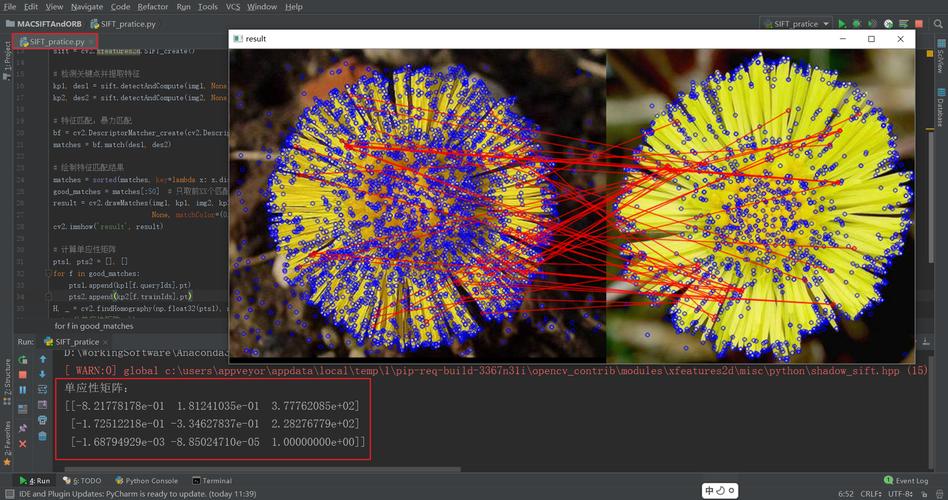
What the output will look like: You'll see your original image next to another image with circles and lines drawn on it. Each circle represents a detected keypoint, and its size corresponds to the scale at which the feature was found.
Example 2: Feature Matching Between Two Images
This is the classic use case. We'll find keypoints in two images of the same object and then match them.
import cv2
import numpy as np
import matplotlib.pyplot as plt
def sift_matcher(img1_path, img2_path):
    # --- 1. Load and Prepare Images ---
    img1 = cv2.imread(img1_path, cv2.IMREAD_GRAYSCALE)
    img2 = cv2.imread(img2_path, cv2.IMREAD_GRAYSCALE)
    if img1 is None or img2 is None:
        print("Error: Could not load one or both images.")
        return
    # --- 2. Detect Keypoints and Descriptors for both images ---
    sift = cv2.SIFT_create()
    keypoints1, descriptors1 = sift.detectAndCompute(img1, None)
    keypoints2, descriptors2 = sift.detectAndCompute(img2, None)
    # --- 3. Match the Descriptors ---
    # We use a Brute-Force matcher with L2 norm (good for SIFT descriptors)
    bf = cv2.BFMatcher(cv2.NORM_L2, crossCheck=True)
    # crossCheck=True means that for a match in the first image,
    # there must be a match in the second image, and vice-versa.
    # This results in higher quality but fewer matches.
    matches = bf.match(descriptors1, descriptors2)
    # Sort the matches based on their distance (lower is better)
    matches = sorted(matches, key=lambda x: x.distance)
    # --- 4. Draw the Best Matches ---
    # We'll draw only the top "good" matches to visualize the result
    num_good_matches = 50 # You can adjust this number
    good_matches = matches[:num_good_matches]
    # The drawMatches function requires color images, so we convert back
    img1_color = cv2.imread(img1_path)
    img2_color = cv2.imread(img2_path)
    matched_image = cv2.drawMatches(img1_color, keypoints1, img2_color, keypoints2, good_matches, None,
                                     flags=cv2.DrawMatchesFlags_NOT_DRAW_SINGLE_POINTS)
    # --- 5. Display the Result ---
    plt.figure(figsize=(15, 8))
    plt.imshow(cv2.cvtColor(matched_image, cv2.COLOR_BGR2RGB))
    plt.title(f'Top {num_good_matches} SIFT Matches')
    plt.axis('off')
    plt.show()
# --- Usage ---
# Replace with paths to your two images
image1_path = 'object_image1.jpg'
image2_path = 'object_image2.jpg' # e.g., a different angle, scale, or lighting
sift_matcher(image1_path, image2_path)
What the output will look like: You'll see a side-by-side image with lines connecting the keypoints that were successfully matched between the two images. Good matches will show clear correspondences, while incorrect matches (if any) will appear as random lines.
Explanation of Key Steps
| Step | Code | Explanation |
|---|---|---|
| Create SIFT Object | sift = cv2.SIFT_create() |
This instantiates the SIFT algorithm. You can pass parameters here, like nfeatures=0 (no limit on features) or nOctaveLayers=3 (number of octaves in the scale pyramid). |
| Detect & Compute | keypoints, descriptors = sift.detectAndCompute(gray_image, None) |
This is the core function. It finds keypoints and calculates their descriptors. The None argument is for a mask, which you can use to only search for features in a specific region of the image. |
| Keypoint Object | keypoint |
Each keypoint is an object with attributes like pt (x, y coordinates), size (diameter of the feature area), angle (orientation), and response (strength of the feature). |
| Descriptors | descriptors |
This is a NumPy array of shape (N, 128), where N is the number of keypoints. Each of the 128 numbers describes the gradient distribution in the patch around the keypoint. This vector is what you compare to find matches. |
| Brute-Force Matcher | bf = cv2.BFMatcher(cv2.NORM_L2, crossCheck=True) |
Creates a matcher object. BFMatcher tries to find the best match for each descriptor by comparing it to all other descriptors. NORM_L2 is the distance metric suitable for SIFT descriptors. crossCheck=True improves match quality. |
| Match & Sort | matches = bf.match(...)matches = sorted(matches, key=lambda x: x.distance) |
bf.match() finds the single best match for each descriptor. The result is a list of DMatch objects. Each DMatch has trainIdx (index in the second image) and distance (a measure of similarity, lower is better). Sorting by distance puts the best matches first. |
Important Note: The Patent Status of SIFT
This is a crucial piece of information for any developer.
- The Patent: SIFT was patented by its creator, David Lowe. The patent expired in December 2025.
- The Impact: Because it was patented, the SIFT algorithm was removed from the standard
opencv-pythonlibrary to prevent legal issues for users. - The Solution: You must use the
opencv-contrib-pythonpackage, which contains these "extra" algorithms, including SIFT, SURF, and ORB (which is free and open-source).
Now that the patent has expired, it's possible that future versions of the standard opencv-python package might re-include SIFT, but for now, opencv-contrib-python is the standard and reliable way to access it.