Of course! In Python, lists and strings are two of the most fundamental and commonly used data types. They are similar in many ways but also have key differences.
Let's break them down, starting with their individual definitions and then exploring how they work together.
The Python list
A list is an ordered, mutable (changeable), collection of items. Think of it as a shopping list or a row of boxes where you can put anything you want, and you can change the contents of the boxes or even add/remove boxes.
Key Characteristics of a List:
- Ordered: The items have a defined order, and that order will not change unless you do it explicitly.
- Mutable: You can change, add, or remove items after the list has been created.
- Heterogeneous: A single list can contain items of different data types (e.g., integers, strings, booleans, even other lists).
Creating a List:
You create a list by placing comma-separated items inside square brackets [].
# A list of numbers
numbers = [1, 5, 12, 33]
# A list of strings
fruits = ["apple", "banana", "cherry"]
# A mixed list
mixed_list = [1, "hello", True, 3.14, [4, 5]]
Common List Operations:
fruits = ["apple", "banana", "cherry"]
# 1. Access an item by index (starts at 0)
print(fruits[0])  # Output: apple
print(fruits[-1]) # Output: cherry (negative index counts from the end)
# 2. Change an item (because lists are mutable)
fruits[1] = "blueberry"
print(fruits) # Output: ['apple', 'blueberry', 'cherry']
# 3. Add an item to the end
fruits.append("orange")
print(fruits) # Output: ['apple', 'blueberry', 'cherry', 'orange']
# 4. Remove an item
fruits.remove("cherry")
print(fruits) # Output: ['apple', 'blueberry', 'orange']
# 5. Get the number of items
print(len(fruits)) # Output: 3
The Python str (String)
A string is an ordered, immutable (unchangeable), sequence of characters. You can think of it as an "immutable list of characters".
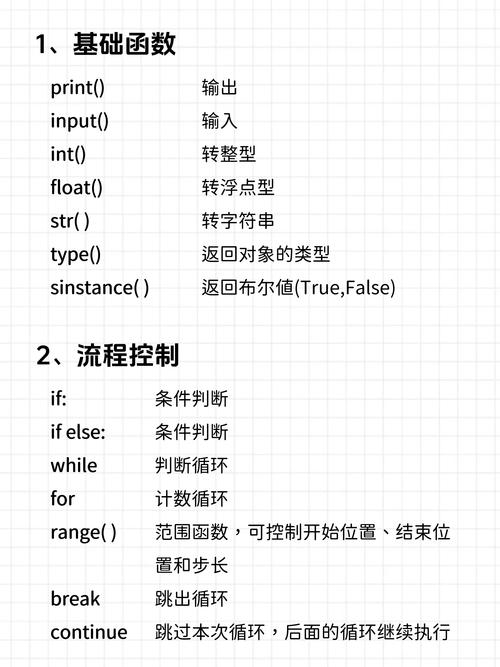
Key Characteristics of a String:
- Ordered: Characters are in a specific sequence.
- Immutable: Once a string is created, you cannot change its characters. Any operation that seems to modify a string actually creates a new one.
- Homogeneous: While you can have numbers or symbols, they are all treated as characters.
Creating a String:
You create a string by enclosing characters in either single quotes or double quotes .
# A simple string
greeting = "Hello, World!"
# A string with single quotes
name = 'Alice'
# A multi-line string (using triple quotes)
bio = """
My name is Bob.
I am a programmer.
"""
Common String Operations:
greeting = "Hello, World!"
# 1. Access a character by index (just like a list)
print(greeting[0]) # Output: H
print(greeting[-1]) # Output: !
# 2. Strings are IMMUTABLE! This will cause an error:
# greeting[0] = "h"  # TypeError: 'str' object does not support item assignment
# 3. To "change" a string, you create a new one
new_greeting = "h" + greeting[1:]
print(new_greeting) # Output: hello, World!
# 4. Get the length of the string
print(len(greeting)) # Output: 13
# 5. Check for a substring
print("World" in greeting) # Output: True
The Connection: Converting and Working with Lists and Strings
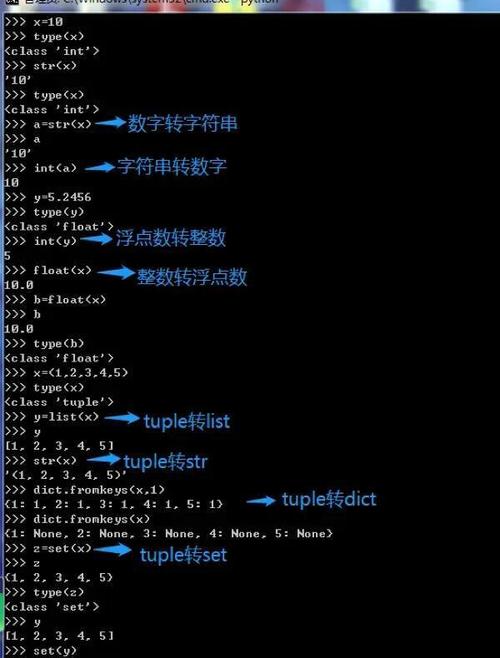
A very common task in Python is converting between strings and lists, or performing operations that treat them similarly.
A. Converting a String to a List
Using list(): This splits the string into a list of its individual characters.
my_string = "Python"
char_list = list(my_string)
print(char_list)
# Output: ['P', 'y', 't', 'h', 'o', 'n']
Using .split(): This is the most common method. It splits a string into a list of substrings, using a specified separator. The default separator is any whitespace.
sentence = "This is a sample sentence"
word_list = sentence.split()
print(word_list)
# Output: ['This', 'is', 'a', 'sample', 'sentence']
csv_data = "apple,banana,cherry,orange"
fruit_list = csv_data.split(',')
print(fruit_list)
# Output: ['apple', 'banana', 'cherry', 'orange']
B. Converting a List to a String
Using .join(): This is the standard and most efficient way. You call .join() on a string (the "separator") and pass the list as an argument.
word_list = ['This', 'is', 'a', 'list']
sentence = " ".join(word_list)
print(sentence)
# Output: This is a list
fruit_list = ['apple', 'banana', 'cherry']
csv_string = ",".join(fruit_list)
print(csv_string)
# Output: apple,banana,cherry
Using a Loop: You can also manually build the string, which is more verbose but good for understanding.
word_list = ['This', 'is', 'a', 'list']
sentence = ""
for word in word_list:
    sentence += word + " "
# Remove the trailing space
sentence = sentence.strip()
print(sentence)
# Output: This is a list
C. Common Operations (Shared Behavior)
Because both are ordered sequences, they share many of the same behaviors, especially through their shared base type, Sequence.
-
Slicing: You can get a "slice" of a string or list using the operator.
my_list = [0, 1, 2, 3, 4, 5]
my_string = "abcdef"
print(my_list[1:4])      # Output: [1, 2, 3]
print(my_string[1:4])     # Output: bcd
print(my_list[:3])       # Output: [0, 1, 2]
print(my_string[:3])      # Output: abc
print(my_list[2:])       # Output: [2, 3, 4, 5]
print(my_string[2:])      # Output: cdef
-
Iteration: You can loop through both.
for char in "hello": print(char) # Output: # h # e # l # l # o for item in [1, 2, 3]: print(item) # Output: # 1 # 2 # 3 -
Checking for membership: Use the
inkeyword.print('ell' in 'hello') # Output: True print(2 in [1, 2, 3]) # Output: True
Summary Table: List vs. String
| Feature | list (e.g., [1, "a", True]) |
str (e.g., "hello") |
|---|---|---|
| Type | Mutable Sequence | Immutable Sequence |
| Declaration | my_list = [1, 2, 3] |
my_string = "abc" |
| Mutability | Can be changed. Items can be added, removed, or modified. | Cannot be changed. Any modification creates a new string. |
| Contents | Can hold any data type (heterogeneous). | Holds only characters (homogeneous). |
| Key Methods | .append(), .remove(), .pop(), .sort() |
.split(), .join(), .replace(), .strip() |
| Example Use Case | Storing a collection of user objects, to-do items. | Storing text, names, file paths, or any textual data. |