Of course! In Python, "string list" can mean two main things:
- A list of strings: A list where each element is a string. This is the most common meaning.
- A string that looks like a list: A string containing characters that represent a list, like
"['apple', 'banana']".
Let's break down both scenarios with clear examples.
A List of Strings (list[str])
This is a standard Python list data structure where every item in the list is a string. It's one of the most fundamental and useful data structures for handling collections of text.
Creating a List of Strings
You can create one using square brackets [] and separating the strings with commas.
# Using square brackets
fruits = ['apple', 'banana', 'cherry']
print(fruits)
# Output: ['apple', 'banana', 'cherry']
# Using the list() constructor (less common for this specific case)
# This is often used to convert other iterables (like a tuple) into a list.
vegetables = list(('carrot', 'broccoli', 'spinach'))
print(vegetables)
# Output: ['carrot', 'broccoli', 'spinach']
Accessing Items in the List
You access elements using their index (starting from 0).
fruits = ['apple', 'banana', 'cherry']
# Get the first item
print(fruits[0])
# Output: 'apple'
# Get the last item
print(fruits[-1])
# Output: 'cherry'
# Get a slice (a sublist)
print(fruits[1:3])
# Output: ['banana', 'cherry']
Modifying the List
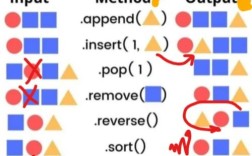
Lists are mutable, meaning you can change them after they are created.
fruits = ['apple', 'banana', 'cherry']
# Change an item by its index
fruits[1] = 'blueberry'
print(fruits)
# Output: ['apple', 'blueberry', 'cherry']
# Add an item to the end
fruits.append('date')
print(fruits)
# Output: ['apple', 'blueberry', 'cherry', 'date']
# Insert an item at a specific position
fruits.insert(1, 'blackberry')
print(fruits)
# Output: ['apple', 'blackberry', 'blueberry', 'cherry', 'date']
# Remove an item by its value
fruits.remove('blueberry')
print(fruits)
# Output: ['apple', 'blackberry', 'cherry', 'date']
# Remove an item by its index (and get its value)
popped_item = fruits.pop(0)
print(f"Removed:", popped_item)
print(f"List is now:", fruits)
# Output:
# Removed: apple
# List is now: ['blackberry', 'cherry', 'date']
Common Operations and Methods
-
Find the length:
print(len(fruits))
# Output: 3
-
Check for an item:
if 'cherry' in fruits: print("Yes, we have cherries!") # Output: Yes, we have cherries! -
Sort the list:
numbers = ['10', '2', '100']
numbers.sort() # Sorts alphabetically/lexicographically
print(numbers)
# Output: ['10', '100', '2']
# To sort numerically, you need to convert to integers first
numbers_as_ints = [int(n) for n in numbers]
numbers_as_ints.sort()
print(numbers_as_ints)
# Output: [2, 10, 100]
-
Join a list of strings into a single string:
words = ['Python', 'is', 'awesome']
sentence = " ".join(words) # The string " " is the separator
print(sentence)
# Output: Python is awesome
A String that Looks Like a List
Sometimes you might get data from a file, an API, or user input that is a string containing a list representation. You need to convert this string into an actual Python list.
Converting a String List to a Real List
The standard way to do this is with the ast.literal_eval() function from the ast (Abstract Syntax Trees) module. It's safe because it only evaluates Python literals (strings, numbers, lists, tuples, dicts, booleans, and None) and not arbitrary code, making it much safer than eval().
import ast
# The string that looks like a list
string_list = "['apple', 'banana', 'cherry']"
# Convert it to a real list
real_list = ast.literal_eval(string_list)
print(f"Original type: {type(string_list)}")
print(f"Original value: {string_list}")
print(f"Converted type: {type(real_list)}")
print(f"Converted value: {real_list}")
# Now you can use it like a normal list
print(real_list[1])
# Output: banana
Why not use eval()?
The eval() function can execute any Python code, which is a major security risk if the string comes from an untrusted source.
# DANGEROUS! Do not use with untrusted input.
malicious_string = "__import__('os').system('echo pwned')"
# eval would execute the command, while literal_eval would raise an error.
# eval(malicious_string) # This would print "pwned" to your terminal!
# ast.literal_eval(malicious_string) # This raises a SyntaxError
Common Use Cases & Examples
Here are some practical examples of working with lists of strings.
Example 1: Filtering a List
Find all fruits that start with the letter 'a'.
fruits = ['apple', 'apricot', 'banana', 'avocado', 'cherry']
# Using a list comprehension (the "Pythonic" way)
a_fruits = [fruit for fruit in fruits if fruit.startswith('a')]
print(a_fruits)
# Output: ['apple', 'apricot', 'avocado']
Example 2: Finding and Replacing in a List
Change all occurrences of 'banana' to 'plantain'.
fruits = ['apple', 'banana', 'cherry', 'banana']
# Using a for loop
for i in range(len(fruits)):
    if fruits[i] == 'banana':
        fruits[i] = 'plantain'
print(fruits)
# Output: ['apple', 'plantain', 'cherry', 'plantain']
Example 3: Counting Occurrences
Count how many times a word appears in a list.
words = ['hello', 'world', 'hello', 'python', 'hello']
count = words.count('hello')
print(f"The word 'hello' appears {count} times.")
# Output: The word 'hello' appears 3 times.
Summary Table
| Task | Method / Code Example |
|---|---|
| Create a list | my_list = ['a', 'b', 'c'] |
| Get length | len(my_list) |
| Access item | my_list[0] |
| Change item | my_list[0] = 'new' |
| Add item (end) | my_list.append('item') |
| Add item (pos) | my_list.insert(1, 'item') |
| Remove item (value) | my_list.remove('item') |
| Remove item (index) | my_list.pop(0) |
| Check for item | 'item' in my_list |
| Join to string | " ".join(my_list) |
| Sort list | my_list.sort() |
| Convert string to list | import ast; real_list = ast.literal_eval("['a', 'b']") |