Of course! Parsing dates in Java has evolved significantly over the years. Here’s a comprehensive guide covering the modern, recommended approach and the legacy methods you might still encounter.
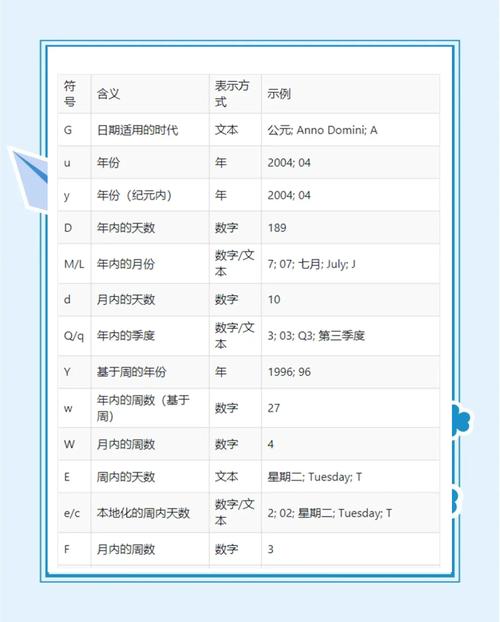
The Modern & Recommended Approach: java.time (Java 8+)
Since Java 8, the java.time package is the standard and best way to handle dates and times. It's immutable, thread-safe, and much easier to use than the old Date and Calendar classes.
The key classes for parsing are:
DateTimeFormatter: The class for parsing and formatting dates and times. You use a pattern to define the format of your input string.LocalDate: Represents a date (year, month, day) without a time.LocalDateTime: Represents a date and time, but without a time zone.ZonedDateTime: Represents a date and time with a time zone.
Parsing a Simple Date (e.g., "2025-10-27")
This is the most common case. You have a string like yyyy-MM-dd and want a LocalDate.
import java.time.LocalDate;
import java.time.format.DateTimeFormatter;
public class SimpleDateParse {
    public static void main(String[] args) {
        String dateString = "2025-10-27";
        // 1. Define the format of the input string
        DateTimeFormatter formatter = DateTimeFormatter.ofPattern("yyyy-MM-dd");
        try {
            // 2. Parse the string into a LocalDate object
            LocalDate localDate = LocalDate.parse(dateString, formatter);
            System.out.println("Original String: " + dateString);
            System.out.println("Parsed LocalDate: " + localDate); // Uses ISO-8601 format by default
            System.out.println("Formatted nicely: " + localDate.format(DateTimeFormatter.ofPattern("MMMM d, yyyy")));
        } catch (Exception e) {
            System.err.println("Failed to parse date: " + e.getMessage());
        }
    }
}
Output:
Original String: 2025-10-27
Parsed LocalDate: 2025-10-27
Formatted nicely: October 27, 2025
Parsing a Date and Time (e.g., "27/10/2025 14:30:00")
Here, you'll parse into a LocalDateTime.
import java.time.LocalDateTime;
import java.time.format.DateTimeFormatter;
public class DateTimeParse {
    public static void main(String[] args) {
        String dateTimeString = "27/10/2025 14:30:00";
        // The pattern must match the input string exactly
        DateTimeFormatter formatter = DateTimeFormatter.ofPattern("dd/MM/yyyy HH:mm:ss");
        try {
            LocalDateTime localDateTime = LocalDateTime.parse(dateTimeString, formatter);
            System.out.println("Original String: " + dateTimeString);
            System.out.println("Parsed LocalDateTime: " + localDateTime);
            // You can also format it back to a different string
            System.out.println("Formatted to US style: " +
                localDateTime.format(DateTimeFormatter.ofPattern("MM-dd-yyyy hh:mm a")));
        } catch (Exception e) {
            System.err.println("Failed to parse date/time: " + e.getMessage());
        }
    }
}
Output:
Original String: 27/10/2025 14:30:00
Parsed LocalDateTime: 2025-10-27T14:30
Formatted to US style: 10-27-2025 02:30 PM
Parsing with a Time Zone (e.g., "2025-10-27T10:00:00Z")
If your date string includes a time zone offset or ID, you should parse it into a ZonedDateTime.
The Z at the end of the string stands for "Zulu time," which is UTC (Coordinated Universal Time).
import java.time.ZonedDateTime;
import java.time.format.DateTimeFormatter;
public class ZonedDateTimeParse {
    public static void main(String[] args) {
        String zonedDateTimeString = "2025-10-27T10:00:00Z[UTC]";
        // The 'X' pattern handles time zone offsets like Z, +08:00, etc.
        // The 'VV' pattern handles time zone IDs like UTC, America/Los_Angeles
        DateTimeFormatter formatter = DateTimeFormatter.ofPattern("yyyy-MM-dd'T'HH:mm:ssVV");
        try {
            ZonedDateTime zonedDateTime = ZonedDateTime.parse(zonedDateTimeString, formatter);
            System.out.println("Original String: " + zonedDateTimeString);
            System.out.println("Parsed ZonedDateTime: " + zonedDateTime);
            // Convert to a different time zone
            System.out.println("In New York time: " + zonedDateTime.withZoneSameInstant(java.time.ZoneId.of("America/New_York")));
        } catch (Exception e) {
            System.err.println("Failed to parse zoned date/time: " + e.getMessage());
        }
    }
}
Output:
Original String: 2025-10-27T10:00:00Z[UTC]
Parsed ZonedDateTime: 2025-10-27T10:00Z[UTC]
In New York time: 2025-10-27T06:00-04:00[America/New_York]
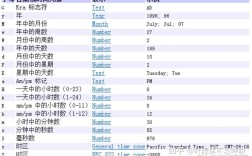
Common DateTimeFormatter Patterns
| Symbol | Meaning | Example |
|---|---|---|
y |
Year | 2025 |
M |
Month in year | 10 (October) |
d |
Day in month | 27 |
H |
Hour in day (0-23) | 14 |
h |
Hour in am/pm (1-12) | 02 |
m |
Minute in hour | 30 |
s |
Second in minute | 00 |
S |
Fraction of second | 123 |
a |
AM/PM marker | PM |
z |
Time zone name | PST, GMT |
Z |
Time zone offset (+0800) | +0800 |
X |
Time zone offset (Z, +08, +08:00) | Z, +08 |
VV |
Time zone ID (America/Los_Angeles) | UTC, America/New_York |
| Escape for text | 'T' in yyyy-MM-dd'T'HH:mm |
Handling Legacy Code: java.text.SimpleDateFormat (Pre-Java 8)
Before Java 8, SimpleDateFormat was the standard. It's not thread-safe, which is a major pitfall. Avoid using it in new code, but you need to know it for maintaining old applications.
import java.text.ParseException;
import java.text.SimpleDateFormat;
import java.util.Date;
public class LegacyDateParse {
    public static void main(String[] args) {
        String dateString = "10/27/23";
        String pattern = "MM/dd/yy";
        // SimpleDateFormat is NOT thread-safe!
        SimpleDateFormat sdf = new SimpleDateFormat(pattern);
        try {
            // The parse() method returns a java.util.Date object
            Date legacyDate = sdf.parse(dateString);
            System.out.println("Original String: " + dateString);
            System.out.println("Parsed java.util.Date: " + legacyDate);
        } catch (ParseException e) {
            System.err.println("Failed to parse date: " + e.getMessage());
        }
    }
}
Key problems with SimpleDateFormat:
- Not Thread-Safe: You cannot share a single instance across multiple threads. Each thread needs its own instance, or you must use synchronization.
- Mutable: Its state can be changed, which can lead to unexpected behavior.
- Confusing API: The
Dateclass itself is poorly designed.
Summary: Which one should I use?
| Scenario | Recommended Class | Why? |
|---|---|---|
| New Application (Java 8+) | java.time |
Modern, immutable, thread-safe, rich API, and the official standard. |
| Maintaining Old Code (Pre-Java 8) | java.text.SimpleDateFormat |
It's what was available. Be very careful of thread-safety issues. |
Converting Legacy Date to java.time |
Date.toInstant() |
The bridge between old and new. Convert a java.util.Date to an Instant, then use atZone() to get a ZonedDateTime. |
Quick Reference Table
| Goal | Modern (java.time) |
Legacy (java.text) |
|---|---|---|
| Parse "yyyy-MM-dd" | LocalDate.parse(str) |
new SimpleDateFormat("yyyy-MM-dd").parse(str) |
| Parse "dd/MM/yyyy HH:mm" | LocalDateTime.parse(str, fmt) |
new SimpleDateFormat("dd/MM/yyyy HH:mm").parse(str) |
| Parse "2025-10-27T10:00Z" | ZonedDateTime.parse(str) |
Not straightforward with SimpleDateFormat |
| Get current date | LocalDate.now() |
new Date() |
| Thread Safety | Safe (immutable) | Unsafe (must be synchronized or re-created) |
| Main Classes | LocalDate, LocalDateTime, ZonedDateTime |
java.util.Date, java.util.Calendar |