Of course! Here is a comprehensive guide on how to work with Modbus CRC (Cyclic Redundancy Check) in Java.
What is Modbus CRC?
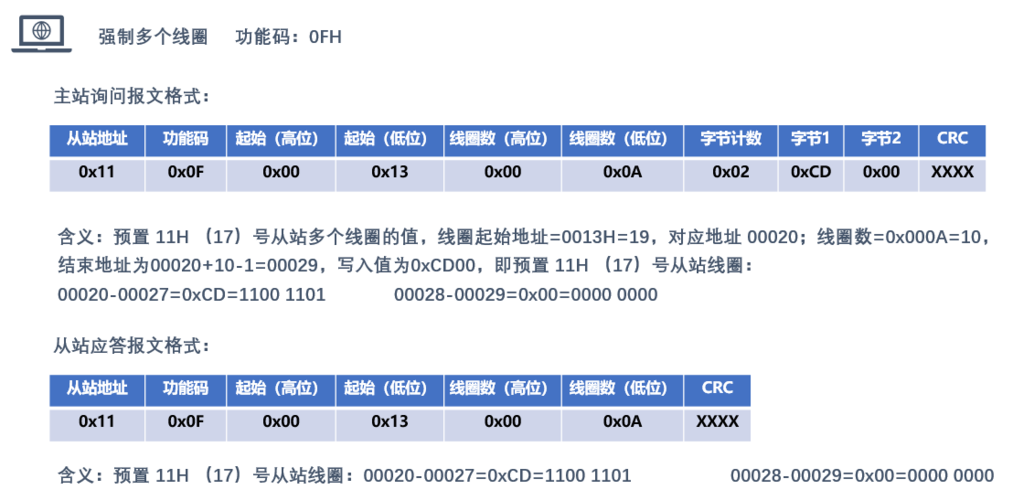
Modbus CRC is an error-detecting code used to ensure the integrity of data transmitted over serial communication lines (like RS-485 or RS-232). It's a 16-bit checksum appended to the end of a Modbus message.
- Purpose: To detect errors (e.g., from electrical noise) that might corrupt the data during transmission.
- Algorithm: It's based on a polynomial division. The standard polynomial used in Modbus is
0xA001(orx¹⁶ + x¹⁵ + x² + 1). - Result: A 16-bit (2-byte) value. If the calculated CRC of a received message matches the CRC appended to the message, the data is considered valid.
The CRC Calculation Algorithm
The core of the Modbus CRC is a function that takes a byte array and returns the 16-bit checksum. The most common and efficient way to implement this is using a pre-calculated lookup table.
How the Lookup Table Works
- Initialization: A 256-byte array (the lookup table) is pre-calculated. Each entry at index
icontains the CRC result for a single byte inputi. - Calculation: To calculate the CRC for a message:
- Start with an initial value (usually
0xFFFF). - For each byte in the message:
- Look up a value from the table using the current byte and the high byte of the running CRC.
- Update the running CRC by XORing it with the value from the table.
- Start with an initial value (usually
Java Implementation
Here are two common ways to implement the CRC calculation in Java: a standard version and a more performant version using a ByteBuffer.
Version 1: Standard Array-Based Implementation
This is the most straightforward and widely used implementation. It's easy to understand and works perfectly for most applications.
public class ModbusCRC {
    // The Modbus CRC polynomial: x^16 + x^15 + x^2 + 1 (0xA001)
    private static final int POLYNOMIAL = 0xA001;
    // Precomputed lookup table for faster CRC calculation
    private static final int[] CRC_TABLE = new int[256];
    // Static initializer to populate the lookup table
    static {
        for (int i = 0; i < 256; i++) {
            int crc = i;
            for (int j = 0; j < 8; j++) {
                if ((crc & 0x0001) != 0) {
                    crc = (crc >>> 1) ^ POLYNOMIAL;
                } else {
                    crc = crc >>> 1;
                }
            }
            CRC_TABLE[i] = crc & 0xFFFF; // Ensure it's a 16-bit value
        }
    }
    /**
     * Calculates the Modbus CRC16 checksum for a given byte array.
     *
     * @param data The byte array to calculate the CRC for.
     * @return The 16-bit CRC checksum as an int.
     */
    public static int calculate(byte[] data) {
        int crc = 0xFFFF; // Initial value
        for (byte b : data) {
            // Get the current byte and XOR it with the high byte of the current CRC
            int tableIndex = (crc ^ b) & 0xFF;
            // Update the CRC by XORing it with the value from the table
            crc = (crc >>> 8) ^ CRC_TABLE[tableIndex];
        }
        return crc & 0xFFFF; // Ensure the result is a 16-bit unsigned int
    }
    /**
     * Calculates the CRC and returns it as a 2-byte little-endian byte array.
     * This is the format typically appended to a Modbus message.
     *
     * @param data The data to check.
     * @return A 2-byte array containing the CRC (Low byte, High byte).
     */
    public static byte[] calculateAsBytes(byte[] data) {
        int crc = calculate(data);
        return new byte[]{
            (byte) (crc & 0xFF), // Low byte
            (byte) ((crc >> 8) & 0xFF) // High byte
        };
    }
    // Main method for demonstration
    public static void main(String[] args) {
        // Example from the Modbus specification
        // Message: 01 04 00 00 00 0A (Read Holding Registers)
        // Expected CRC: D5 CA
        byte[] message = new byte[]{(byte) 0x01, (byte) 0x04, 0x00, 0x00, 0x00, 0x0A};
        int crc = calculate(message);
        System.out.println("Calculated CRC: 0x" + Integer.toHexString(crc).toUpperCase()); // Expected: d5ca
        byte[] crcBytes = calculateAsBytes(message);
        System.out.println("CRC as Bytes: [0x" + Integer.toHexString(crcBytes[0] & 0xFF).toUpperCase() +
                           ", 0x" + Integer.toHexString(crcBytes[1] & 0xFF).toUpperCase() + "]"); // Expected: [0xCA, 0xD5] -> Little Endian
    }
}
Version 2: Using java.nio.ByteBuffer
This version is more modern and can be slightly more efficient, especially when dealing with streams of data. It avoids creating intermediate byte arrays for the CRC result.
import java.nio.ByteBuffer;
import java.nio.ByteOrder;
public class ModbusCRCByteBuffer {
    // Same polynomial and table as before
    private static final int POLYNOMIAL = 0xA001;
    private static final int[] CRC_TABLE = new int[256];
    static {
        for (int i = 0; i < 256; i++) {
            int crc = i;
            for (int j = 0; j < 8; j++) {
                if ((crc & 0x0001) != 0) {
                    crc = (crc >>> 1) ^ POLYNOMIAL;
                } else {
                    crc = crc >>> 1;
                }
            }
            CRC_TABLE[i] = crc & 0xFFFF;
        }
    }
    /**
     * Calculates the Modbus CRC and appends it to a ByteBuffer.
     * The buffer's position is advanced by 2 bytes.
     *
     * @param buffer The ByteBuffer containing the data. Must be in Little-Endian order.
     */
    public static void appendCRC(ByteBuffer buffer) {
        // Save the original position to calculate the CRC only over the data
        int limit = buffer.limit();
        buffer.limit(buffer.position());
        int crc = 0xFFFF;
        while (buffer.hasRemaining()) {
            byte b = buffer.get();
            int tableIndex = (crc ^ b) & 0xFF;
            crc = (crc >>> 8) ^ CRC_TABLE[tableIndex];
        }
        // Restore the limit and append the CRC bytes in little-endian order
        buffer.limit(limit);
        buffer.put((byte) (crc & 0xFF));
        buffer.put((byte) ((crc >> 8) & 0xFF));
    }
    // Main method for demonstration
    public static void main(String[] args) {
        // Create a ByteBuffer in Little-Endian order
        ByteBuffer buffer = ByteBuffer.allocate(8); // 6 data bytes + 2 CRC bytes
        buffer.order(ByteOrder.LITTLE_ENDIAN);
        // Add the message data
        buffer.put((byte) 0x01);
        buffer.put((byte) 0x04);
        buffer.put((byte) 0x00);
        buffer.put((byte) 0x00);
        buffer.put((byte) 0x00);
        buffer.put((byte) 0x0A);
        // Prepare to read the data for CRC calculation
        buffer.flip(); // Flip to read mode
        // Append the CRC
        appendCRC(buffer);
        // Flip back to read mode to see the final message
        buffer.flip();
        // Print the final message
        System.out.println("Final message with CRC:");
        while (buffer.hasRemaining()) {
            System.out.printf("0x%02X ", buffer.get());
        }
        // Expected output: 0x01 0x04 0x00 0x00 0x00 0x0A 0xCA 0xD5
    }
}
Using a Third-Party Library (Recommended)
For production code, it's often better to use a well-tested and maintained library. A popular choice for Modbus in Java is jamod.
Why use a library?
- Reliability: It's been tested extensively.
- Features: Provides full Modbus functionality (TCP, RTU, ASCII), not just CRC.
- Maintained: Actively updated.
How to use jamod for CRC
-
Add the dependency to your
pom.xml(Maven): (图片来源网络,侵删)
<dependency> <groupId>com.ghgande</groupId> <artifactId>j2mod</artifactId> <!-- Check for the latest version on Maven Central --> <version>3.2.2</version> </dependency> -
Use the CRC utility:
import com.ghgande.j2mod.modbus.util.CRC16;
public class JamodCRCExample {
    public static void main(String[] args) {
        // Example message
        byte[] message = new byte[]{(byte) 0x01, (byte) 0x04, 0x00, 0x00, 0x00, 0x0A};
        // Use the CRC16 utility from the jamod library
        int crc = CRC16.calculate(message);
        System.out.println("Calculated CRC with jamod: 0x" + Integer.toHexString(crc).toUpperCase()); // Expected: d5ca
    }
}
Practical Example: Verifying a Received Message
Here's how you would use the ModbusCRC class in a real-world scenario to validate a message that includes its own CRC.
public class ModbusMessageValidator {
    public static boolean validateMessage(byte[] fullMessage) {
        // A valid message must have at least 2 bytes for the CRC itself
        if (fullMessage.length < 2) {
            return false;
        }
        // 1. Separate the data from the appended CRC
        int dataLength = fullMessage.length - 2;
        byte[] data = new byte[dataLength];
        byte[] receivedCrcBytes = new byte[2];
        System.arraycopy(fullMessage, 0, data, 0, dataLength);
        System.arraycopy(fullMessage, dataLength, receivedCrcBytes, 0, 2);
        // 2. Calculate the CRC for the data part
        int calculatedCrc = ModbusCRC.calculate(data);
        // 3. Convert the received CRC bytes into an int (little-endian)
        int receivedCrc = ((receivedCrcBytes[1] & 0xFF) << 8) | (receivedCrcBytes[0] & 0xFF);
        // 4. Compare the calculated CRC with the received CRC
        System.out.println("Received CRC: 0x" + Integer.toHexString(receivedCrc).toUpperCase());
        System.out.println("Calculated CRC: 0x" + Integer.toHexString(calculatedCrc).toUpperCase());
        return calculatedCrc == receivedCrc;
    }
    public static void main(String[] args) {
        // A valid message: [Data] [CRC_Low] [CRC_High]
        // Message: 01 04 00 00 00 0A CA D5
        byte[] validMessage = new byte[]{
            (byte) 0x01, (byte) 0x04, 0x00, 0x00, 0x00, 0x0A,
            (byte) 0xCA, (byte) 0xD5 // CRC in little-endian
        };
        // An invalid message (one bit flipped in the data)
        byte[] invalidMessage = new byte[]{
            (byte) 0x01, (byte) 0x04, 0x00, 0x00, 0x00, 0x0B, // Last data byte changed to 0x0B
            (byte) 0xCA, (byte) 0xD5 // CRC is still for the original message
        };
        System.out.println("--- Validating Valid Message ---");
        boolean isValid = validateMessage(validMessage);
        System.out.println("Is message valid? " + isValid); // Expected: true
        System.out.println("\n--- Validating Invalid Message ---");
        isValid = validateMessage(invalidMessage);
        System.out.println("Is message valid? " + isValid); // Expected: false
    }
}
This example demonstrates the complete cycle: extracting data, calculating the checksum, and comparing it to the one received to ensure data integrity.