
Of course! This is a fantastic topic. Python is one of the most popular languages for competitive programming on Codeforces due to its readability and powerful standard library.
Here’s a comprehensive guide to get you started with Python on Codeforces, from setup to advanced techniques.
Why Python for Codeforces?
- Readability: Python's clean syntax allows you to focus on the algorithm and logic rather than complex language constructs.
- Standard Library: It has a rich standard library (
collections,itertools,math,bisect,heapq, etc.) that provides many data structures and algorithms out-of-the-box. - Fast I/O: For competitive programming, reading input quickly is crucial. Python's default input can be slow, but we can easily optimize it.
- Large Community: You'll find a huge community of Python users on Codeforces, with many editorials, discussions, and shared resources.
Setup: The Codeforces Python Template
Before you start, you need a fast and reliable way to read input. The standard input() function is too slow for large datasets. The standard solution is to use sys.stdin.
Here is the essential Python template you should use for almost every problem on Codeforces.
import sys
def main():
    # --- Fast I/O Setup ---
    input = sys.stdin.readline
    # This makes input() much faster by reading from the standard buffer.
    # Note: It leaves a newline character at the end, which you usually need to strip.
    # --- Reading Input ---
    # Example: Read a single integer
    # t = int(input())
    # Example: Read two integers in one line
    # n, k = map(int, input().split())
    # Example: Read a list of integers
    # arr = list(map(int, input().split()))
    # Example: Read multiple lines
    # n = int(input())
    # for _ in range(n):
    #     data = input().split()
    #     # ... process data ...
    # --- Your Solution Logic Goes Here ---
    # This is just a placeholder. Replace it with your actual code.
    print("Hello, Codeforces!")
if __name__ == "__main__":
    main()
Key parts of the template:
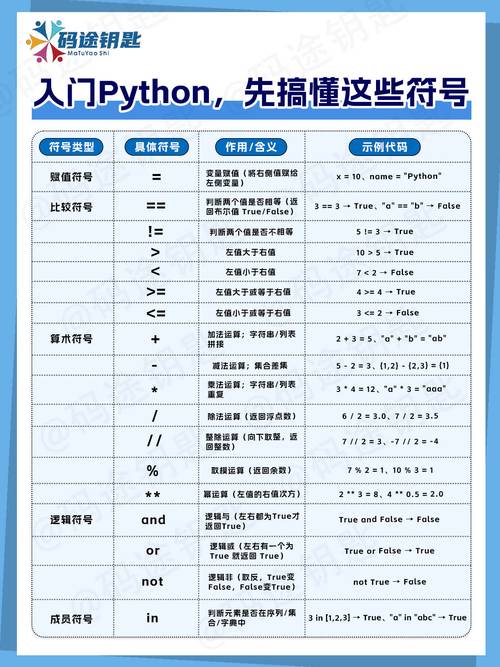
import sys: Imports the system library.input = sys.stdin.readline: This is the magic line. It redefines theinput()function to be much faster. It reads an entire line from the input buffer.input().split(): This is the standard way to get a list of strings from a line of input.map(int, ...): This applies theintfunction to every item in the list returned bysplit(), converting them to integers.if __name__ == "__main__":: This is a standard Python construct. It ensures that themain()function is called only when the script is executed directly (not when imported as a module). It's good practice.
Common Input/Output Patterns
Let's expand on the template with common scenarios.
Problem A: Reading a single integer t (number of test cases)
import sys
def main():
    input = sys.stdin.readline
    t = int(input().strip()) # .strip() is good practice to remove trailing newline
    for _ in range(t):
        # ... solve the problem for one test case ...
        n = int(input().strip())
        print(n * n)
if __name__ == "__main__":
    main()
Problem B: Reading n and k, then a list of n numbers
import sys
def main():
    input = sys.stdin.readline
    n, k = map(int, input().split())
    arr = list(map(int, input().split()))
    # Example: print the sum of the list
    print(sum(arr))
if __name__ == "__main__":
    main()
Problem C: Reading a string and a list of integers on the same line
import sys
def main():
    input = sys.stdin.readline
    data = input().split()
    s = data[0]
    k = int(data[1])
    # Or more concisely:
    # s, k = input().split()
    # k = int(k)
    print(f"The string is '{s}' and the number is {k}")
if __name__ == "__main__":
    main()
Problem D: Reading a grid (matrix)
import sys
def main():
    input = sys.stdin.readline
    n, m = map(int, input().split())
    grid = []
    for _ in range(n):
        row = list(input().strip()) # Use .strip() if there might be spaces/newlines
        grid.append(row)
    # Example: Print the grid
    for row in grid:
        print(''.join(row))
if __name__ == "__main__":
    main()
Essential Python Libraries for CP
You should be very familiar with these. They are your best friends.
| Library | Common Use Cases | Example |
|---|---|---|
collections |
- deque: Fast appends/pops from both ends (for BFS, sliding window).- defaultdict: Dictionary with default values for missing keys.- Counter: Counts hashable objects (perfect for frequency counts). |
from collections import deque, defaultdict, Counterd = defaultdict(int)c = Counter(['a', 'b', 'a']) |
itertools |
- permutations: Generates all permutations of an iterable.- combinations: Generates all combinations of a given length.- product: Cartesian product of input iterables. |
from itertools import permutations, combinationsp = permutations([1, 2, 3]) |
math |
- floor, ceil, sqrt, gcd, factorial, log.- inf: Represents infinity (useful for initialization). |
import mathg = math.gcd(a, b)x = math.inf |
bisect |
- bisect_left, bisect_right: Finds insertion points in a sorted list.- Essential for binary search and maintaining sorted lists. |
import bisectidx = bisect.bisect_left(sorted_list, value) |
heapq |
- heapify: Converts a list into a min-heap in-place.- heappush, heappop: Standard heap operations.- Note: Python only has a min-heap. For a max-heap, store negative values. |
import heapqheapq.heappush(my_heap, item) |
Performance and Pitfalls
Pitfall 1: Slow I/O (The #1 Issue)
Even with sys.stdin.readline, you can still make mistakes.
- Bad:
n = int(input()); print(n) - Good:
n = int(input().strip())orn = int(input())(usually fine, but.strip()is safer if input formatting is weird). - Printing: Using
print()is generally fast enough. For massive output, you can build a string and print it once, but it's rarely necessary.
Pitfall 2: Global Variables vs. Functions
- Global is Faster (but riskier): Accessing variables in the global scope is slightly faster than passing them to functions. For simple problems, you can write everything in the global scope.
- Functions are Safer and Cleaner: For complex problems, using functions to encapsulate logic is highly recommended. It prevents bugs from variable name clashes and makes your code easier to read and debug.
Example: Global vs. Function

# --- Slower but simpler for beginners ---
import sys
input = sys.stdin.readline
n = int(input())
arr = list(map(int, input().split()))
max_val = -10**18
for num in arr:
    if num > max_val:
        max_val = num
print(max_val)
# --- Faster and better practice for larger problems ---
import sys
def solve():
    input = sys.stdin.readline
    n = int(input())
    arr = list(map(int, input().split()))
    max_val = -10**18
    # Logic is contained within the function
    for num in arr:
        if num > max_val:
            max_val = num
    print(max_val)
if __name__ == "__main__":
    solve()
Pitfall 3: Recursion Depth
Python has a recursion limit (usually around 1000). For problems that require deep recursion (like a DFS on a large tree), you will hit this limit and get a RecursionError.
Solution: Increase the recursion limit (use with caution!) or, better yet, rewrite your algorithm to use an iterative approach (e.g., using a stack for DFS).
import sys
sys.setrecursionlimit(300000) # Set it higher, e.g., 300k or 1M
# Or, prefer iterative solutions:
# stack = [start_node]
# while stack:
#     node = stack.pop()
#     # ... process node ...
#     for neighbor in graph[node]:
#         stack.append(neighbor)
A Complete Walkthrough: Problem A from a Contest
Let's solve a simple problem. We'll use Problem 158A - Next Round as an example.
Problem Statement:
"To advance to the next round, a contestant's score must be strictly greater than the score of the participant in k-th place. If there are less than k participants who solved at least one problem, then all of them advance. Otherwise, only the participants whose score is strictly greater than the k-th place score advance."
Input:
The first line contains two integers n and k (1 ≤ k ≤ n ≤ 50). The second line contains n integers representing the scores of the participants.
Output:
The number of participants who advance to the next round.
Python Solution:
import sys
def main():
    # Use the fast I/O setup
    input = sys.stdin.readline
    # Read the first line: n and k
    # map(int, ...) converts the string inputs to integers
    n, k = map(int, input().split())
    # Read the second line: the list of scores
    scores = list(map(int, input().split()))
    # The k-th place score is at index k-1 (since lists are 0-indexed)
    kth_score = scores[k - 1]
    # Count how many participants have a score strictly greater than the kth_score.
    # We also need to count participants who solved at least one problem.
    # The problem states: "If there are less than k participants who solved at least one problem, then all of them advance."
    # This is equivalent to counting all participants with a score > 0 if the kth_score is 0.
    # But a more direct interpretation is to count all scores > kth_score.
    # Let's follow the direct rule: count scores > kth_score.
    # However, there's a nuance. If kth_score is 0, we shouldn't count people with 0.
    # The condition "score must be strictly greater than the score of the participant in k-th place"
    # handles this perfectly.
    count = 0
    for score in scores:
        # The condition is simple: is the score strictly greater than the kth_score?
        if score > kth_score:
            count += 1
        else:
            # Since the list is sorted in non-increasing order, we can break early
            # if we find a score that is not greater. This is an optimization.
            # Note: The problem does not state the list is sorted, but it's common.
            # Let's assume it is not sorted for a robust solution.
            pass # We'll continue to the end to be safe.
    print(count)
if __name__ == "__main__":
    main()
A More Optimized Version (assuming sorted input):
import sys
def main():
    input = sys.stdin.readline
    n, k = map(int, input().split())
    scores = list(map(int, input().split()))
    kth_score = scores[k-1]
    # Since the list is non-increasing, we can find the first index
    # where the score is <= kth_score. The count is that index.
    # We can use a list comprehension and the `sum` function for a concise solution.
    # This is very "Pythonic"
    count = sum(1 for score in scores if score > kth_score)
    print(count)
if __name__ == "__main__":
    main()
Resources and Next Steps
- Codeforces itself: The best resource. Start with the Problemset. Filter by difficulty (e.g., "Difficulty 800-1000") and solve problems in that range. Read the editorials after solving a problem (or if you get stuck) to learn about better approaches.
- Codeforces Python Template: Many experienced users share their templates on GitHub. Search for "codeforces python template" to see how others structure their code.
- Practice Platforms:
- AtCoder: Another great platform with many high-quality problems. Their Beginner Contests are excellent for practice.
- LeetCode: While focused on interviews, the "Algorithms" section has many problems that translate well to competitive programming.
Happy coding, and good luck on Codeforces











