Of course! Here is a comprehensive guide to implementing and using a LinkedList in Java, covering both the built-in java.util.LinkedList class and how to build your own from scratch.
The Built-in java.util.LinkedList
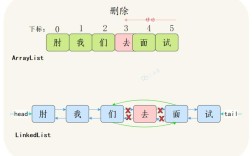
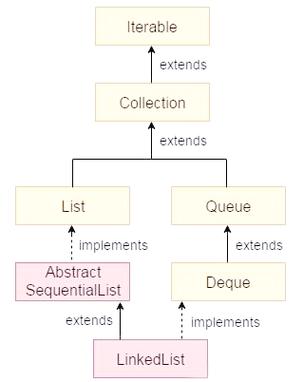
Java provides a built-in LinkedList class in the java.util package. It's important to understand that this is not a linked list in the traditional computer science sense (where LinkedList and ArrayList are two separate implementations). Instead, java.util.LinkedList is a doubly-linked list implementation of the List and Deque interfaces.
This means it can be used as a list (with index-based access) and as a double-ended queue (for fast additions/removals at both ends).
Key Characteristics of java.util.LinkedList
- Structure: Each element (node) stores the data and a reference (or "pointer") to both the
nextandpreviousnode. - Performance:
- Fast for Additions/Removals: Adding or removing elements from the beginning or end of the list is very fast (
O(1)). - Slow for Random Access: Getting an element by its index (e.g.,
list.get(500)) is slow (O(n)), as it has to traverse the list from the start (or end) to find the element. - Memory Overhead: It uses more memory than an
ArrayListbecause each element stores two references (nextandprev) in addition to the data.
- Fast for Additions/Removals: Adding or removing elements from the beginning or end of the list is very fast (
When to Use java.util.LinkedList
- When you need to frequently add or remove elements from both ends of a list (it implements the
Dequeinterface). - When you don't need random access to elements by index.
- When memory is not a primary concern.
Basic Operations with java.util.LinkedList
Here are some common operations with code examples.
import java.util.LinkedList;
public class BuiltInLinkedListExample {
    public static void main(String[] args) {
        // 1. Create a LinkedList of Strings
        LinkedList<String> friends = new LinkedList<>();
        // 2. Add elements to the end of the list (append)
        friends.add("Alice");
        friends.add("Bob");
        friends.add("Charlie");
        System.out.println("Initial list: " + friends); // [Alice, Bob, Charlie]
        // 3. Add an element to the beginning of the list (prepend)
        friends.addFirst("David");
        System.out.println("After addFirst: " + friends); // [David, Alice, Bob, Charlie]
        // 4. Add an element to the end of the list
        friends.addLast("Eve");
        System.out.println("After addLast: " + friends); // [David, Alice, Bob, Charlie, Eve]
        // 5. Add an element at a specific index
        friends.add(2, "Frank");
        System.out.println("After add(2, 'Frank'): " + friends); // [David, Alice, Frank, Bob, Charlie, Eve]
        // 6. Get elements
        System.out.println("First element: " + friends.getFirst()); // David
        System.out.println("Last element: " + friends.getLast());  // Eve
        System.out.println("Element at index 3: " + friends.get(3)); // Bob
        // 7. Remove elements
        friends.removeFirst(); // Removes "David"
        System.out.println("After removeFirst: " + friends); // [Alice, Frank, Bob, Charlie, Eve]
        friends.removeLast(); // Removes "Eve"
        System.out.println("After removeLast: " + friends); // [Alice, Frank, Bob, Charlie]
        friends.remove("Bob"); // Removes the first occurrence of "Bob"
        System.out.println("After remove('Bob'): " + friends); // [Alice, Frank, Charlie]
        // 8. Check if an element exists
        System.out.println("List contains 'Alice'? " + friends.contains("Alice")); // true
        // 9. Get the size of the list
        System.out.println("Size of the list: " + friends.size()); // 3
        // 10. Iterate over the list
        System.out.println("--- Iterating ---");
        for (String friend : friends) {
            System.out.println(friend);
        }
    }
}
Building a Custom Linked List from Scratch
Understanding how to build a linked list is a fundamental programming exercise. It helps you grasp the underlying data structure. We'll create a simple, singly-linked list.
The Building Blocks: Node and MyLinkedList
NodeClass: Each element in a linked list is aNode. It contains the data and a reference to the nextNode.MyLinkedListClass: This class manages the collection ofNodes. It keeps track of thehead(the first node) and thetail(the last node) for efficiency.
Implementation
Here is a complete, well-commented implementation.
// Step 1: Create the Node class
class Node<T> {
    T data;      // The data stored in the node
    Node<T> next; // Reference to the next node in the list
    // Constructor to create a new node
    public Node(T data) {
        this.data = data;
        this.next = null; // By default, the next node is null
    }
}
// Step 2: Create the MyLinkedList class
public class MyLinkedList<T> {
    private Node<T> head; // The first node in the list
    private Node<T> tail; // The last node in the list
    private int size;     // The number of elements in the list
    // Constructor for an empty list
    public MyLinkedList() {
        this.head = null;
        this.tail = null;
        this.size = 0;
    }
    // --- Basic Operations ---
    // Add a node to the end of the list
    public void add(T data) {
        Node<T> newNode = new Node<>(data);
        if (head == null) {
            // If the list is empty, the new node is both head and tail
            head = newNode;
            tail = newNode;
        } else {
            // Otherwise, add the new node after the current tail
            tail.next = newNode;
            tail = newNode; // Update the tail to be the new node
        }
        size++;
    }
    // Add a node to the beginning of the list
    public void addFirst(T data) {
        Node<T> newNode = new Node<>(data);
        if (head == null) {
            head = newNode;
            tail = newNode;
        } else {
            newNode.next = head; // New node's next points to the old head
            head = newNode;      // Head is now the new node
        }
        size++;
    }
    // Remove the first node from the list
    public T removeFirst() {
        if (head == null) {
            throw new IndexOutOfBoundsException("List is empty");
        }
        Node<T> removedNode = head;
        head = head.next; // Move the head to the next node
        if (head == null) {
            // If the list is now empty, the tail should also be null
            tail = null;
        }
        size--;
        return removedNode.data;
    }
    // Get the size of the list
    public int size() {
        return size;
    }
    // Check if the list is empty
    public boolean isEmpty() {
        return size == 0;
    }
    // --- Utility Methods ---
    @Override
    public String toString() {
        StringBuilder sb = new StringBuilder();
        sb.append("[");
        Node<T> current = head;
        while (current != null) {
            sb.append(current.data);
            if (current.next != null) {
                sb.append(" -> ");
            }
            current = current.next;
        }
        sb.append("]");
        return sb.toString();
    }
    // --- Main method to test our custom linked list ---
    public static void main(String[] args) {
        MyLinkedList<String> list = new MyLinkedList<>();
        System.out.println("Initial list: " + list);
        System.out.println("Is list empty? " + list.isEmpty());
        list.add("Apple");
        list.add("Banana");
        list.add("Cherry");
        System.out.println("After adding fruits: " + list);
        System.out.println("Size: " + list.size());
        list.addFirst("Date");
        System.out.println("After adding 'Date' to the front: " + list);
        String removedFruit = list.removeFirst();
        System.out.println("Removed first element: " + removedFruit);
        System.out.println("List after removal: " + list);
        System.out.println("Size: " + list.size());
        list.add("Elderberry");
        System.out.println("Final list: " + list);
    }
}
Output of the Custom MyLinkedList
Initial list: []
Is list empty? true
After adding fruits: [Apple -> Banana -> Cherry]
Size: 3
After adding 'Date' to the front: [Date -> Apple -> Banana -> Cherry]
Removed first element: Date
List after removal: [Apple -> Banana -> Cherry]
Size: 2
Final list: [Apple -> Banana -> Cherry -> Elderberry]
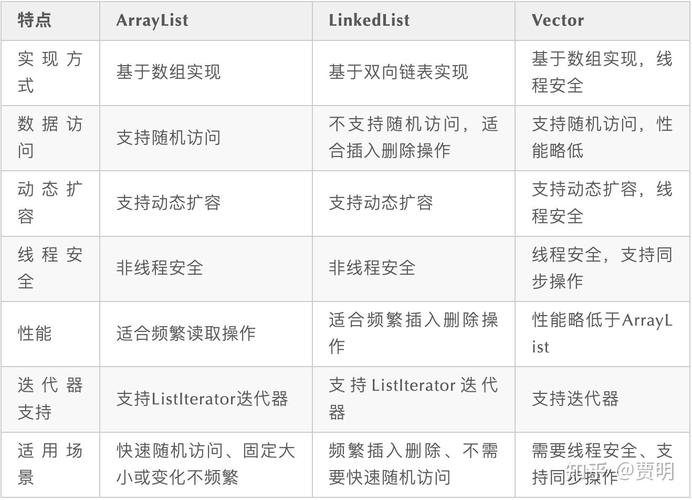
LinkedList vs. ArrayList: Quick Comparison
| Feature | java.util.LinkedList |
ArrayList |
|---|---|---|
| Internal Structure | Doubly-linked list of nodes. | Dynamic array. |
| Memory Usage | Higher. Each element stores data, next, and prev pointers. |
Lower. Stores elements in a contiguous block of memory. |
| Add/Remove at End | Very Fast (O(1)). |
Fast (O(1) amortized). |
| Add/Remove at Start | Fast (O(1)). |
Slow (O(n)), as all elements must be shifted. |
Random Access (get(i)) |
Slow (O(n)), must traverse the list. |
Very Fast (O(1)), direct array index access. |
| Iteration | Slower due to pointer chasing. | Faster due to contiguous memory. |
| Best For | Frequent add/remove operations at both ends. | Frequent random access and fewer add/remove operations. |
Summary
- Use the built-in
java.util.LinkedListwhen you need a list that is frequently modified at the beginning or end, or when you need to use it as a queue (Deque). - For most general-purpose list needs where you need fast access by index,
ArrayListis a better choice. - Building a custom linked list is a great way to learn about data structures and pointers/references. It forces you to understand how nodes link together and how to manage the
headandtailof the list.