Of course! Let's break down Java's if, if-else, and if-else-if statements. These are fundamental control flow structures that allow your program to make decisions.
The if Statement
The if statement is the simplest form of conditional logic. It executes a block of code only if a specified condition evaluates to true.
Syntax
if (condition) {
    // Code to execute if the condition is true
}
How it Works
- The
conditionis a boolean expression (an expression that results in eithertrueorfalse). - If the condition is
true, the code inside the curly braces is executed. - If the condition is
false, the code block is skipped entirely, and the program continues to the next line after theifstatement.
Example
public class IfExample {
    public static void main(String[] args) {
        int age = 20;
        System.out.println("Checking age...");
        // This condition is true, so the code inside the if block will run.
        if (age >= 18) {
            System.out.println("You are an adult.");
        }
        System.out.println("This line will always be printed.");
    }
}
Output:
Checking age...
You are an adult.
This line will always be printed.
The if-else Statement
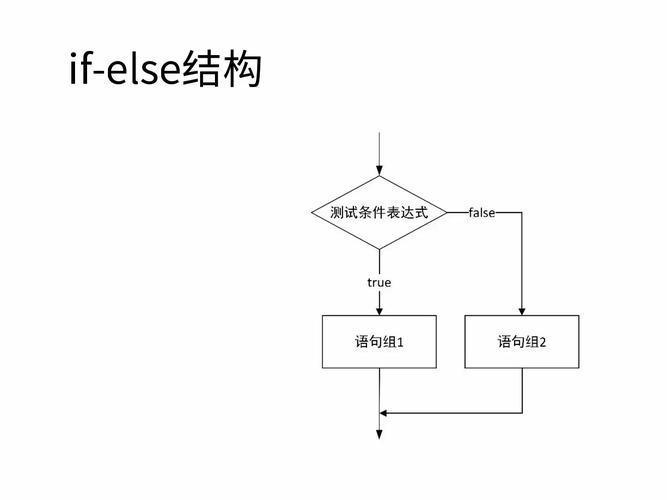
The if-else statement provides an alternative path. It executes one block of code if the condition is true, and a different block of code if the condition is false.
Syntax
if (condition) {
    // Code to execute if the condition is true
} else {
    // Code to execute if the condition is false
}
How it Works
- The
conditionis evaluated. - If it's
true, the first block of code (afterif) is executed, and theelseblock is skipped. - If it's
false, the first block is skipped, and the code inside theelseblock is executed. - Only one of the two blocks will ever be executed.
Example
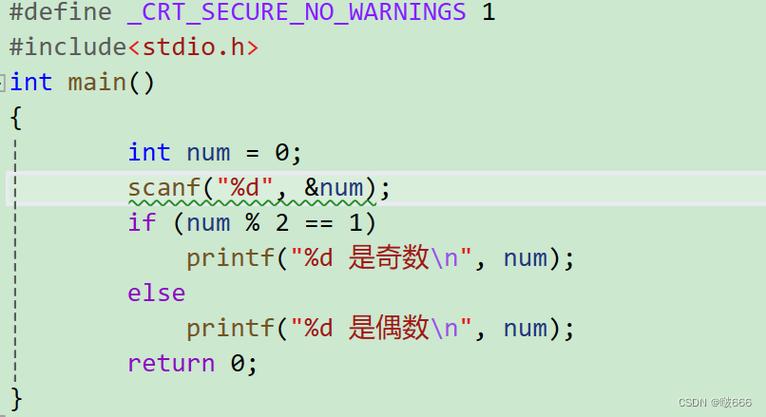
public class IfElseExample {
    public static void main(String[] args) {
        int score = 85;
        System.out.println("Checking score...");
        if (score >= 60) {
            System.out.println("You passed the exam!");
        } else {
            System.out.println("You failed the exam.");
        }
        System.out.println("Checking complete.");
    }
}
Output:
Checking score...
You passed the exam!
Checking complete.
The if-else-if Ladder
When you have multiple conditions to check in sequence, you can chain if-else statements together. This is often called an if-else-if ladder. It allows you to check a series of conditions until one of them evaluates to true.
Syntax
if (condition1) {
    // Code to execute if condition1 is true
} else if (condition2) {
    // Code to execute if condition1 is false and condition2 is true
} else if (condition3) {
    // Code to execute if condition1 and condition2 are false and condition3 is true
} else {
    // Code to execute if all previous conditions are false
}
How it Works
- The program evaluates the
condition1. - If
condition1istrue, its code block is executed, and the rest of the ladder is ignored. - If
condition1isfalse, it moves on to evaluatecondition2. - This continues down the ladder until a condition is met.
- If none of the
iforelse ifconditions are true, the finalelseblock (if it exists) is executed as a "catch-all".
Example
public class ElseIfExample {
    public static void main(String[] args) {
        int grade = 75;
        System.out.println("Determining the grade...");
        if (grade >= 90) {
            System.out.println("Grade: A");
        } else if (grade >= 80) {
            System.out.println("Grade: B");
        } else if (grade >= 70) {
            System.out.println("Grade: C");
        } else if (grade >= 60) {
            System.out.println("Grade: D");
        } else {
            System.out.println("Grade: F");
        }
    }
}
Output:
Determining the grade...
Grade: C
Note: The order of conditions is important. If we had grade >= 70 before grade >= 80, the logic would be wrong.
Key Concepts and Best Practices
-
Boolean Expression: The condition inside the parentheses must evaluate to a boolean (
trueorfalse). You cannot use an integer or a string directly. (图片来源网络,侵删)
- Correct:
if (age > 18) - Incorrect:
if (age)(This will cause a compile-time error).
- Correct:
-
Code Blocks are Crucial: If your
iforelseblock contains more than one statement, you must enclose them in curly braces . Omitting them is a common mistake for beginners.- Correct:
if (temperature > 30) { System.out.println("It's hot."); System.out.println("Drink water."); } - Incorrect (and a common bug):
// Only the first line is part of the if statement!
if (temperature > 30)
    System.out.println("It's hot.");
    System.out.println("Drink water."); // This will ALWAYS run.
- Correct:
-
The
elseBlock is Optional: You can have anifstatement without anelse. You can also have anif-elsechain without a finalelse. -
Indentation: While not required by the Java compiler, proper indentation is essential for readability. It makes it easy to see which code belongs to which
iforelseblock.
Summary Table
| Statement Type | Purpose | When to Use |
|---|---|---|
if |
Execute code only if a condition is true. |
You have a single condition and a single action to take if it's met. No alternative action is needed. |
if-else |
Execute one block of code if a condition is true, and a different block if it's false. |
You have exactly two possible outcomes and need to perform a different action for each. |
if-else-if |
Check a series of conditions in order and execute the block for the first true condition. |
You have three or more mutually exclusive conditions and need to perform a specific action for the first one that is met. |