String.matches()
String.matches() 是 Java 中一个最常用的正则表达式方法,它的作用是判断整个字符串是否完全匹配给定的正则表达式。
(图片来源网络,侵删)
方法签名
public boolean matches(String regex)
- 参数
regex: 一个正则表达式的字符串。 - 返回值: 如果整个字符串完全匹配
regex模式,则返回true;否则返回false。
关键点:整个字符串
这是 matches() 方法最重要的特性,它不会在字符串的中间寻找匹配项,而是要求从字符串的开头到结尾,都必须完全符合正则表达式的规则。
这相当于在正则表达式两端自动添加了 ^ (开始) 和 (结束) 锚点。
str.matches(regex)等价于str.matches("^" + regex + "$")
代码示例
让我们通过一系列例子来理解它的行为。
示例 1:简单的完全匹配
public class RegexMatchesExample {
    public static void main(String[] args) {
        String str1 = "hello";
        String str2 = "hello world";
        String regex = "hello";
        // str1 完全是 "hello",所以匹配成功
        System.out.println(str1.matches(regex)); // 输出: true
        // str2 是 "hello world",比 "hello" 长,所以不匹配
        System.out.println(str2.matches(regex)); // 输出: false
    }
}
示例 2:使用 ^ 和 的显式对比
public class RegexAnchorsExample {
    public static void main(String[] args) {
        String str = "hello world";
        // 注意:这里没有 ^ 和 $
        String regex1 = "hello";
        // 显式地使用 ^ 和 $ 来匹配整个字符串
        String regex2 = "^hello$";
        // regex1 只会查找子串 "hello",而 matches() 要求整个字符串匹配,所以失败
        System.out.println(str.matches(regex1)); // 输出: false
        // regex2 明确要求字符串必须从 "hello" 开始,到 "hello" 结束,所以失败
        System.out.println(str.matches(regex2)); // 输出: false
        // 一个能匹配整个字符串的例子
        String str3 = "hello";
        System.out.println(str3.matches(regex2)); // 输出: true
    }
}
示例 3:使用字符类和量词
public class RegexAdvancedExample {
    public static void main(String[] args) {
        // 示例:匹配一个由3个数字组成的字符串
        String str1 = "123";
        String str2 = "12a";
        String str3 = "1234";
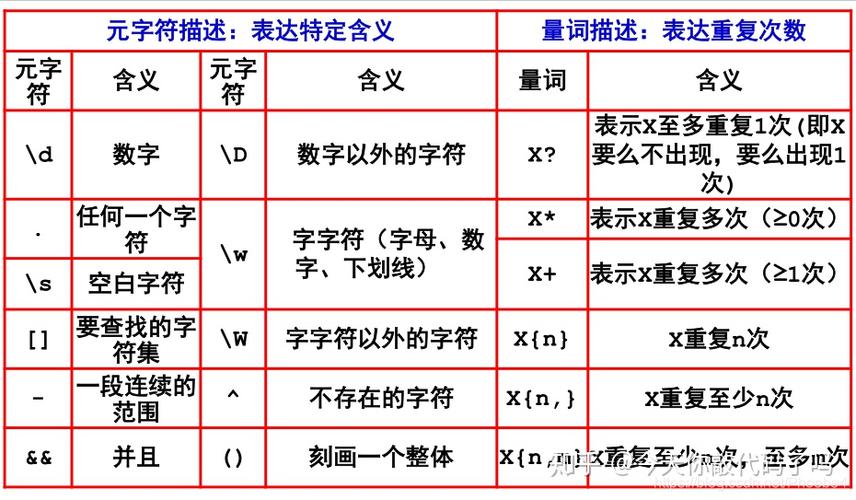
        String regex = "\\d{3}"; // \d 表示数字,{3} 表示恰好3个
        System.out.println(str1.matches(regex)); // 输出: true
        System.out.println(str2.matches(regex)); // 输出: false (因为 'a' 不是数字)
        System.out.println(str3.matches(regex)); // 输出: false (因为长度超过了3)
        System.out.println("--------------------");
        // 示例:匹配一个有效的邮箱地址(简化版)
        // 格式:字母开头,包含字母、数字、下划线或点,然后是 @ 符号,最后是域名
        String email1 = "test.user@example.com";
        String email2 = "test-user@sub.domain.co";
        String email3 = "invalid.email@";
        String email4 = "@domain.com";
        String emailRegex = "^[a-zA-Z][a-zA-Z0-9._]*@[a-zA-Z0-9.-]+\\.[a-zA-Z]{2,}$";
        System.out.println(email1.matches(emailRegex)); // 输出: true
        System.out.println(email2.matches(emailRegex)); // 输出: true
        System.out.println(email3.matches(emailRegex)); // 输出: false
        System.out.println(email4.matches(emailRegex)); // 输出: false
    }
}
注意:在 Java 字符串中,反斜杠 \ 是一个转义字符,要表示正则表达式中的 \d,你需要在 Java 字符串中写成 \\d。
(图片来源网络,侵删)
matches() vs. 其他正则方法
理解 matches() 与其他正则方法的区别非常重要,以避免误用。
| 方法 | 描述 | 示例 (str = "abc123") |
|---|---|---|
String.matches(regex) |
整个字符串必须匹配 regex。 |
"abc123".matches("\\d+") -> false |
String.replaceAll(regex, replacement) |
替换所有匹配 regex 的子串。 |
"abc123".replaceAll("\\d", "X") -> "abcXXX" |
String.replaceFirst(regex, replacement) |
替换第一个匹配 regex 的子串。 |
"abc123".replaceFirst("\\d", "X") -> "abcX23" |
String.split(regex) |
在所有匹配 regex 的位置分割字符串。 |
"a,b,c".split(",") -> ["a", "b", "c"] |
Pattern.matches(regex, input) |
String.matches() 的静态方法,功能完全相同。 |
Pattern.matches("\\d+", "123") -> true |
一个常见的错误
假设你想检查一个字符串是否包含至少一个数字,你可能会错误地使用 matches()。
// 错误的用法
String text = "hello";
String regex = "\\d"; // 匹配一个数字
// 这个判断会返回 false,因为 "hello" 整个字符串不等于一个数字。
// 但你真正想问的是 "hello" 里面有没有数字。
boolean hasNumber = text.matches(regex); // 返回 false
如果你想要检查字符串是否包含某个模式,应该使用 find() 方法(通过 Pattern 和 Matcher 类)。
import java.util.regex.Pattern;
import java.util.regex.Matcher;
// 正确的用法:检查是否包含至少一个数字
String text = "hello123";
String regex = "\\d";
Pattern pattern = Pattern.compile(regex);
Matcher matcher = pattern.matcher(text);
// find() 方法会尝试在字符串中查找与模式匹配的子串
boolean containsNumber = matcher.find(); // 返回 true
System.out.println(containsNumber); // 输出: true
| 特性 | 描述 |
|---|---|
| 用途 | 用于验证整个字符串的格式是否符合预期,验证手机号、邮箱、邮政编码等。 |
| 行为 | 严格匹配,要求字符串从头到尾完全符合正则表达式。 |
| 等价于 | 在正则表达式两端自动添加了 ^ (开始) 和 (结束) 锚点。 |
| 语法 | boolean result = myString.matches("正则表达式"); |
| 转义字符 | 在 Java 字符串中,正则表达式的反斜杠需要双写,\d 写成 \\d。 |
| 常见误区 | 不要用它来检查字符串是否包含某个子模式,应该使用 Pattern.matcher().find()。 |
matches() 的核心是“完全匹配”,你就不会在验证输入格式时用错它了。