Of course! Let's break down the final keyword when used with Java Strings. This is a fundamental concept that often confuses new developers.
Here’s a comprehensive guide covering the key points:
- The Core Meaning of
final final Stringvs. ImmutableString(The Crucial Distinction)- Why Use
finalfor Strings? (Best Practices) - Code Examples
finalwithstaticandString
The Core Meaning of final
When you apply the final keyword to a variable in Java, it means the reference held by that variable cannot be changed to point to a different object after it has been assigned.
Think of it like this:
- A variable is a label on a box.
- An object is the item inside the box.
finalmeans you can't re-label the box to point to a different item.
Crucially, final does NOT mean the contents of the box are immutable. If the item inside the box is a container (like an array or a list), you can still change what's inside that container.
final String vs. Immutable String (The Crucial Distinction)
This is the most important concept to understand.
String is Immutable by Design
First, you need to know that all String objects in Java are immutable. This is a core feature of the String class itself, not because of the final keyword.
- Immutability means that once a
Stringobject is created, its sequence of characters cannot be changed. - Any operation that seems to modify a
String(liketoUpperCase(),replace(), or concatenation with ) actually creates a newStringobject with the modified content. The originalStringremains unchanged.
String s1 = "hello";
String s2 = s1.toUpperCase(); // s1 is still "hello". A new object "HELLO" is created and assigned to s2.
System.out.println(s1); // Output: hello
How final Interacts with Immutability
Now, let's bring final into the picture.
final String myString = "text";- The
finalkeyword prevents themyStringvariable from being reassigned to point to a differentStringobject. - Because
Stringis already immutable, you can't change the content of the object it points to anyway.
- The
So, for Strings, final adds an extra layer of compile-time safety against reassignment, but it doesn't make the String "more immutable" than it already is.
Example: final String
final String myName = "Alice";
// This line will COMPILE ERROR!
// myName = "Bob"; // Cannot assign a value to final variable myName
// This is perfectly fine, but it creates a NEW String.
// The original "Alice" is untouched.
myName = myName + " Smith"; // This line will also cause a COMPILE ERROR.
// Wait, let's correct that. The `final` keyword prevents the reassignment.
// So, you can't do `myName = ...`. The operation itself is forbidden.
Let's rephrase the correct example:
final String greeting = "Hello";
// The following line is forbidden by the compiler:
// greeting = greeting + " World!"; // COMPILE ERROR: Cannot assign a value to final variable 'greeting'
// You can, however, call methods that don't change the reference:
String upperGreeting = greeting.toUpperCase(); // Creates a new "HELLO", greeting is still "Hello"
System.out.println(greeting); // Output: Hello
Why Use final for Strings? (Best Practices)
Even though String is already immutable, using final is highly recommended for several reasons:
-
Thread Safety: Immutability is the cornerstone of thread-safe objects. Since a
final Stringreference cannot be changed to point to a new object, and the object itself cannot be modified, it is inherently safe to share across multiple threads without synchronization. -
Security: Sensitive data like passwords, API keys, or tokens are often stored in
final Strings. This prevents an attacker (or a buggy part of your code) from accidentally or maliciously reassigning the variable to point to a different, insecure string. -
Optimization (Compile-Time Constants): If a
final Stringis alsostaticand initialized with a compile-time constant expression, the Java compiler performs a powerful optimization called "constant folding". It replaces the variable's usage throughout the code with the actual string literal. This can save memory (as there's only one copy) and can even slightly improve performance.// This is a compile-time constant public static final String CONFIG_PATH = "/app/config/settings.xml"; // In the code, every usage of CONFIG_PATH might be replaced // by the literal "/app/config/settings.xml" by the compiler.
-
Readability and Intent: Using
finalsignals to other developers (and to your future self) that this variable is not intended to be reassigned. It makes the code's intent clearer and acts as self-documentation. It also helps the compiler catch accidental reassignments.
Code Examples
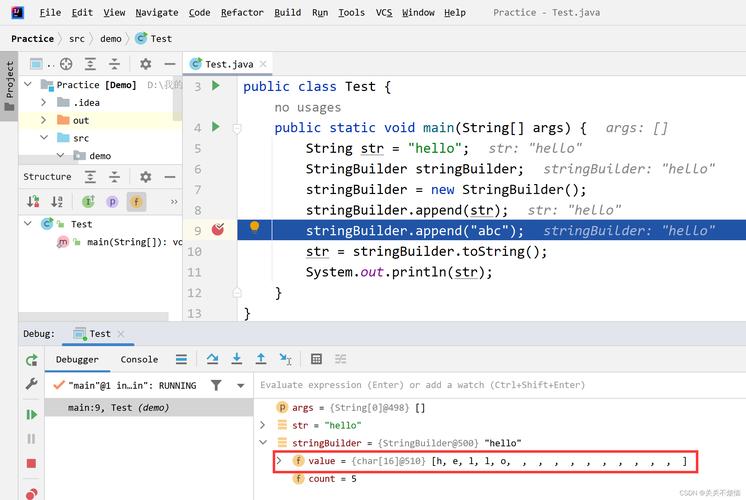
Let's see final in action with a non-String object to really drive home the difference.
public class FinalExample {
    public static void main(String[] args) {
        // Example 1: final String (reassignment is forbidden)
        final String finalString = "I am final";
        // finalString = "I try to change, but I can't!"; // COMPILE ERROR
        // Example 2: final with a mutable object (e.g., StringBuilder)
        // The 'final' applies only to the reference, NOT the object's state.
        final StringBuilder sb = new StringBuilder("Hello");
        // This is ALLOWED because we are not changing the 'sb' reference.
        // We are changing the state of the object it points to.
        sb.append(" World!");
        System.out.println(sb.toString()); // Output: Hello World!
        // This line is FORBIDDEN, just like with a String.
        // sb = new StringBuilder("Goodbye"); // COMPILE ERROR: Cannot assign a value to final variable sb
    }
}
final with static and String
Combining final, static, and String is a very common and powerful pattern.
static: The variable belongs to the class, not to any specific instance of the class. There is only one copy shared across all objects.final: The variable's reference cannot be changed.
Together, they create a compile-time constant. These are typically named in ALL_CAPS with underscores.
public class AppConfig {
    // This is a class-level, immutable, compile-time constant.
    public static final String DATABASE_URL = "jdbc:mysql://localhost:3306/mydb";
    // This is also a constant, but its value is determined at runtime.
    // It's still immutable and thread-safe, but the compiler can't fold it.
    public static final String SERVER_HOST;
    static {
        // Could be read from a config file, etc.
        SERVER_HOST = "production.server.com";
    }
    public void connect() {
        // Using the constant
        System.out.println("Connecting to: " + DATABASE_URL);
    }
}
// In another class:
String url = AppConfig.DATABASE_URL; // Standard way to access a static constant
Summary Table
| Keyword | Meaning for a Variable | Example (final String name) |
Key Takeaway |
|---|---|---|---|
final |
The reference cannot be reassigned. | name = "Bob"; is a compile-time error. |
Prevents the variable from pointing to a new object. |
String |
The object is immutable by design. | name.toUpperCase(); creates a new string. |
The content of the String object can never be changed. |
static final |
A class-level constant. | public static final String PI = "3.14"; |
One immutable value for the entire class. Compiler can optimize this. |