Of course! In Java, when you talk about a "Vector of int," you're essentially asking for a dynamic array that can grow and shrink to hold integer values.
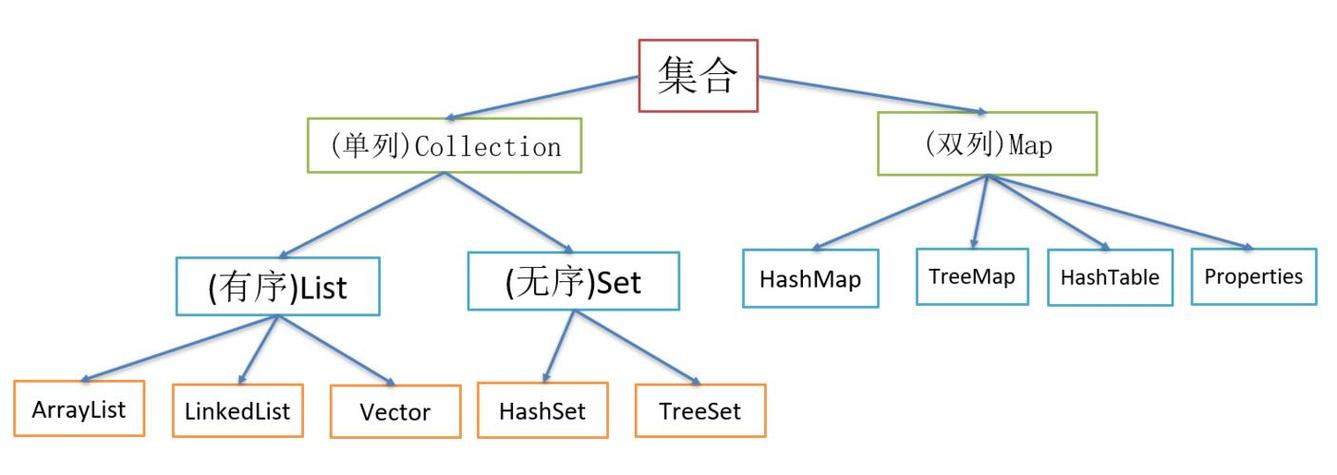
There are two primary ways to achieve this in modern Java:
Vector<int>(The direct, but incorrect way)Vector<Integer>(The correct, legacy way)ArrayList<Integer>(The modern, recommended way)
Let's break down each one.
The Direct (but Incorrect) Approach: Vector<int>
If you try to write Vector<int>, your code will not compile.
// THIS WILL CAUSE A COMPILATION ERROR
Vector<int> numbers = new Vector<>();
Why?
Java is a strongly-typed language. The generic type parameter (the thing in the angle brackets < >) must be a reference type (a class), not a primitive type (like int, double, char, etc.).
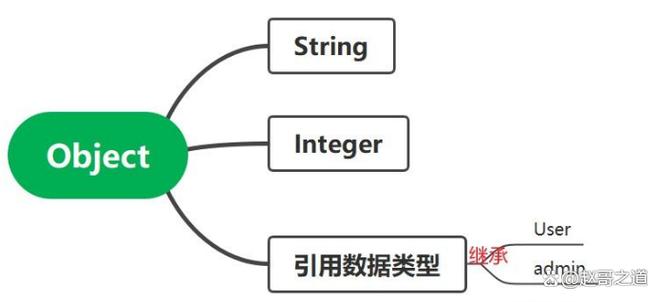
int is a primitive type. It stores the actual value (e.g., 10).
The Correct Legacy Approach: Vector<Integer>
To store integers, you must use the wrapper class for the primitive type. The wrapper class for int is Integer.
Integer is a reference type that wraps an int value inside an object.
Key Characteristics of Vector
Vector is an old class from Java 1.0. It is thread-safe, meaning it's safe to use in multi-threaded environments. However, this thread-safety comes with a performance cost because many of its methods are synchronized.
How to Use Vector<Integer>
import java.util.Vector;
import java.util.Iterator;
public class VectorIntegerExample {
    public static void main(String[] args) {
        // 1. Create a Vector of Integer objects
        Vector<Integer> numbers = new Vector<>();
        // 2. Add elements (autoboxing converts int to Integer automatically)
        numbers.add(10);
        numbers.add(20);
        numbers.add(30);
        System.out.println("Vector after adding elements: " + numbers);
        // 3. Add an element at a specific index
        numbers.add(1, 15); // Insert 15 at index 1
        System.out.println("Vector after inserting at index 1: " + numbers);
        // 4. Get an element by its index
        int firstElement = numbers.get(0); // Unboxing converts Integer to int automatically
        System.out.println("Element at index 0: " + firstElement);
        // 5. Set (replace) an element at a specific index
        numbers.set(2, 25);
        System.out.println("Vector after setting element at index 2: " + numbers);
        // 6. Check if the vector contains a value
        boolean hasTwenty = numbers.contains(20);
        System.out.println("Does the vector contain 20? " + hasTwenty);
        // 7. Get the size of the vector
        System.out.println("Size of the vector: " + numbers.size());
        // 8. Remove an element by its value
        numbers.remove(Integer.valueOf(20)); // Use Integer.valueOf() to remove the value, not the index
        System.out.println("Vector after removing 20: " + numbers);
        // 9. Remove an element by its index
        numbers.remove(0);
        System.out.println("Vector after removing element at index 0: " + numbers);
        // 10. Iterate using an enhanced for-loop
        System.out.println("Iterating with enhanced for-loop:");
        for (Integer number : numbers) {
            System.out.print(number + " ");
        }
        System.out.println();
        // 11. Iterate using an Iterator
        System.out.println("Iterating with Iterator:");
        Iterator<Integer> iterator = numbers.iterator();
        while (iterator.hasNext()) {
            Integer number = iterator.next();
            System.out.print(number + " ");
        }
        System.out.println();
        // 12. Clear the vector
        numbers.clear();
        System.out.println("Vector after clearing: " + numbers);
        System.out.println("Is the vector empty? " + numbers.isEmpty());
    }
}
The Modern Recommended Approach: ArrayList<Integer>
For almost all new Java code, you should use ArrayList instead of Vector. It has the same functionality as Vector but is not thread-safe. This lack of synchronization makes it significantly faster in single-threaded applications, which is the most common use case.
The syntax is identical to Vector, just replace Vector with ArrayList.
How to Use ArrayList<Integer>
import java.util.ArrayList;
public class ArrayListIntegerExample {
    public static void main(String[] args) {
        // 1. Create an ArrayList of Integer objects
        ArrayList<Integer> numbers = new ArrayList<>();
        // 2. Add elements
        numbers.add(100);
        numbers.add(200);
        numbers.add(300);
        System.out.println("ArrayList after adding elements: " + numbers);
        // 3. Add an element at a specific index
        numbers.add(1, 150);
        System.out.println("ArrayList after inserting at index 1: " + numbers);
        // 4. Get an element by its index
        int firstElement = numbers.get(0);
        System.out.println("Element at index 0: " + firstElement);
        // 5. Remove an element by its value
        numbers.remove(Integer.valueOf(200));
        System.out.println("ArrayList after removing 200: " + numbers);
        // ... all other methods are the same as Vector
    }
}
Summary: Vector<Integer> vs. ArrayList<Integer>
| Feature | Vector<Integer> |
ArrayList<Integer> |
Recommendation |
|---|---|---|---|
| Origin | Java 1.0 (Legacy) | Java 1.2 (Modern) | Use ArrayList |
| Thread Safety | Yes (synchronized methods) | No (not synchronized) | Use Vector only if you need thread safety in a shared collection. For most cases, manage concurrency at a higher level. |
| Performance | Slower due to synchronization overhead. | Faster (no synchronization cost). | Use ArrayList for better performance. |
| API | Some legacy methods (e.g., addElement, elementAt). |
Cleaner, more modern API. | ArrayList API is generally preferred. |
| Capacity Growth | Can specify an initial capacity and a capacity increment. | Only specifies an initial capacity. | ArrayList's growth strategy is simpler and usually sufficient. |
When to Use Vector?
You should almost always prefer ArrayList. The only time you might consider Vector is if you are:
- Maintaining old legacy code that already uses it.
- Working in a multi-threaded environment where you need a simple, drop-in thread-safe collection and are not concerned with the performance penalty.
For any new project, use ArrayList<Integer>.