Of course! Let's break down the relationship between Integer and char in Java. This is a fundamental concept that involves both primitive types and their wrapper classes.
The Two Key Players
First, it's crucial to understand the difference between the primitive types and their wrapper classes.
| Primitive Type | Wrapper Class | Size | Purpose |
|---|---|---|---|
char |
Character |
16 bits (2 bytes) | Represents a single character (e.g., 'a', '7', '@'). |
int |
Integer |
32 bits (4 bytes) | Represents a whole number (e.g., -123, 0, 42). |
The Core Concept: char is a Numeric Type
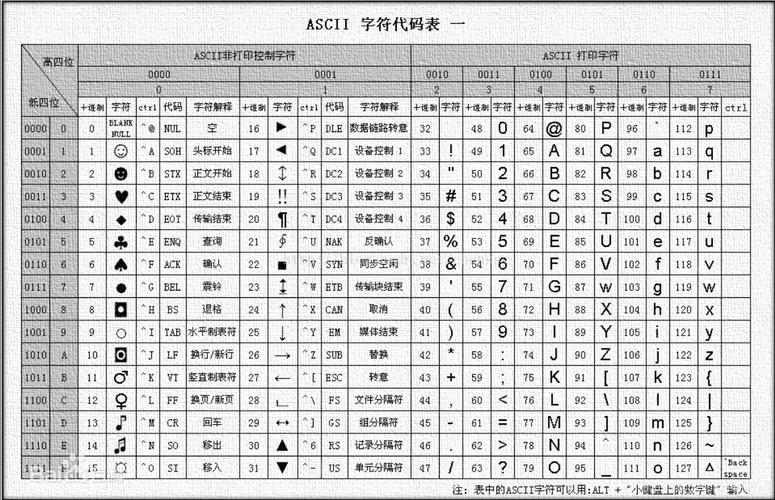
This is the most important thing to remember about char: it is not just a character; it is a 16-bit unsigned numeric value that represents a character using the Unicode standard.
Every character you see (like 'A', 'B', 'あ', '€') has a corresponding numeric Unicode code point.
'A'has a Unicode value of65.'B'has a Unicode value of66.'a'has a Unicode value of97.'0'has a Unicode value of48.
Because char is fundamentally a number, you can perform arithmetic operations on it, just like with int.
public class CharExample {
    public static void main(String[] args) {
        char myChar = 'A';
        System.out.println("The char is: " + myChar);
        System.out.println("The numeric value of 'A' is: " + (int) myChar); // Cast to int to see the number
        // Arithmetic with char
        char nextChar = (char) (myChar + 1); // 'A' + 1 = 66, which is 'B'
        System.out.println("The next character is: " + nextChar);
    }
}
Output:
The char is: A
The numeric value of 'A' is: 65
The next character is: B
Converting Between char and int
This numeric nature makes conversion straightforward.
From char to int
You can convert a char to its int value (the Unicode code point) in two ways:
- Widening Primitive Conversion (Implicit): Since
int(32 bits) is larger thanchar(16 bits), Java can automatically convert acharto anint. - Casting (Explicit): You can use
(int)to make the conversion explicit, which is good practice for clarity.
char c = 'Z';
int codePoint = c; // Implicit widening
int codePoint2 = (int) c; // Explicit casting
System.out.println("Implicit conversion: " + codePoint); // Output: 90
System.out.println("Explicit casting: " + codePoint2);   // Output: 90
From int to char
You can convert an int to a char if the integer is a valid Unicode code point (i.e., it's between 0 and 65,535). This requires an explicit cast because it's a narrowing conversion (you might lose information).
int number = 65;
char c = (char) number; // Explicit cast required
System.out.println("The character for 65 is: " + c); // Output: A
// You can also use this to print the character for a specific code point
char heart = (char) 0x1F496; // Unicode for ❤️
System.out.println("The heart character is: " + heart); // Output: ❤️
The Role of Integer and Character (Wrapper Classes)
The wrapper classes (Integer, Character) are used when you need an object instead of a primitive. For example, in collections like ArrayList or HashMap.
Converting Character to int
To get the numeric value from a Character object, you first need to get its primitive char value using the .charValue() method, and then you can convert that char to an int.
Character charObject = 'K'; // 'K' has a Unicode value of 75
// Method 1: Two-step process
char primitiveChar = charObject.charValue(); // Get the primitive 'char'
int intValue = primitiveChar;                // Convert 'char' to 'int'
// Method 2: Chained conversion
int intValue2 = charObject.charValue();
System.out.println("The int value of Character 'K' is: " + intValue); // Output: 75
Converting Integer to char
To convert an Integer object to a char, you first get its primitive int value and then cast it to a char.
Integer intObject = 65;
// Method 1: Two-step process
int primitiveInt = intObject.intValue(); // Get the primitive 'int'
char charValue = (char) primitiveInt;    // Cast 'int' to 'char'
// Method 2: Chained conversion
char charValue2 = (char) intObject.intValue();
System.out.println("The char value of Integer 65 is: " + charValue); // Output: A
Common Pitfalls and Examples
Pitfall 1: char vs. String
A common mistake is trying to convert a String containing a digit to a char and expecting the numeric value.
// INCORRECT - This will not give you the number 5
String s = "5";
char c = s.charAt(0); // c is now the character '5', whose Unicode value is 53
int num = c; // num will be 53, not 5
System.out.println(num); // Output: 53
The Correct Way: To convert a String to a numeric type, use the wrapper class's parse method.
String s = "5";
int num = Integer.parseInt(s); // Correctly converts the string "5" to the integer 5
System.out.println(num); // Output: 5
Pitfall 2: Confusing char with Character
You cannot directly cast between a primitive char and a wrapper Integer. You must go through the primitive int.
char myChar = 'A';
Integer myInt = (Integer) myChar; // COMPILE ERROR! Incompatible types.
// The correct way is a two-step process:
int tempInt = myChar; // Convert char to int
Integer myIntObj = tempInt; // "Box" the int into an Integer
Summary Table
| Conversion | Method | Example |
|---|---|---|
char to int |
Widening or Casting | int i = 'A'; or int i = (int) 'A'; |
int to char |
Casting | char c = (char) 65; |
Character to int |
.charValue() then widen |
int i = myCharObj.charValue(); |
Integer to char |
.intValue() then cast |
char c = (char) myIntObj.intValue(); |
String to int |
Integer.parseInt() |
int i = Integer.parseInt("123"); |