Of course! This is a fundamental concept in Java. Let's break down List, Set, and Map with clear explanations, code examples, and a comparison table.
The Big Picture: The Java Collections Framework
List, Set, and Map are the three primary interfaces of the Java Collections Framework. They are not classes themselves, but blueprints for different types of collections that store groups of objects.
Think of them as different types of containers, each optimized for a specific purpose.
List - An Ordered Collection
A List is an ordered collection (also known as a sequence). It allows duplicate elements. The most important feature is that you control the position where each element is inserted. You can access elements by their integer index (position).
Key Characteristics:
- Ordered: Elements are stored in the order you add them.
- Allows Duplicates: You can add the same object multiple times.
- Indexed: You can access elements by their position (e.g.,
get(0)for the first element).
Common Implementations:
| Implementation | Description | Performance (Add/Get) | When to Use |
|---|---|---|---|
ArrayList |
A resizable-array implementation. It's the most common List. |
Fast for adding/getting at the end. Slow for adding/removing in the middle. | Default choice. Use when you need fast random access and don't frequently add/remove elements from the middle. |
LinkedList |
Implemented as a doubly-linked list. | Fast for adding/removing anywhere. Slow for random access. | Use when you need to frequently add and remove elements from the beginning, middle, or end of the list. |
Code Example (ArrayList):
import java.util.ArrayList;
import java.util.List;
public class ListExample {
    public static void main(String[] args) {
        // Create an ArrayList of Strings
        List<String> fruits = new ArrayList<>();
        // Add elements (duplicates are allowed)
        fruits.add("Apple");
        fruits.add("Banana");
        fruits.add("Orange");
        fruits.add("Apple"); // Duplicate is allowed
        // The list is ordered: [Apple, Banana, Orange, Apple]
        System.out.println("Initial list: " + fruits);
        // Get an element by its index (0-based)
        String firstFruit = fruits.get(0); // "Apple"
        System.out.println("First fruit: " + firstFruit);
        // Remove an element by its value
        fruits.remove("Banana");
        System.out.println("After removing 'Banana': " + fruits);
        // Get the size of the list
        System.out.println("Size of the list: " + fruits.size());
    }
}
Set - A Collection of Unique Elements
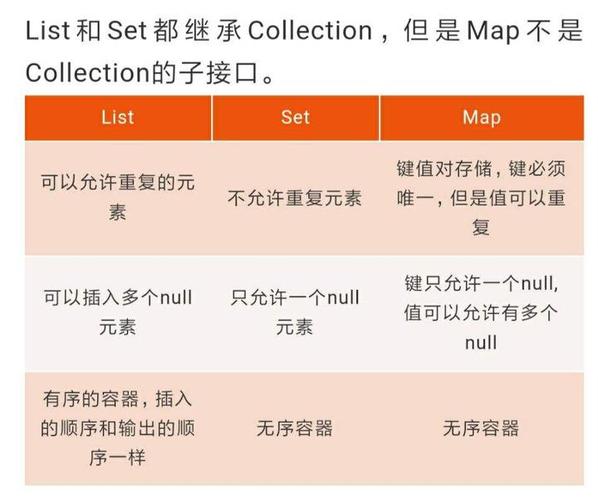
A Set is a collection that cannot contain duplicate elements. It models the mathematical set abstraction. The Set interface does not provide any additional methods beyond what's in the Collection interface, but it enforces the uniqueness constraint.
Key Characteristics:
- No Duplicates: Adding a duplicate element is simply ignored.
- Unordered (in most cases): The order of elements is not guaranteed (though some implementations maintain a specific order). You cannot access elements by index.
Common Implementations:
| Implementation | Description | Performance (Add/Contains) | When to Use |
|---|---|---|---|
HashSet |
Implemented using a hash table. The fastest implementation. | Very Fast (O(1) average time). | Default choice. Use when you need to store unique elements and don't care about the order. |
LinkedHashSet |
A HashSet that maintains insertion order. |
Fast (slightly slower than HashSet). |
Use when you need to store unique elements and must preserve the order in which they were added. |
TreeSet |
Implemented using a tree structure (Red-Black Tree). | Fast (O(log n) time). | Use when you need to store unique elements and have them sorted in natural order (or a custom order defined by a Comparator). |
Code Example (HashSet):
import java.util.HashSet;
import java.util.Set;
public class SetExample {
    public static void main(String[] args) {
        // Create a HashSet of Integers
        Set<Integer> numbers = new HashSet<>();
        // Add elements (duplicates are ignored)
        numbers.add(10);
        numbers.add(5);
        numbers.add(20);
        numbers.add(5); // This duplicate is ignored
        numbers.add(15);
        // The set contains only unique elements. Order is not guaranteed.
        System.out.println("Set of numbers: " + numbers);
        // Check if an element exists
        boolean contains10 = numbers.contains(10);
        System.out.println("Does the set contain 10? " + contains10);
        // Remove an element
        numbers.remove(20);
        System.out.println("After removing 20: " + numbers);
        // Get the size of the set
        System.out.println("Size of the set: " + numbers.size());
    }
}
Map - A Key-Value Pair Collection
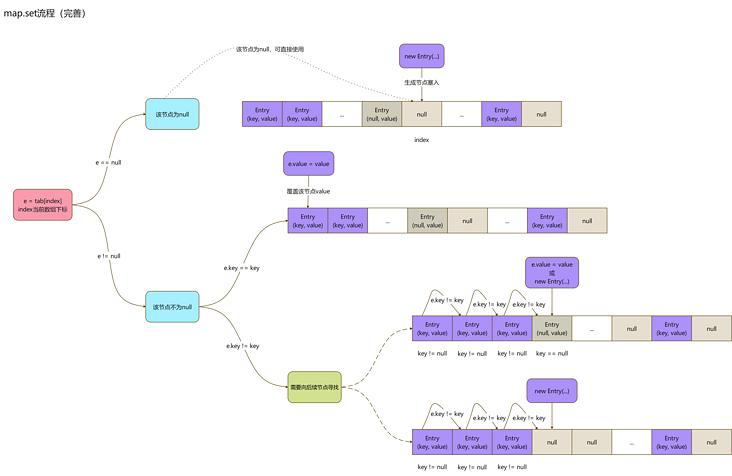
A Map is an object that maps keys to values. A map cannot contain duplicate keys; each key can map to at most one value. It's like a dictionary or a phone book.
Key Characteristics:
- Key-Value Pairs: Stores data as pairs (e.g.,
"username" -> "johndoe"). - Unique Keys: Keys must be unique. If you add a value with an existing key, the old value is replaced.
- Values Can Be Duplicated: Different keys can map to the same value.
- No Duplicates in Keys: Enforced by the
Setof keys.
Common Implementations:
| Implementation | Description | Performance (Get/Put) | When to Use |
|---|---|---|---|
HashMap |
The most common implementation. Uses a hash table for keys. | Very Fast (O(1) average time). | Default choice. Use when you need fast key-value lookups and don't care about the order of keys. |
LinkedHashMap |
A HashMap that maintains insertion order of keys. |
Fast (slightly slower than HashMap). |
Use when you need fast lookups and must preserve the order in which keys were inserted. |
TreeMap |
Implemented using a tree structure. Keys are sorted. | Fast (O(log n) time). | Use when you need key-value pairs and must have keys sorted in natural order (or a custom order). |
Code Example (HashMap):
import java.util.HashMap;
import java.util.Map;
public class MapExample {
    public static void main(String[] args) {
        // Create a HashMap with String keys and Integer values
        Map<String, Integer> ages = new HashMap<>();
        // Put key-value pairs into the map
        ages.put("Alice", 30);
        ages.put("Bob", 25);
        ages.put("Charlie", 35);
        System.out.println("Initial map: " + ages);
        // Get a value by its key
        int alicesAge = ages.get("Alice");
        System.out.println("Alice's age: " + alicesAge);
        // If you put a value with an existing key, the old value is replaced
        ages.put("Bob", 26); // Bob's age is updated from 25 to 26
        System.out.println("After updating Bob's age: " + ages);
        // Check if a key exists
        boolean hasAlice = ages.containsKey("Alice");
        System.out.println("Does the map have 'Alice'? " + hasAlice);
        // Get the size of the map (number of key-value pairs)
        System.out.println("Size of the map: " + ages.size());
    }
}
Comparison Table: At a Glance
| Feature | List |
Set |
Map |
|---|---|---|---|
| Purpose | An ordered collection of elements. | A collection of unique elements. | A collection of key-value pairs. |
| Duplicates | Allowed. | Not Allowed. | Keys are unique. Values can be duplicated. |
| Order | Guaranteed (insertion order). | Not guaranteed (except for LinkedHashSet and TreeSet). |
Not guaranteed (except for LinkedHashMap and TreeMap). |
| Indexing | Yes, elements can be accessed by an integer index. | No, elements cannot be accessed by index. | No, elements are accessed by a key. |
| Common Use Case | Storing a sequence of items, like a list of tasks, a history of commands, or search results. | Storing a collection of unique items, like tags, user permissions, or unique words in a document. | Storing data for quick lookup, like a phone book, user profiles, or configuration settings. |
| Default Implementation | ArrayList |
HashSet |
HashMap |
How to Choose?
-
Do you need to preserve the order of insertion and allow duplicates?
- Use a
List(e.g.,ArrayList).
- Use a
-
Do you only care about storing unique items, and order doesn't matter?
- Use a
Set(e.g.,HashSet).
- Use a
-
Do you need to store data that you can look up quickly using a unique identifier?
 (图片来源网络,侵删)
- Use a
Map(e.g.,HashMap).
- Use a
-
Do you need a
SetorMapto be sorted?- Use
TreeSetorTreeMap.
- Use
-
Do you need a
SetorMapto maintain insertion order?- Use
LinkedHashSetorLinkedHashMap.
- Use