Of course! Let's break down float and double in Java. This is a fundamental concept for any Java developer.

The Big Picture: Floating-Point Numbers
In programming, we need to represent numbers with decimal points (e.g., 3.14, -99.98, 1.5). These are called floating-point numbers. The name comes from the fact that the decimal point can "float" to different positions to represent a wide range of values.
In Java, there are two primitive data types for this:
float(single-precision)double(double-precision)
Key Differences: float vs. double
| Feature | float (Single-Precision) |
double (Double-Precision) |
|---|---|---|
| Size in Memory | 32 bits (4 bytes) | 64 bits (8 bytes) |
| Precision | Approximately 7 decimal digits | Approximately 15-16 decimal digits |
| Range | Smaller range (approx. ±3.4 x 10³⁸) | Larger range (approx. ±1.8 x 10³⁰⁸) |
| Default Type | Not the default for decimal literals. | The default for decimal literals in Java. |
| Suffix | Must be suffixed with f or F. |
Can be suffixed with d or D (but is optional). |
| Performance | Generally faster on some older hardware, but modern CPUs handle double just as fast. |
Slightly slower on some older hardware, but this is negligible in most modern applications. |
| Usage | Used when memory is a critical concern and high precision is not required (e.g., graphics, games). | The default choice for most scientific, financial, and general-purpose calculations. |
Detailed Explanation
Precision: The Most Important Difference
Precision refers to the number of significant decimal digits a type can accurately represent.
doublehas more precision. This is the most important reason to choosedoubleoverfloatin most cases. The extra 32 bits indoubleare used to store more significant digits, which prevents rounding errors in calculations.
Example: Precision in Action
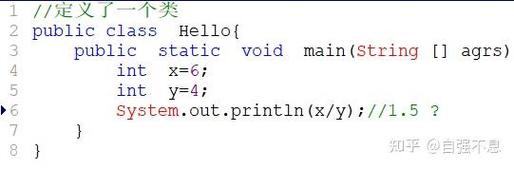
public class PrecisionExample {
    public static void main(String[] args) {
        // A number with more than 7 significant digits
        double preciseValue = 123.456789012345;
        // A float can only accurately hold about 7 digits
        float lessPreciseValue = 123.456789012345f;
        System.out.println("Original double value: " + preciseValue);
        System.out.println("Stored in float:      " + lessPreciseValue);
        // Let's see what happens with a calculation
        double doubleResult = preciseValue - 123.456;
        float floatResult = lessPreciseValue - 123.456f;
        System.out.println("\nUsing double for calculation: " + doubleResult);
        System.out.println("Using float for calculation:  " + floatResult);
    }
}
Output:
Original double value: 123.456789012345
Stored in float:      123.45679
Using double for calculation: 0.000789012345
Using float for calculation:  0.000786438
Notice how the float version lost accuracy and the final result is less precise.
Default Type for Literals
This is a very common point of confusion for beginners.
If you write a decimal number in your Java code without a suffix, the Java compiler automatically assumes it's a double.
// This is a DOUBLE, not a float!
double myNumber = 9.81; // Correct
// This will cause a COMPILE ERROR
// float myPi = 3.14159; // Error: incompatible types: possible lossy conversion from double to float
To tell the compiler you want a float, you must append the letter f or F to the end of the number.
// This is a FLOAT
float myPi = 3.14159f; // Correct, because of the 'f'
float myPi2 = 2.718F;  // Also correct, using 'F' is common practice
For double, the suffix d or D is optional but can improve code readability.
double myDouble = 123.456;    // Correct (default)
double myDouble2 = 123.456d;  // Also correct, more explicit
When to Use Which?
Use double by default. It provides significantly more precision and is the standard for almost all general-purpose programming. The memory overhead of an extra 4 bytes per variable is negligible in most modern applications.
Use float only when:
- Memory is extremely constrained: You are working on a device with very limited RAM (e.g., some embedded systems) and have millions of floating-point numbers.
- You are interfacing with libraries or APIs that specifically require
floatvalues. For example, many older graphics libraries or game engines usefloatfor performance reasons on older GPUs. - The nature of the data doesn't require high precision. For example, representing a texture coordinate or a normalized value between 0.0 and 1.0 might not need 15 digits of precision.
The Weird World of Floating-Point Arithmetic
Both float and double use the IEEE 754 standard for representing floating-point numbers. This standard has some quirks you must be aware of.
Inaccuracy with Decimals
Binary floating-point types cannot perfectly represent many common decimal fractions (like 0.1 or 0.2). They are stored as very close approximations.
float f = 0.1f + 0.2f;
System.out.println(f); // Prints 0.30000000000000004
double d = 0.1 + 0.2;
System.out.println(d); // Prints 0.30000000000000004
This happens in all languages that use this standard (C++, C#, JavaScript, etc.), not just Java. Never use float or double for financial calculations where exact precision is required.
NaN (Not a Number)
This value represents an undefined or unrepresentable result, such as 0 / 0.0 or the square root of a negative number.
double result = Math.sqrt(-1.0);
System.out.println(result); // Prints NaN
// You must check for NaN with Double.isNaN() or Float.isNaN()
if (Double.isNaN(result)) {
    System.out.println("The result is Not a Number");
}
Infinity and `-Infinity
These represent values that have grown too large to be represented.
double tooBig = Double.MAX_VALUE * 2.0;
System.out.println(tooBig); // Prints Infinity
double negativeInfinity = -1.0 / 0.0;
System.out.println(negativeInfinity); // Prints -Infinity
Best Practices
- Prefer
double: Unless you have a specific reason to usefloat, default todouble. - Be explicit with literals: Always use the
fsuffix forfloatliterals (14f) to avoid compilation errors and make your code clear. - Avoid for money: For financial or currency calculations, use
java.math.BigDecimalor work with integers representing cents (e.g.,int priceInCents). - Be aware of precision issues: When comparing two floating-point numbers for equality, don't use . Check if their absolute difference is within a small "epsilon" value.
// Don't do this:
if (d1 == d2) { ... }
// Do this instead:
double epsilon = 0.00001;
if (Math.abs(d1 - d2) < epsilon) {
    // The numbers are "close enough"
}