目录
- WebService 简介
- SOAP (Simple Object Access Protocol)
- REST (Representational State Transfer)
- 调用 SOAP WebService 的方法
- 使用 JDK 自带的
wsimport工具 (最传统) - 使用 Apache CXF 框架 (更强大、更灵活)
- 使用 Spring Boot + CXF (企业级应用首选)
- 使用 JDK 自带的
- 调用 RESTful WebService (Web API) 的方法
- 使用
java.net.HttpURLConnection(原生,不推荐) - 使用 Apache HttpClient (业界标准)
- 使用 OkHttp (轻量级,流行)
- 使用 Spring Boot
RestTemplate(经典、便捷) - 使用 Spring Boot
WebClient(响应式、现代)
- 使用
- 总结与对比
WebService 简介
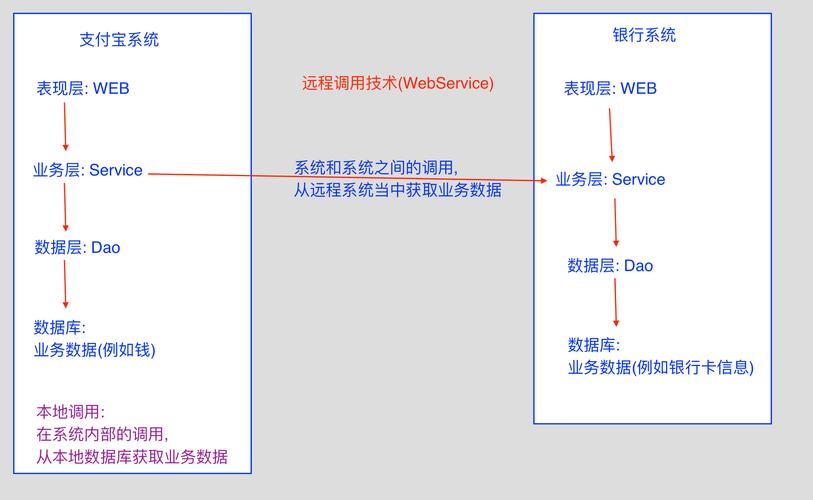
WebService 是一种跨编程语言和跨操作系统的远程调用技术,允许不同应用通过网络进行交互,主要有两种风格:
SOAP (Simple Object Access Protocol)
- 特点:
- 是一个协议,有严格的规范(如 WSDL, SOAP Header, SOAP Body)。
- 基于 XML 进行数据交换,格式非常严谨、冗长。
- 通常运行在 HTTP/HTTPS 上,但也可以使用 SMTP 等协议。
- 具有内置的安全和事务支持。
- 耦合度高,客户端和服务端必须严格遵守契约(WSDL)。
- 场景: 传统的企业级应用(如银行、政府、电信系统),对安全性、事务性要求高的场景。
REST (Representational State Transfer)
- 特点:
- 是一种架构风格,而不是一个协议。
- 基于 HTTP 协议,利用其方法(GET, POST, PUT, DELETE)。
- 数据交换格式通常使用轻量级的 JSON 或 XML。
- 无状态,每次请求都包含处理该请求所需的所有信息。
- 耦合度低,非常灵活,是现代 Web 和移动应用后端服务的标准。
- 场景: 几乎所有现代 Web 应用、移动 App、微服务架构,我们通常称之为 "Web API"。
调用 SOAP WebService 的方法
假设我们要调用一个天气预报的 SOAP WebService,其 WSDL 地址为 http://www.webxml.com.cn/WebServices/WeatherWebService.asmx?wsdl。
使用 JDK 自带的 wsimport 工具 (最传统)
这是最基础的方法,不需要引入第三方库。
步骤 1: 生成客户端代码
打开命令行,执行以下命令,这会根据 WSDL 文件生成一系列 Java 源文件和 class 文件。
# -keep: 生成源代码
# -d: 指定 class 文件输出目录
# -p: 指定包名
wsimport -keep -d . -p com.example.weather http://www.webxml.com.cn/WebServices/WeatherWebService.asmx?wsdl
执行后,你会得到 com.example.weather 包下的 WeatherWebService、WeatherWebServiceSoap、ArrayOfString 等类。
步骤 2: 编写 Java 代码调用
import com.example.weather.ArrayOfString;
import com.example.weather.WeatherWebService;
import com.example.weather.WeatherWebServiceSoap;
public class WeatherClient {
    public static void main(String[] args) {
        // 1. 创建服务视图对象 (WeatherWebService)
        WeatherWebService service = new WeatherWebService();
        // 2. 获取服务端点接口 (WeatherWebServiceSoap)
        WeatherWebServiceSoap soap = service.getWeatherWebServiceSoap();
        // 3. 调用具体的方法,传入参数
        // 查询北京、上海、广州的天气
        ArrayOfString result = soap.getWeather("北京,上海,广州", "");
        // 4. 处理返回结果
        if (result != null && result.getString() != null) {
            for (String s : result.getString()) {
                System.out.println(s);
            }
        }
    }
}
优点:
- 无需额外依赖,JDK 自带。
- 简单直接。
缺点:
- 功能有限,不支持 WS-Security 等高级特性。
- 生成的代码有时会比较冗余。
使用 Apache CXF 框架 (更强大、更灵活)
CXF 是一个开源的 Services 框架,支持 SOAP 和 RESTful 服务。
步骤 1: 添加 Maven 依赖
<dependency>
    <groupId>org.apache.cxf</groupId>
    <artifactId>cxf-spring-boot-starter-jaxws</artifactId>
    <version>3.4.5</version> <!-- 使用最新版本 -->
</dependency>
步骤 2: 使用 CXF 的 wsdl2java 工具生成客户端代码
CXF 也提供了类似的工具,功能更强大。
# -client: 生成客户端测试代码
wsdl2java -client -p com.example.cxf.weather http://www.webxml.com.cn/WebServices/WeatherWebService.asmx?wsdl
步骤 3: 编写 Java 代码调用
CXF 生成的代码通常有更清晰的客户端工厂类。
import com.example.cxf.weather.WeatherWebService;
import com.example.cxf.weather.WeatherWebServiceService;
public class CxfWeatherClient {
    public static void main(String[] args) {
        // 1. 通过工厂类创建服务
        WeatherWebServiceService service = new WeatherWebServiceService();
        // 2. 获取服务端口
        WeatherWebService port = service.getWeatherWebServiceSoap();
        // 3. 调用方法
        String city = "北京";
        // 注意:CXF 生成的参数类型可能与原生 wsimport 不同,需要查看生成的代码
        java.util.List<String> result = port.getWeather(city, "").getString();
        // 4. 处理结果
        System.out.println("北京的天气信息:");
        result.forEach(System.out::println);
    }
}
优点:
- 功能强大,支持 WS-* 标准(安全、事务等)。
- 可与 Spring 框架无缝集成。
- 性能更好,可配置性更高。
使用 Spring Boot + CXF (企业级应用首选)
这是在 Spring Boot 项目中集成 SOAP 服务的标准做法。
步骤 1: 创建 Spring Boot 项目,添加 CXF 依赖
<dependency>
    <groupId>org.apache.cxf</groupId>
    <artifactId>cxf-spring-boot-starter-jaxws</artifactId>
    <version>3.4.5</version>
</dependency>
步骤 2: 创建一个客户端配置类
import org.apache.cxf.jaxws.JaxWsProxyFactoryBean;
import org.springframework.context.annotation.Bean;
import org.springframework.context.annotation.Configuration;
@Configuration
public class WeatherClientConfig {
    @Bean
    public WeatherWebService weatherWebServiceClient() {
        // 1. 创建工厂
        JaxWsProxyFactoryBean factory = new JaxWsProxyFactoryBean();
        // 2. 设置服务接口 (wsdl 中定义的)
        factory.setServiceClass(com.example.weather.WeatherWebService.class);
        // 3. 设置 WSDL 地址
        factory.setAddress("http://www.webxml.com.cn/WebServices/WeatherWebService.asmx");
        // 4. 创建并返回客户端代理对象
        return (WeatherWebService) factory.create();
    }
}
注意:这里的 com.example.weather.WeatherWebService 是用 wsdl2java 工具生成的接口。
步骤 3: 创建 Service 层调用
import org.springframework.beans.factory.annotation.Autowired;
import org.springframework.stereotype.Service;
import com.example.weather.ArrayOfString;
import com.example.weather.WeatherWebService;
@Service
public class WeatherService {
    @Autowired
    private WeatherWebService weatherWebService;
    public void getWeatherInfo(String cityName) {
        System.out.println("正在查询 " + cityName + " 的天气...");
        ArrayOfString result = weatherWebService.getWeather(cityName, "");
        if (result != null && result.getString() != null) {
            result.getString().forEach(System.out::println);
        }
    }
}
优点:
- 完全融入 Spring 生态,依赖注入、事务管理等都可以使用。
- 代码结构清晰,易于维护和测试。
- 企业级应用的最佳实践。
调用 RESTful WebService (Web API) 的方法
假设我们要调用一个公共的 IP 地址查询 API:http://ip-api.com/json/8.8.8.8?fields=status,message,country,city,query,它会返回一个 JSON 对象。
使用 Spring Boot RestTemplate (经典、便捷)
RestTemplate 是 Spring 框架提供的用于同步 HTTP 请求的客户端,非常经典和方便。
步骤 1: 在 Spring Boot 启动类上添加 @EnableRestTemplate
import org.springframework.boot.SpringApplication;
import org.springframework.boot.autoconfigure.SpringBootApplication;
import org.springframework.context.annotation.Bean;
import org.springframework.web.client.RestTemplate;
@SpringBootApplication
public class MyApplication {
    public static void main(String[] args) {
        SpringApplication.run(MyApplication.class, args);
    }
    @Bean
    public RestTemplate restTemplate() {
        return new RestTemplate();
    }
}
步骤 2: 创建 Service 调用
import org.springframework.beans.factory.annotation.Autowired;
import org.springframework.stereotype.Service;
import org.springframework.web.client.RestTemplate;
import com.fasterxml.jackson.annotation.JsonIgnoreProperties;
// 定义一个与返回 JSON 结构对应的 Java 类
@JsonIgnoreProperties(ignoreUnknown = true) // 忽略 JSON 中存在但 Java 类中没有的字段
class IpInfo {
    private String status;
    private String country;
    private String city;
    private String query;
    // Getters and Setters...
}
@Service
public class IpApiService {
    @Autowired
    private RestTemplate restTemplate;
    public void getIpInfo() {
        String url = "http://ip-api.com/json/8.8.8.8?fields=status,message,country,city,query";
        // 使用 getForObject 方法,直接将 JSON 映射到 IpInfo 对象
        IpInfo ipInfo = restTemplate.getForObject(url, IpInfo.class);
        if (ipInfo != null && "success".equals(ipInfo.getStatus())) {
            System.out.println("查询成功!");
            System.out.println("IP: " + ipInfo.getQuery());
            System.out.println("国家: " + ipInfo.getCountry());
            System.out.println("城市: " + ipInfo.getCity());
        } else {
            System.out.println("查询失败: " + (ipInfo != null ? ipInfo.getMessage() : "未知错误"));
        }
    }
}
优点:
- Spring 生态核心,使用极其广泛。
- API 设计简洁,支持 GET, POST, PUT, DELETE 等各种方法。
- 自动将 JSON/XML 转换为 Java 对象(反序列化),反之亦然(序列化)。
缺点:
- 在 Spring Boot 2.4 之后,官方已标记为不推荐使用,建议迁移到
WebClient。
使用 Spring Boot WebClient (响应式、现代)
WebClient 是 Spring 5 引入的、基于响应式编程的非阻塞 HTTP 客户端,是 RestTemplate 的替代品。
步骤 1: 创建 WebClient 实例
通常使用 WebClient.create() 静态方法。
import org.springframework.stereotype.Service;
import org.springframework.web.reactive.function.client.WebClient;
import reactor.core.publisher.Mono;
@Service
public class WebClientIpApiService {
    // 创建一个可重用的 WebClient 实例
    private final WebClient webClient;
    public WebClientIpApiService(WebClient.Builder webClientBuilder) {
        this.webClient = webClientBuilder.baseUrl("http://ip-api.com").build();
    }
    public void getIpInfo() {
        String ip = "8.8.8.8";
        String path = "/json/" + ip;
        String fields = "status,message,country,city,query";
        // 定义响应式流
        Mono<IpInfo> ipInfoMono = this.webClient.get()
                .uri(uriBuilder -> uriBuilder.path(path).queryParam("fields", fields).build())
                .retrieve() // 发出请求并获取响应
                .bodyToMono(IpInfo.class); // 将响应体反序列化为 IpInfo 对象,并包装在 Mono 中
        // 订阅 Mono 并处理结果
        ipInfoMono.subscribe(
                ipInfo -> {
                    if ("success".equals(ipInfo.getStatus())) {
                        System.out.println("WebClient 查询成功!");
                        System.out.println("IP: " + ipInfo.getQuery());
                        System.out.println("国家: " + ipInfo.getCountry());
                        System.out.println("城市: " + ipInfo.getCity());
                    }
                },
                error -> System.err.println("WebClient 查询出错: " + error.getMessage())
        );
        // 因为 WebClient 是非阻塞的,主线程可能先于响应结束
        // 在实际应用中,通常会阻塞等待或在 WebFlux 环境中处理
        try {
            Thread.sleep(1000); // 简单等待
        } catch (InterruptedException e) {
            e.printStackTrace();
        }
    }
}
注意:IpInfo 类和 RestTemplate 示例中一样。
优点:
- 非阻塞,性能更高,能更好地利用系统资源,适合高并发场景。
- 响应式编程,提供了更灵活的数据流处理能力(
Mono,Flux)。 - 是 Spring 官方推荐的未来方向。
缺点:
- 学习曲线比
RestTemplate陡峭,需要理解响应式编程。 - 对于简单的同步调用,代码可能显得更复杂。
总结与对比
| 特性 | SOAP (wsimport/CXF) | REST (RestTemplate) | REST (WebClient) |
|---|---|---|---|
| 风格 | 协议,严格 | 架构风格,灵活 | 架构风格,灵活 |
| 数据格式 | XML (严格) | JSON/XML (轻量) | JSON/XML (轻量) |
| 协议 | HTTP/SMTP/等 | HTTP | HTTP |
| 状态 | 无/有状态 | 无状态 | 无状态 |
| 主要场景 | 传统企业应用,高安全/事务要求 | 大部分 Java Web 应用 | 高并发、微服务、响应式应用 |
| 易用性 | 中等 (需生成代码) | 高 (非常简单) | 中等 (需学习响应式) |
| 性能 | 同步,较低 | 同步,中等 | 异步非阻塞,高 |
| 官方推荐 | - | 不推荐 (已弃用) | 推荐 |
如何选择?
-
如果你的服务是 SOAP 协议的:
- 新项目,强烈推荐使用 Spring Boot + CXF,因为它结构最清晰,最易于维护。
- 简单的、一次性的调用,可以使用
wsimport。
-
如果你的服务是 RESTful API 的:
- 如果你还在使用 Spring Boot 2.3 或更早版本,或者项目简单:
RestTemplate是一个非常成熟和方便的选择。 - 如果你在开发新项目,特别是高并发或微服务项目:请直接学习并使用 WebClient,它是未来的趋势。
- 如果你还在使用 Spring Boot 2.3 或更早版本,或者项目简单:
希望这份详细的指南能帮助你掌握在 Java 中调用 WebService 的各种方法!