Of course! This is a very common and powerful combination. Here’s a comprehensive guide covering everything from installation to best practices for using Python to interact with a MySQL database on a CentOS system.
We'll break this down into three main parts:
- Setting up the Environment: Installing MySQL and Python on CentOS.
- Connecting with Python: Using the
mysql-connector-pythonlibrary. - Best Practices & Advanced Topics: Security, connection pooling, and alternatives.
Part 1: Setting up the Environment on CentOS
First, you need a working CentOS server with Python and a MySQL database server.
Step 1: Install MySQL Server on CentOS
It's highly recommended to use the official MySQL repository from Oracle.
-
Download and add the MySQL Yum repository.
 (图片来源网络,侵删)
# Download the repository configuration package sudo dnf localinstall https://dev.mysql.com/get/mysql80-community-release-el9-7.noarch.rpm -y
-
Verify the repository is added.
sudo dnf repolist enabled | grep ".*" | grep ".*.*-.*-.*"
You should see something like
mysql-8.0-communityandmysql-connectors-communityenabled. -
Install the MySQL Server.
sudo dnf install mysql-community-server -y
-
Start and Enable the MySQL Service.
 (图片来源网络,侵删)
sudo systemctl start mysqld sudo systemctl enable mysqld
-
Secure the Installation. This command will guide you through setting a root password, removing anonymous users, disallowing remote root login, and more. This is a critical step.
sudo mysql_secure_installation
Follow the prompts. For a development server, you can set a root password and answer "yes" to the rest.
Step 2: Install Python and a MySQL Connector Library
CentOS 9 comes with Python 3.9 pre-installed. You just need to add the library that allows Python to "talk" to MySQL.
The most common and officially supported library is mysql-connector-python.
-
Install the MySQL Connector for Python.
# Using pip (the Python package installer)
pip3 install mysql-connector-python
Note: You might need to use
pipinstead ofpip3depending on your system's configuration. -
Verify the installation.
pip3 show mysql-connector-python
This should show you the version and location of the installed package.
Part 2: Connecting to MySQL with Python
Now for the fun part! Let's write some Python code.
Basic Connection and Query
This script connects to your MySQL server, creates a database and a table, inserts some data, and then retrieves it.
Create a file named db_example.py:
import mysql.connector
from mysql.connector import Error
def create_connection(host_name, user_name, user_password):
    """Create a database connection to a MySQL server."""
    connection = None
    try:
        connection = mysql.connector.connect(
            host=host_name,
            user=user_name,
            passwd=user_password
        )
        print("Connection to MySQL DB successful")
        return connection
    except Error as e:
        print(f"The error '{e}' occurred")
def create_database(connection, query):
    """Execute a query to create a database."""
    cursor = connection.cursor()
    try:
        cursor.execute(query)
        print("Database created successfully")
    except Error as e:
        print(f"The error '{e}' occurred")
def execute_query(connection, query, data=None):
    """Execute a single query."""
    cursor = connection.cursor()
    try:
        if data:
            cursor.execute(query, data)
        else:
            cursor.execute(query)
        connection.commit()
        print("Query executed successfully")
    except Error as e:
        print(f"The error '{e}' occurred")
def execute_read_query(connection, query):
    """Execute a read query and fetch the results."""
    cursor = connection.cursor(dictionary=True) # dictionary=True gives rows as dicts
    result = None
    try:
        cursor.execute(query)
        result = cursor.fetchall()
        return result
    except Error as e:
        print(f"The error '{e}' occurred")
# --- Main Execution ---
if __name__ == "__main__":
    # Replace with your MySQL root credentials
    db_host = "localhost"
    db_user = "root"
    db_password = "YOUR_SECURE_PASSWORD"
    # 1. Create a connection (without specifying a database)
    connection = create_connection(db_host, db_user, db_password)
    if connection:
        # 2. Create a new database
        create_database_query = "CREATE DATABASE IF NOT EXISTS python_db"
        create_database(connection, create_database_query)
        # 3. Close the connection to reconnect and select the new database
        connection.close()
        # 4. Reconnect to the specific database
        connection = mysql.connector.connect(
            host=db_host,
            user=db_user,
            passwd=db_password,
            database="python_db"
        )
        # 5. Create a table
        create_users_table_query = """
        CREATE TABLE IF NOT EXISTS users (
            id INT AUTO_INCREMENT PRIMARY KEY,
            name VARCHAR(255) NOT NULL,
            email VARCHAR(255) NOT NULL UNIQUE,
            age INT
        )
        """
        execute_query(connection, create_users_table_query)
        # 6. Insert data into the table
        insert_user_query = "INSERT INTO users (name, email, age) VALUES (%s, %s, %s)"
        user_data = ("Alice", "alice@example.com", 30)
        execute_query(connection, insert_user_query, user_data)
        user_data_2 = ("Bob", "bob@example.com", 25)
        execute_query(connection, insert_user_query, user_data_2)
        # 7. Read data from the table
        select_users_query = "SELECT * FROM users"
        users = execute_read_query(connection, select_users_query)
        for user in users:
            print(user)
        # 8. Close the connection
        connection.close()
        print("Connection closed.")
To run this script:
- Save the code as
db_example.py. - Replace
"YOUR_SECURE_PASSWORD"with your actual MySQL root password. - Run it from your terminal:
python3 db_example.py
You should see output showing the connection, successful queries, and the data you inserted.
Part 3: Best Practices & Advanced Topics
Writing scripts that work is good; writing robust, secure, and maintainable scripts is great.
Security: Never Hardcode Credentials
Storing your database password directly in the code is a major security risk. Use environment variables instead.
How to do it:
-
Set an environment variable in your terminal session:
export DB_PASSWORD="YOUR_SUPER_SECRET_PASSWORD"
Note: This will only last for your current terminal session. To make it permanent, add it to your
~/.bashrcor~/.bash_profilefile. -
Modify your Python script to read the variable:
import os
# ... inside your main block ...
db_password = os.getenv("DB_PASSWORD")
if not db_password:
    print("Error: DB_PASSWORD environment variable not set.")
    exit()
connection = mysql.connector.connect(
    host=db_host,
    user=db_user,
    passwd=db_password
)
# ... rest of your code
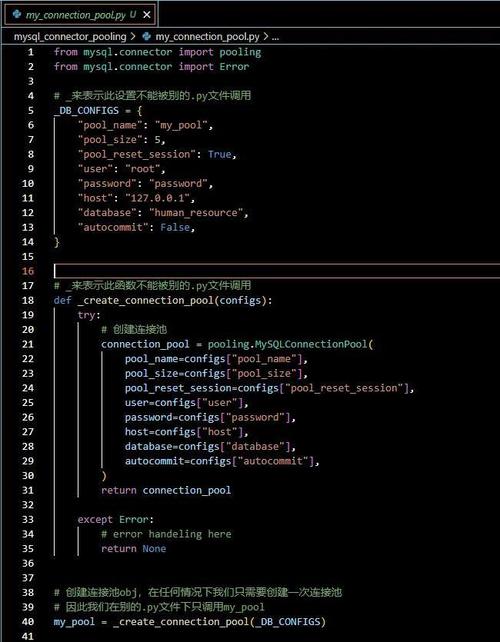
Using Connection Pooling
Creating a new database connection for every single query is inefficient. A connection pool is a cache of database connections that can be reused, significantly improving performance.
How to do it:
import mysql.connector
from mysql.connector import pooling
# --- Configuration ---
db_config = {
    "host": "localhost",
    "user": "root",
    "password": os.getenv("DB_PASSWORD"),
    "database": "python_db"
}
# --- Create a Connection Pool ---
# pool_name: A name for the pool
# pool_size: The number of connections to keep open
try:
    connection_pool = pooling.MySQLConnectionPool(
        pool_name="mypool",
        pool_size=5,
        **db_config
    )
    print("Connection pool created successfully")
except Error as e:
    print(f"Error creating connection pool: {e}")
# --- Get a connection from the pool ---
try:
    connection_from_pool = connection_pool.get_connection()
    print("Got connection from pool")
    # Use the connection as you normally would
    cursor = connection_from_pool.cursor()
    cursor.execute("SELECT * FROM users")
    results = cursor.fetchall()
    for row in results:
        print(row)
    # --- IMPORTANT: Close the connection to return it to the pool ---
    connection_from_pool.close()
    print("Connection returned to pool")
except Error as e:
    print(f"Error getting connection from pool: {e}")
Using an ORM (Object-Relational Mapper)
For larger applications, writing raw SQL can become tedious and error-prone. ORMs like SQLAlchemy allow you to interact with your database using Python objects and methods, which can be more intuitive and safer.
Example with SQLAlchemy:
-
Install SQLAlchemy:
pip3 install SQLAlchemy
-
Create a file
orm_example.py:from sqlalchemy import create_engine, Column, Integer, String from sqlalchemy.orm import sessionmaker from sqlalchemy.ext.declarative import declarative_base # Replace with your connection string # mysql+mysqlconnector://user:password@host/dbname DATABASE_URL = "mysql+mysqlconnector://root:YOUR_SECURE_PASSWORD@localhost/python_db" # Create the engine engine = create_engine(DATABASE_URL) # Create a "Session" class SessionLocal = sessionmaker(autocommit=False, autoflush=False, bind=engine) # Create a Base class for our models Base = declarative_base() # Define a User model (this maps to the 'users' table) class User(Base): __tablename__ = 'users' id = Column(Integer, primary_key=True, index=True) name = Column(String(255), index=True) email = Column(String(255), unique=True, index=True) age = Column(Integer) # Create the table if it doesn't exist Base.metadata.create_all(bind=engine) # --- Use the ORM to interact with the database --- # Create a new session db = SessionLocal() # Create a new user new_user = User(name="Charlie", email="charlie@example.com", age=42) db.add(new_user) db.commit() print("New user created with ORM") # Query users users = db.query(User).all() print("\nUsers in database:") for user in users: print(f"ID: {user.id}, Name: {user.name}, Email: {user.email}, Age: {user.age}") # Close the session db.close()
This ORM approach abstracts away the SQL, making your code cleaner and more Pythonic.