Of course! Let's dive deep into Python's socketserver module. It's a powerful and often underutilized tool for creating network servers.
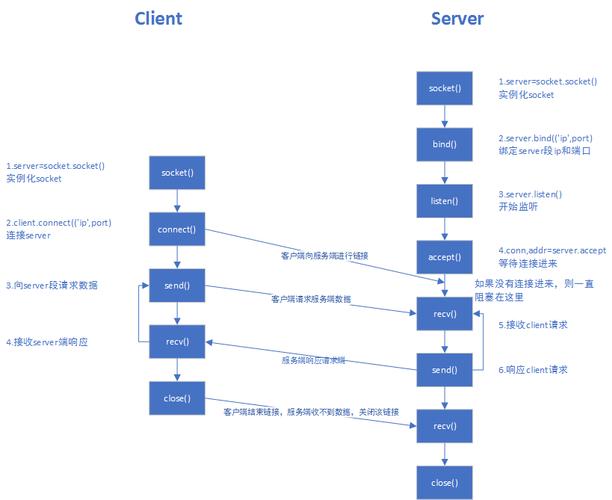
What is socketserver?
The socketserver module in Python provides a framework for creating network servers. It simplifies the process of writing servers by handling the low-level socket details like listening for connections, accepting them, and managing multiple clients.
Think of it as a pre-built foundation for your server. You don't have to worry about the plumbing (sockets), you just need to build the rooms (your application logic).
The Core Concept: Request Handler Classes
The central idea behind socketserver is the Request Handler. You create a class that inherits from one of the base handler classes (like BaseRequestHandler), and you override a single method: handle().
This handle() method is where all your server's logic for interacting with a single client goes. When a client connects, the socketserver framework creates an instance of your handler class and calls its handle() method.

A Simple "Hello, World!" Server
Let's start with the most basic example: a server that listens on a port, and when a client connects, it sends back a "Hello, World!" message and closes the connection.
This example uses TCP.
The Server Code (server.py)
import socketserver
# We define a custom handler class that inherits from BaseRequestHandler
class MyTCPHandler(socketserver.BaseRequestHandler):
    """
    The request handler class for the server.
    It is instantiated once per connection to the server, and must
    override the handle() method to implement communication to the
    client.
    """
    def handle(self):
        # self.request is the socket connected to the client
        self.data = self.request.recv(1024).strip()
        print(f"Received from {self.client_address[0]}:{self.client_address[1]}")
        print(f"Received data: {self.data.decode('utf-8')}")
        # Just send back a simple ACK message
        message = "Hello, World!".encode('utf-8')
        self.request.sendall(message)
if __name__ == "__main__":
    HOST, PORT = "localhost", 9999
    # Create the server, binding to localhost on port 9999
    # The TCPServer class handles the TCP socket creation and listening.
    with socketserver.TCPServer((HOST, PORT), MyTCPHandler) as server:
        print(f"Server listening on {HOST}:{PORT}")
        # Activate the server; this will keep running until you
        # interrupt the program with Ctrl+C
        server.serve_forever()
The Client Code (client.py)
To test our server, we need a client.
import socket
HOST = "127.0.0.1"  # The server's hostname or IP address
PORT = 9999        # The port used by the server
with socket.socket(socket.AF_INET, socket.SOCK_STREAM) as s:
    s.connect((HOST, PORT))
    s.sendall(b"Hello from client!")
    data = s.recv(1024)
print(f"Received from server: {data.decode('utf-8')}")
How to Run It
- Save the code: Save the server code as
server.pyand the client code asclient.pyin the same directory. - Run the server: Open a terminal and run
python server.py. You'll seeServer listening on localhost:9999. - Run the client: Open a second terminal and run
python client.py. - Check the output:
- In the client terminal, you'll see:
Received from server: Hello, World! - In the server terminal, you'll see:
Received from 127.0.0.1:54321
Received data: Hello from client!
(Note: The port
54321will be a random high-numbered port assigned by your OS for the outgoing connection).
- In the client terminal, you'll see:
Understanding the Key Components
Let's break down the server code.
-
MyTCPHandler(socketserver.BaseRequestHandler)- This is the heart of your application. You define your custom logic here.
BaseRequestHandleris a generic handler. For TCP, you'd typically useStreamRequestHandler, which provides file-like interfaces (rfile,wfile) for reading and writing, which is often more convenient. For UDP, you'd useDatagramRequestHandler.
-
def handle(self)- This method is called for every new connection.
self.request: This is the socket object connected to the client.self.client_address: A tuple(ip_address, port)of the client.self.server: The server instance itself.
-
socketserver.TCPServer((HOST, PORT), MyTCPHandler)- This creates the server object.
TCPServer: This class uses TCP sockets. There's alsoUDPServerfor UDP.(HOST, PORT): The address and port the server will bind to.MyTCPHandler: The class that will handle requests.
-
with ... as server:- Using a
withstatement is a best practice. It ensures that the server's resources (like the listening socket) are properly cleaned up when the server shuts down, even if an error occurs.
- Using a
-
server.serve_forever()- This starts the server's main loop. It will listen for incoming connections and dispatch them to your handler class until the program is interrupted (e.g., with
Ctrl+C).
- This starts the server's main loop. It will listen for incoming connections and dispatch them to your handler class until the program is interrupted (e.g., with
Handling Multiple Clients: Threading and Forking
A simple server like the one above can only handle one client at a time. If a client connects and stays idle, no other clients can connect. socketserver solves this elegantly with "mix-in" classes.
ThreadingMixIn
This is the most common approach on modern operating systems. When a client connects, the server starts a new thread to handle that client, leaving the main thread free to listen for more connections.
How to use it: You create a new server class that inherits from both ThreadingMixIn and TCPServer.
# In server.py
import socketserver
import threading
class ThreadedTCPServer(socketserver.ThreadingMixIn, socketserver.TCPServer):
    """Handle requests in a separate thread."""
    # You can set a 'daemon_threads' attribute if you want threads to
    # exit when the main program does.
    daemon_threads = True
class MyTCPHandler(socketserver.BaseRequestHandler):
    def handle(self):
        print(f"Thread {threading.current_thread().name} handling client {self.client_address}")
        self.data = self.request.recv(1024).strip()
        print(f"Received from {self.client_address[0]}:{self.client_address[1]}: {self.data.decode('utf-8')}")
        # Echo the message back to the client
        self.request.sendall(self.data)
if __name__ == "__main__":
    HOST, PORT = "localhost", 9999
    with ThreadedTCPServer((HOST, PORT), MyTCPHandler) as server:
        print(f"Threaded server listening on {HOST}:{PORT}")
        server.serve_forever()
Now, you can run multiple clients simultaneously, and each one will be handled by its own thread.
ForkingMixIn
This is an alternative for Unix-like systems. When a client connects, the server process forks (creates a new copy of itself) to handle the client. This is more memory-intensive than threading but can be useful for CPU-bound tasks.
You would use it in the same way:
class ForkingTCPServer(socketserver.ForkingMixIn, socketserver.TCPServer):
Summary of Server Types
| Base Class | Mix-in Class | Combined Server Class | Protocol | Use Case |
|---|---|---|---|---|
TCPServer |
- | TCPServer |
TCP | Simple, single-threaded server. Good for learning or very simple tasks. |
TCPServer |
ThreadingMixIn |
ThreadedTCPServer |
TCP | Most common. Handles multiple clients concurrently using threads. |
TCPServer |
ForkingMixIn |
ForkingTCPServer |
TCP | Handles multiple clients by forking processes. (Unix/Linux) |
UDPServer |
- | UDPServer |
UDP | Simple, single-threaded UDP server. |
UDPServer |
ThreadingMixIn |
ThreadedUDPServer |
UDP | Handles multiple UDP datagrams concurrently using threads. |
UDPServer |
ForkingMixIn |
ForkingUDPServer |
UDP | Handles multiple UDP datagrams by forking processes. (Unix/Linux) |
When to Use socketserver
- For learning: It's the perfect way to understand the fundamentals of network programming without getting bogged down in boilerplate socket code.
- For simple servers: If you need a basic TCP/UDP server quickly,
socketserveris fantastic. - For handling many concurrent clients: The
ThreadingMixInmakes it trivial to build a responsive server.
When to Not Use socketserver
- For high-performance, production-level servers: For building things like web servers (HTTP), chat servers, or APIs, you are often better off using a dedicated framework like:
- HTTP Servers:
http.server(built-in, simple), FastAPI, Flask, Django. - AsyncIO Servers: For very high concurrency (thousands of connections), an asynchronous framework like FastAPI (with Starlette/ASGI), AIOHTTP, or Tornado is more efficient. They use a single thread with an event loop, which has less overhead than creating many threads.
- HTTP Servers: