Of course! Let's break down how for loops, if statements, and the break keyword work together in Python. This is a fundamental concept for controlling the flow of your programs.
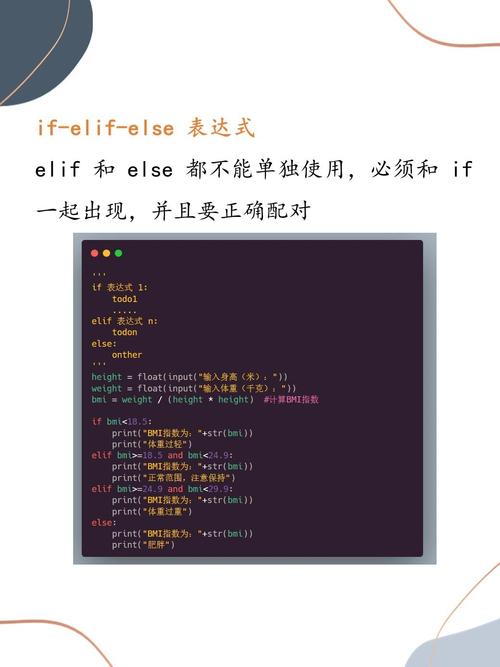
The Core Idea
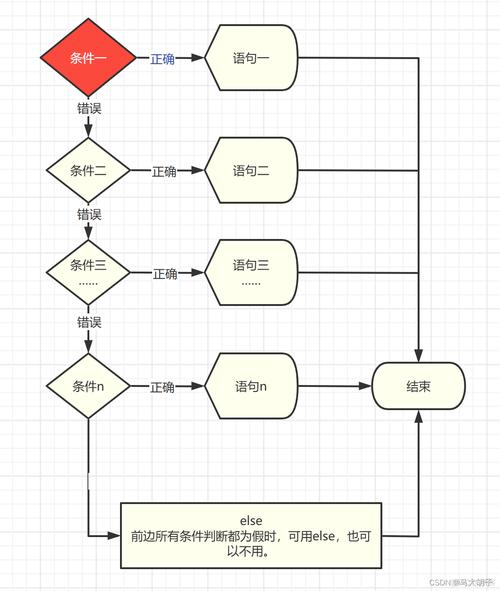
When you combine a for loop, an if statement, and a break, you create a powerful structure that allows you to:
- Iterate through a sequence of items (like a list or a string).
- Check a condition for each item using an
ifstatement. - Stop the entire loop immediately if the condition is met, using
break.
The break statement exits the innermost loop it is in. Once the loop is broken, the program continues executing the code after the loop.
A Simple Analogy
Imagine you're looking for your keys in a room.
- The
forloop is you walking through the room, item by item (e.g., checking the table, then the couch, then the shelf). - The
ifstatement is you asking, "Are these my keys?" - The
breakis you stopping your search and leaving the room the instant you find your keys. You don't need to check the rest of the room.
Syntax
Here is the basic structure:
for item in sequence:
    # Do something with the item
    if some_condition_is_met:
        print("Condition met! Breaking the loop.")
        break  # This immediately terminates the for loop
    # This code will be skipped if the 'if' condition is true and break is executed
    print(f"Processing item: {item}")
# This code runs after the loop has finished (either by break or naturally)
print("The loop has ended.")
Code Examples
Let's look at a few practical examples.
Example 1: Finding a Specific Number in a List
This is the most common use case. We want to search through a list of numbers and stop when we find the number 7.
numbers = [2, 4, 6, 8, 7, 10, 12]
print("Starting the search for the number 7...")
for number in numbers:
    print(f"Checking the number: {number}")
    if number == 7:
        print("Found it! The loop will now stop.")
        break  # Exit the loop immediately
print("The search is over.")
Output:
Starting the search for the number 7...
Checking the number: 2
Checking the number: 4
Checking the number: 6
Checking the number: 8
Checking the number: 7
Found it! The loop will now stop.
The search is over.
Notice how the loop stopped at 7 and didn't check 10 or 12.
Example 2: Validating User Input
Here, we'll keep asking the user for a password until they enter the correct one ("secret123"). The loop will break as soon as the correct password is given.
correct_password = "secret123"
while True:  # An infinite loop that we will break out of
    user_input = input("Please enter the password: ")
    if user_input == correct_password:
        print("Access granted!")
        break  # Exit the loop on success
    else:
        print("Incorrect password. Please try again.")
print("Program finished.")
Sample Interaction:
Please enter the password: password123
Incorrect password. Please try again.
Please enter the password: letmein
Incorrect password. Please try again.
Please enter the password: secret123
Access granted!
Program finished.
Example 3: Breaking out of Nested Loops
This is an important concept. The break statement only exits the loop it is directly inside.
# We want to find the coordinates (row, col) of the first 'X'
grid = [
    ['A', 'B', 'C'],
    ['D', 'X', 'F'],
    ['G', 'H', 'I']
]
found = False # A flag to indicate if we found the item
for row_index, row in enumerate(grid):
    for col_index, item in enumerate(row):
        if item == 'X':
            print(f"Found 'X' at row {row_index}, column {col_index}.")
            found = True
            break  # This breaks the INNER loop (the column loop)
    if found:
        break # This breaks the OUTER loop (the row loop)
print("Search complete.")
Output:
Found 'X' at row 1, column 1.
Search complete.
Without the second if found: break, the inner loop would break, but the outer loop would continue to the next row (['G', 'H', 'I']).
break vs. continue
It's crucial not to confuse break with continue.
break: Exits the entire loop immediately. The loop stops, and the program moves to the code after the loop.continue: Skips the rest of the current iteration. It jumps back to the top of the loop to process the next item in the sequence. The loop itself does not stop.
Comparison Example
print("--- Using 'break' ---")
for i in range(1, 6):
    if i == 3:
        break
    print(i) # Prints 1, 2
print("\n--- Using 'continue' ---")
for i in range(1, 6):
    if i == 3:
        continue # Skip the rest of this iteration
    print(i) # Prints 1, 2, 4, 5
Key Takeaways
forloop: Iterates over a sequence.ifstatement: Checks a condition within the loop.break: Exits the loop immediately when triggered. It does not execute any more iterations.- Use Case: Perfect for searching for an item and stopping once it's found, or for validating input.
breakonly exits its own loop: In nested loops, you need abreakin each level or a flag variable to control outer loops.