Of course! Let's dive into Python's socket module. This is a fundamental topic for network programming.
I'll structure this guide from the basics to more practical examples.
What is a Socket?
Think of a socket as an endpoint for sending or receiving data across a computer network. It's like a phone jack in a wall. To have a conversation, you need:
- A phone (your program).
- To plug it into a jack (create a socket).
- A phone number to call (the IP address).
- An extension number to reach a specific person (the port).
Python's socket module provides the tools to create these "phone jacks" and start communicating.
The Core Building Blocks
Before we write code, let's understand the key concepts and functions.
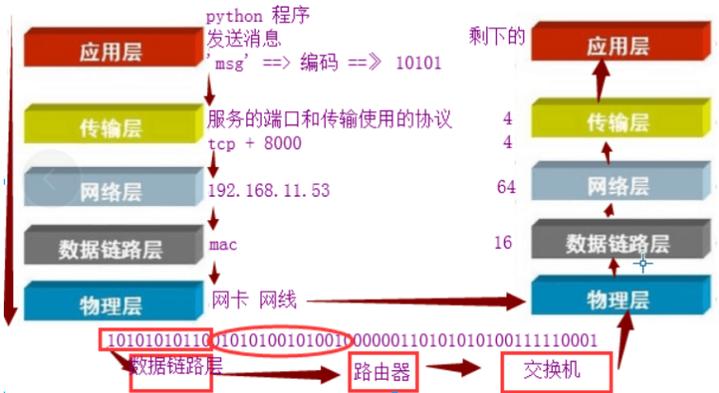
Key Concepts
- IP Address: A unique numerical label for a device on a network (e.g.,
168.1.10or0.0.1for the local machine). - Port: A 16-bit number that helps identify a specific process or service on a machine. Ports range from 0 to 65535. Common examples:
80for HTTP,443for HTTPS,22for SSH. - Protocol: The set of rules for communication. We'll focus on TCP (reliable, connection-oriented) and UDP (fast, connectionless).
- TCP (Transmission Control Protocol): Like a phone call. You establish a connection, talk, and then hang up. It guarantees that data arrives in the correct order. This is the most common protocol for general networking.
- UDP (User Datagram Protocol): Like sending a postcard. You just send the data and hope it arrives. It's faster but doesn't guarantee delivery or order. Good for things like video streaming or online games where speed is more important than perfect accuracy.
Key Socket Functions
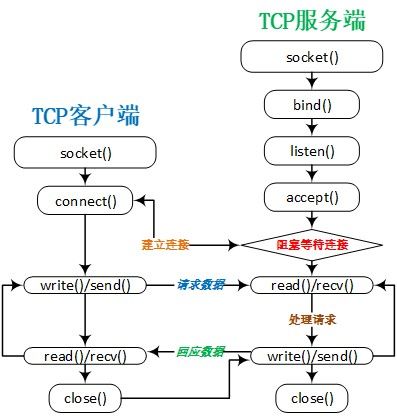
| Function | Description | Used By... |
|---|---|---|
socket.socket() |
Creates a new socket object. | Both Client & Server |
socket.bind() |
Associates the socket with a specific IP address and port. | Server |
socket.listen() |
Puts the server socket into a "listening" state, ready to accept connections. | Server |
socket.accept() |
Waits for an incoming connection and, when one arrives, accepts it and returns a new socket for communication and the client's address. | Server |
socket.connect() |
Actively tries to connect to a server at a specific IP and port. | Client |
socket.send() |
Sends data through a connected socket. | Both Client & Server |
socket.recv() |
Receives data from a connected socket. | Both Client & Server |
socket.close() |
Closes the socket, terminating the connection. | Both Client & Server |
A Simple TCP "Echo" Server & Client
This is the "Hello, World!" of socket programming. The server will listen for a connection, receive a message, and send the exact same message back to the client.
The Server (server.py)
The server's job is to bind, listen, accept, and then communicate.
# server.py
import socket
# Use '0.0.0.0' to listen on all available network interfaces
# Use '127.0.0.1' to listen only on the local machine (localhost)
HOST = '127.0.0.1'
PORT = 65432  # Port to listen on (non-privileged ports are > 1023)
# Create a socket object
# AF_INET: Use IPv4
# SOCK_STREAM: Use TCP
with socket.socket(socket.AF_INET, socket.SOCK_STREAM) as s:
    print("Socket created")
    # Bind the socket to the address and port
    s.bind((HOST, PORT))
    print(f"Socket bound to {HOST}:{PORT}")
    # Listen for incoming connections
    # The argument is the number of unaccepted connections that the system
    # will allow before refusing new connections.
    s.listen()
    print("Server is listening...")
    # Wait for an incoming connection
    # accept() returns a new socket object to use for communication and
    # a tuple representing the address of the client (host, port).
    conn, addr = s.accept()
    # Use a 'with' statement to automatically close the connection
    with conn:
        print(f"Connected by {addr}")
        while True:
            # Receive data from the client (up to 1024 bytes)
            data = conn.recv(1024)
            if not data:
                # If recv() returns an empty object, the client has closed the connection
                break
            print(f"Received from client: {data.decode('utf-8')}")
            # Echo the received data back to the client
            conn.sendall(data)
            print("Echoed data back to client")
print("Server has closed the connection.")
The Client (client.py)
The client's job is to connect, send, and receive.
# client.py
import socket
HOST = '127.0.0.1'  # The server's hostname or IP address
PORT = 65432        # The port used by the server
with socket.socket(socket.AF_INET, socket.SOCK_STREAM) as s:
    print("Client socket created")
    # Connect to the server
    s.connect((HOST, PORT))
    print(f"Connected to server at {HOST}:{PORT}")
    # Message to send
    message = b"Hello, server! This is a test message."
    print(f"Sending message: {message.decode('utf-8')}")
    # Send the message to the server
    s.sendall(message)
    # Look for the response
    data = s.recv(1024)
print(f"Received from server: {data.decode('utf-8')}")
How to Run It
-
Save the two files as
server.pyandclient.py. (图片来源网络,侵删)
 -
Open two terminal windows.
-
In the first terminal, run the server:
python server.py
You should see:
Socket created
Socket bound to 127.0.0.1:65432
Server is listening...
The server will now be waiting and will not proceed until a client connects.
-
In the second terminal, run the client:
python client.py
You should see:
Client socket created Connected to server at 127.0.0.1:65432 Sending message: Hello, server! This is a test message. Received from server: Hello, server! This is a test message. -
Now, look back at the first terminal (the server). You will see:
Connected by ('127.0.0.1', 54321)  # Port number will vary
Received from client: Hello, server! This is a test message.
Echoed data back to client
Server has closed the connection.
A More Robust Server (Handling Multiple Clients)
The simple server above can only handle one client at a time. It stops listening after the first connection is closed. To handle multiple clients, you need to run the accept()-recv()-send() logic in a loop.
Here's an improved server that can handle multiple clients sequentially.
# robust_server.py
import socket
HOST = '127.0.0.1'
PORT = 65432
with socket.socket(socket.AF_INET, socket.SOCK_STREAM) as s:
    s.bind((HOST, PORT))
    s.listen()
    print(f"Server listening on {HOST}:{PORT}")
    while True:  # Main loop to accept connections
        # This will block until a new connection arrives
        conn, addr = s.accept()
        with conn:
            print(f"Connected by {addr}")
            while True:
                data = conn.recv(1024)
                if not data:
                    break
                print(f"Received from {addr}: {data.decode('utf-8')}")
                conn.sendall(data)
            print(f"Connection with {addr} closed.")
To see this in action, you can run client.py multiple times in different terminals. The robust_server.py will handle them one after the other.
UDP Sockets (Connectionless)
UDP is much simpler because there's no concept of a "connection." You just send packets to an address.
UDP Server (udp_server.py)
# udp_server.py
import socket
HOST = '127.0.0.1'
PORT = 65433
# SOCK_DGRAM for UDP
with socket.socket(socket.AF_INET, socket.SOCK_DGRAM) as s:
    s.bind((HOST, PORT))
    print(f"UDP Server listening on {HOST}:{PORT}")
    while True:
        # recvfrom() is the UDP equivalent of recv()
        # It returns the data and the client's address
        data, addr = s.recvfrom(1024)
        print(f"Received from {addr}: {data.decode('utf-8')}")
        # sendto() is the UDP equivalent of send()
        # You must provide the address to send to
        s.sendto(data, addr)
        print(f"Echoed data back to {addr}")
UDP Client (udp_client.py)
# udp_client.py
import socket
HOST = '127.0.0.1'
PORT = 65433
# SOCK_DGRAM for UDP
with socket.socket(socket.AF_INET, socket.SOCK_DGRAM) as s:
    message = b"Hello, UDP Server!"
    print(f"Sending message: {message.decode('utf-8')}")
    # sendto() requires the address
    s.sendto(message, (HOST, PORT))
    # recvfrom() is used to get the response
    data, addr = s.recvfrom(1024)
print(f"Received from {addr}: {data.decode('utf-8')}")
Notice how UDP doesn't have listen() or accept(). It's a "fire-and-forget" model, which makes it faster but less reliable.
Important Considerations
- Encoding/Decoding: Sockets send and receive raw bytes (
bytes), not strings (str). You must encode your string data into bytes before sending (e.g.,my_string.encode('utf-8')) and decode it back into a string after receiving (e.g.,received_bytes.decode('utf-8')). - Blocking Calls: Functions like
accept()andrecv()are blocking. This means your program will pause and wait until an event occurs (a connection is made, data is received). For advanced applications, you'd use non-blocking sockets or asynchronous I/O (likeasyncio). - Error Handling: The examples above use
withstatements, which automatically handle closing the socket, even if errors occur. For more complex error handling, you should wrap socket operations intry...exceptblocks. - Security: These basic examples are not secure. They are vulnerable to many attacks. For real-world applications, especially those exposed to the internet, you should use TLS/SSL to encrypt your connections. Python's
sslmodule can be used to "wrap" your sockets for secure communication.