Of course! Writing ASCII text in Python can mean a few different things, from simply printing text to creating stylized "ASCII art" or converting characters to their underlying ASCII codes.
Here’s a complete guide covering the most common interpretations.
The Basics: Printing Standard ASCII Text
Standard text files, Python source code, and most strings you use are already in ASCII (or a superset like UTF-8 that's fully compatible with ASCII). The simplest way to "write" ASCII is to print it to the console or save it to a file.
Printing to the Console
This is the most straightforward method. Python's print() function outputs text, which is by default in ASCII.
# A simple ASCII string
message = "Hello, World! This is ASCII."
# Print it to the console
print(message)
Output:
Hello, World! This is ASCII.Writing to a Text File
To save your ASCII text to a file, you use Python's built-in file handling. The key is to open the file in write mode ('w') and specify the encoding as 'ascii'.
# The text we want to write
ascii_text = "This is a line of ASCII text.\nAnd this is a second line."
# The file path where we want to save it
file_path = "my_ascii_file.txt"
# Open the file in write mode ('w') with ASCII encoding
# The 'with' statement ensures the file is automatically closed
with open(file_path, 'w', encoding='ascii') as f:
    f.write(ascii_text)
print(f"Successfully wrote ASCII text to {file_path}")
After running this, a file named my_ascii_file.txt will be created with the following content:
This is a line of ASCII text.
And this is a second line.
Creating ASCII Art
ASCII art is the practice of creating pictures using only printable ASCII characters. Python is great for generating this.
Method A: Hardcoding a Multi-line String
For simple, static art, you can just use a multi-line string enclosed in triple quotes ( or ).

ascii_cat = """
 /\\_/\\
( o.o )
 > ^ <
"""
print(ascii_cat)
Output:
 /\_/\
( o.o )
 > ^ <
Method B: Generating Art Programmatically
For more complex or dynamic art, you can use loops and string operations.
Example: Drawing a Diamond
def draw_diamond(size):
    """Draws a diamond shape using asterisks."""
    if size <= 0:
        return
    # Top half of the diamond
    for i in range(1, size + 1):
        # Calculate leading spaces
        spaces = " " * (size - i)
        # Calculate asterisks
        stars = "*" * (2 * i - 1)
        print(spaces + stars)
    # Bottom half of the diamond
    for i in range(size - 1, 0, -1):
        # Calculate leading spaces
        spaces = " " * (size - i)
        # Calculate asterisks
        stars = "*" * (2 * i - 1)
        print(spaces + stars)
# Draw a diamond of size 5
draw_diamond(5)
Output:
Converting Characters to ASCII Codes
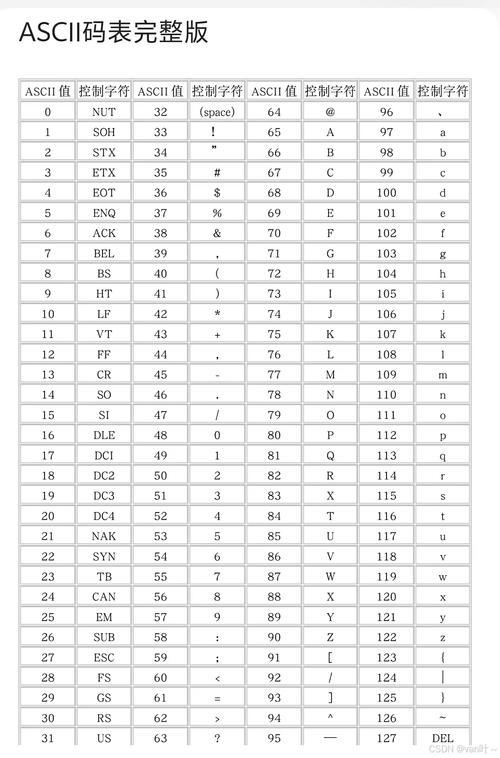
Sometimes you might want to get the actual numeric ASCII value of a character. This is done with the built-in ord() function. To convert back from a number to a character, you use chr().
Using ord() and chr()
# Get the ASCII code for a character
char_a = 'a'
ascii_code_a = ord(char_a)
print(f"The ASCII code for '{char_a}' is {ascii_code_a}")
# Get the ASCII code for a number (it's treated as a character)
char_5 = '5'
ascii_code_5 = ord(char_5)
print(f"The ASCII code for '{char_5}' is {ascii_code_5}")
# Convert an ASCII code back to a character
code = 65
char_from_code = chr(code)
print(f"The character for ASCII code {code} is '{char_from_code}'")
Output:
The ASCII code for 'a' is 97
The ASCII code for '5' is 53
The character for ASCII code 65 is 'A'
Converting an Entire String to ASCII Codes
You can use a list comprehension to convert every character in a string.
message = "Python"
ascii_codes = [ord(char) for char in message]
print(f"Original message: {message}")
print(f"ASCII codes: {ascii_codes}")
Output:
Original message: Python
ASCII codes: [80, 121, 116, 104, 111, 110]
Important: Handling Non-ASCII Characters
When you explicitly use the 'ascii' encoding, Python will raise an error if it encounters a character that isn't in the ASCII set (like , , , or ).
# This will cause an error!
non_ascii_text = "Héllö, Wörld!"
try:
    with open("error_file.txt", 'w', encoding='ascii') as f:
        f.write(non_ascii_text)
except UnicodeEncodeError as e:
    print(f"Error: {e}")
    print("Cannot write because 'é' and 'ö' are not valid ASCII characters.")
How to handle this:
-
Use UTF-8 (Recommended): UTF-8 is a modern encoding that can represent every character in the Unicode standard, including all ASCII characters. It's the standard for almost everything today.
# This works perfectly! with open("good_file.txt", 'w', encoding='utf-8') as f: f.write(non_ascii_text) -
Replace or Ignore Errors: If you must use ASCII and want to avoid the error, you can tell Python how to handle problematic characters.
# Replace non-ASCII characters with a placeholder '?'
with open("replaced_file.txt", 'w', encoding='ascii', errors='replace') as f:
    f.write(non_ascii_text) # Writes "H?ll?, W?rld!"
# Ignore non-ASCII characters completely
with open("ignored_file.txt", 'w', encoding='ascii', errors='ignore') as f:
    f.write(non_ascii_text) # Writes "Hll, Wrld!"
Summary
| Goal | Method | Example |
|---|---|---|
| Print simple text | Use print() |
print("Hello") |
| Save text to a file | open(file, 'w', encoding='ascii') followed by f.write(text) |
with open('f.txt', 'w', encoding='ascii') as f: f.write("data") |
| Create static ASCII art | Use a multi-line string () | cat = """ /\_/\\ ( o.o ) """ |
| Generate dynamic ASCII art | Use loops and string operations (, , print()) |
for i in range(5): print("*" * i) |
| Get a character's ASCII code | Use ord(char) |
code = ord('A') |
| Get a character from an ASCII code | Use chr(code) |
char = chr(65) |
| Handle non-ASCII characters | Use encoding='utf-8' (best practice) or use errors='replace' or errors='ignore' with encoding='ascii'' |
open(f, 'w', encoding='utf-8') |