Of course! Let's break down range(rows) in Python, starting with the basics and moving to practical examples.

The Short Answer
range(rows) is a Python function that generates a sequence of numbers starting from 0 up to (but not including) the number you provide, which in this case is rows.
It's most commonly used in a for loop to repeat a block of code a specific number of times.
Detailed Breakdown
What is range()?
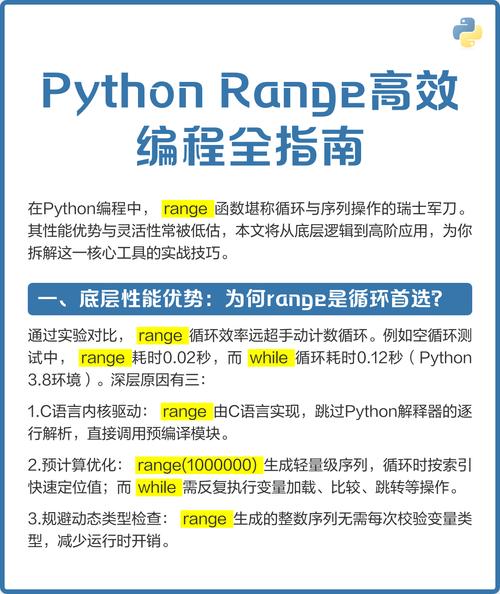
The range() function creates an immutable sequence of numbers. This means it generates numbers on-the-fly as you need them, which is very memory-efficient, especially for large numbers.
It has three primary forms:
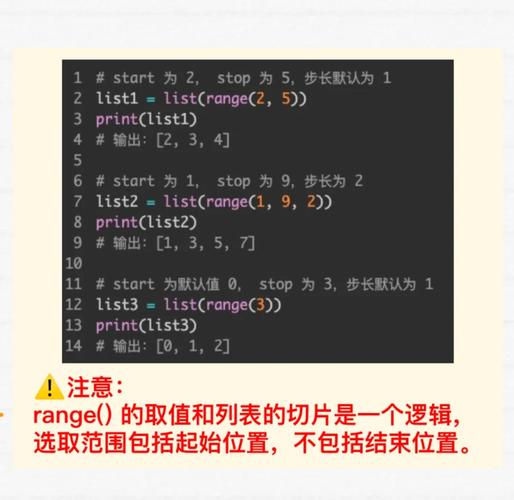
range(stop): Generates numbers from0tostop - 1.range(start, stop): Generates numbers fromstarttostop - 1.range(start, stop, step): Generates numbers fromstarttostop - 1, incrementing bystep.
Your question, range(rows), uses the first form.
How range(rows) Works
When you call range(rows), it behaves like this:
- Start Value:
0(this is the default) - Stop Value:
rows(the number you provide) - Step Value:
1(this is the default)
Crucially, the sequence stops before it reaches the stop value.
Example:
If rows = 5, then range(rows) is equivalent to range(5).
It will generate the sequence: 0, 1, 2, 3, 4
Practical Examples
Example 1: Simple Loop
This is the most common use case. You want to execute a block of code rows number of times.
# Let's say we want to print "Hello" 5 times.
rows = 5
for i in range(rows):
    print(f"Hello, this is iteration number {i}")
Output:
Hello, this is iteration number 0
Hello, this is iteration number 1
Hello, this is iteration number 2
Hello, this is iteration number 3
Hello, this is iteration number 4
Notice the loop variable i takes on the values 0, 1, 2, 3, 4.
Example 2: Iterating Over a List (with len())
A very frequent pattern is to iterate over the indices of a list. You do this by combining range() with len().
fruits = ["apple", "banana", "cherry", "date"]
# Get the number of items in the list
num_fruits = len(fruits)
# Loop through the indices of the list
for i in range(num_fruits):
    # Use the index to access each item
    print(f"Index {i}: {fruits[i]}")
Output:
Index 0: apple
Index 1: banana
Index 2: cherry
Index 3: date
Note: A more "Pythonic" way to do this is often with
for fruit in fruits:. However, usingrange(len())is essential when you need the index for other reasons (e.g., modifying the list or comparing adjacent items).
Example 3: Creating a Pattern
You can use the loop variable i to control the output, which is very powerful for creating patterns.
rows = 5
for i in range(rows):
    # In the first iteration (i=0), print 1 star.
    # In the second iteration (i=1), print 2 stars.
    # ...and so on.
    print("*" * (i + 1))
Output:
(We use i + 1 because i starts at 0, but we want to print 1 star on the first line.)
Common Pitfalls and Important Notes
range() does not create a list of numbers directly.
In Python 2, range(5) would immediately create the list [0, 1, 2, 3, 4]. In Python 3, range() is a "sequence type" that generates numbers on demand. This is more memory-efficient.
If you need an actual list, you must convert it using the list() constructor.
rows = 5
# This is a range object
range_obj = range(rows)
print(f"Type of range_obj: {type(range_obj)}")
# Output: Type of range_obj: <class 'range'>
# This is a list
number_list = list(range(rows))
print(f"Number list: {number_list}")
# Output: Number list: [0, 1, 2, 3, 4]
The loop starts at 0, not 1.
This is a common source of bugs for beginners. If you need a loop that goes from 1 to rows, you have two options:
Option A: Use range(1, rows + 1)
rows = 5
for i in range(1, rows + 1): # Stop value is now rows + 1
    print(f"Counting: {i}")
Output:
Counting: 1
Counting: 2
Counting: 3
Counting: 4
Counting: 5
Option B: Just add 1 inside the loop
rows = 5
for i in range(rows):
    print(f"Counting: {i + 1}")
This produces the same output.
Summary Table
| Code | Description | Generated Sequence (for rows=5) |
|---|---|---|
for i in range(rows): |
Loops from 0 to rows - 1. |
i will be 0, 1, 2, 3, 4 |
list(range(rows)) |
Creates a list of numbers from 0 to rows - 1. |
[0, 1, 2, 3, 4] |
range(1, rows + 1) |
Generates a sequence from 1 to rows. |
1, 2, 3, 4, 5 |



![Python reversed()怎么用?[::-1]和它有啥区别?](https://www.jerry.net.cn/zb_users/cache/thumbs/ed28fc61e3e820b31c4e5ed7c6a8b7fc-252-157-1.jpeg)