在Python中获取网关IP地址
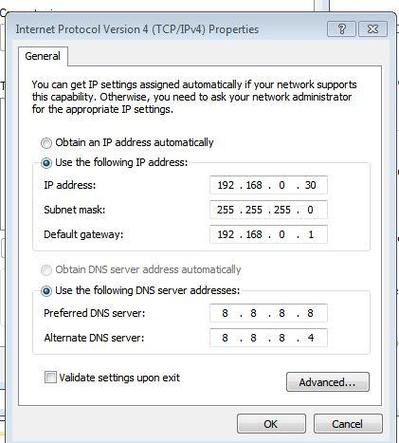
在Python中获取网关IP地址可以通过多种方式实现,以下是几种常见的方法:
(图片来源网络,侵删)
方法1:使用netifaces库(推荐)
netifaces是一个跨平台的库,可以轻松获取网络接口信息,包括网关地址。
import netifaces
def get_gateway_ip():
    try:
        # 获取默认网关
        gateway = netifaces.gateways()['default'][netifaces.AF_INET][0]
        return gateway
    except (KeyError, IndexError):
        return None
gateway_ip = get_gateway_ip()
if gateway_ip:
    print(f"网关IP地址: {gateway_ip}")
else:
    print("无法获取网关IP地址")
首先需要安装该库:
pip install netifaces
方法2:使用subprocess执行系统命令
可以通过执行系统命令来获取网关信息,然后在Python中解析输出。
在Windows上:
import subprocess
def get_gateway_ip_windows():
    try:
        # 执行route print命令
        result = subprocess.run(['route', 'print'], capture_output=True, text=True, check=True)
        # 解析输出获取网关
        for line in result.stdout.split('\n'):
            if '0.0.0.0' in line:
                parts = line.split()
                return parts[2]  # 网关IP在第三列
    except (subprocess.CalledProcessError, IndexError):
        return None
gateway_ip = get_gateway_ip_windows()
if gateway_ip:
    print(f"网关IP地址: {gateway_ip}")
else:
    print("无法获取网关IP地址")
在Linux/macOS上:
import subprocess
def get_gateway_ip_linux():
    try:
        # 执行ip route命令
        result = subprocess.run(['ip', 'route'], capture_output=True, text=True, check=True)
        # 解析输出获取默认网关
        for line in result.stdout.split('\n'):
            if 'default via' in line:
                parts = line.split()
                return parts[2]  # 网关IP在第三列
    except (subprocess.CalledProcessError, IndexError):
        return None
gateway_ip = get_gateway_ip_linux()
if gateway_ip:
    print(f"网关IP地址: {gateway_ip}")
else:
    print("无法获取网关IP地址")
方法3:使用psutil库
psutil是一个跨平台的库,可以获取系统和进程信息,包括网络信息。
(图片来源网络,侵删)
import psutil
def get_gateway_ip_psutil():
    try:
        # 获取网络接口信息
        gateways = psutil.net_if_addrs()
        # 获取默认网关
        default_gateway = psutil.net_if_addrs()['default']
        if default_gateway:
            return default_gateway[0].address
    except (KeyError, IndexError):
        return None
gateway_ip = get_gateway_ip_psutil()
if gateway_ip:
    print(f"网关IP地址: {gateway_ip}")
else:
    print("无法获取网关IP地址")
首先需要安装该库:
pip install psutil
注意事项
- 不同操作系统获取网关的方法可能不同,上述方法需要根据实际环境选择
- 某些方法可能需要管理员/root权限才能获取准确信息
- 在多网卡环境中,可能需要额外处理才能获取正确的网关
方法中,netifaces是最通用和推荐的方法,因为它跨平台且API简单直接。
(图片来源网络,侵删)