Of course! Using a switch statement with an enum is one of the most common and powerful features in Java. It makes your code more readable, type-safe, and less error-prone than using if-else if chains with magic strings or numbers.
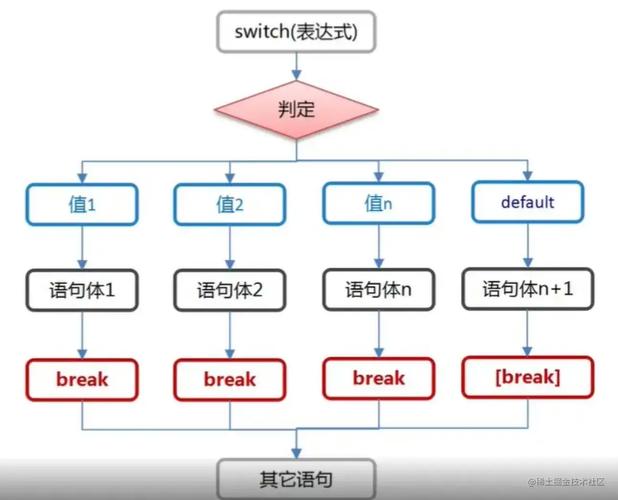
Here’s a complete guide, from the basics to best practices.
The Basics: A Simple Example
Let's start with a simple enum and a switch statement to handle its different values.
Step 1: Define the Enum
First, create an enum. By convention, enum names are singular and use UPPER_CASE_SNAKE_CASE.
// File: Day.java
public enum Day {
    MONDAY,
    TUESDAY,
    WEDNESDAY,
    THURSDAY,
    FRIDAY,
    SATURDAY,
    SUNDAY
}
Step 2: Use the Enum in a Switch
Now, let's write a method that uses a switch statement to do something based on the Day.

// File: DayPlanner.java
public class DayPlanner {
    public String getTaskForDay(Day day) {
        // The switch expression must be of type Day or an enum type.
        switch (day) {
            case MONDAY:
                return "Start the week with a team meeting.";
            case TUESDAY:
                return "Work on project documentation.";
            case WEDNESDAY:
                return "Mid-week code review.";
            case THURSDAY:
                return "Client presentation prep.";
            case FRIDAY:
                return "Wrap up the week and plan for Monday.";
            // The compiler will warn you if you forget a case!
            // This is a huge benefit of using enums with switch.
            case SATURDAY:
                return "Enjoy the weekend!";
            case SUNDAY:
                return "Relax and recharge.";
        }
        // This line is required by the compiler if the switch doesn't cover all cases.
        // However, since our enum is exhaustive, this line is actually unreachable.
        // We can use a 'default' case instead to make it cleaner.
        return "Invalid day.";
    }
    // A better way with a default case
    public String getTaskForDayWithDefault(Day day) {
        switch (day) {
            case MONDAY:
                return "Start the week with a team meeting.";
            case TUESDAY:
                return "Work on project documentation.";
            case WEDNESDAY:
                return "Mid-week code review.";
            case THURSDAY:
                return "Client presentation prep.";
            case FRIDAY:
                return "Wrap up the week and plan for Monday.";
            case SATURDAY:
            case SUNDAY:
                return "Enjoy your weekend!";
            default:
                // This handles any future additions to the enum if we forget to add a case.
                return "No specific task for this day.";
        }
    }
}
Key Takeaways:
- Type Safety: You can't accidentally pass a string like
"Munday"to thegetTaskForDaymethod. The compiler will catch it. - Compiler Warnings: If you add a new value to the
Dayenum (e.g.,HOLIDAY) and forget to add acasefor it, the compiler will generate an error, preventing bugs. - Readability: The
switchstatement is very clear and concise for handling multiple cases of a single type.
Advanced: Using enum with Methods and Fields
Enums can have their own fields, constructors, and methods. This is where they become incredibly powerful. Let's enhance our Day enum.
Step 1: Enhance the Enum with Fields and Methods
We can add a isWeekend property and a method to check it.
// File: Day.java
public enum Day {
    // Each enum constant can have arguments, which are passed to the constructor.
    MONDAY(false),
    TUESDAY(false),
    WEDNESDAY(false),
    THURSDAY(false),
    FRIDAY(false),
    SATURDAY(true),
    SUNDAY(true);
    // A field to store the property
    private final boolean isWeekend;
    // The constructor is private by default
    Day(boolean isWeekend) {
        this.isWeekend = isWeekend;
    }
    // A public getter method
    public boolean isWeekend() {
        return isWeekend;
    }
}
Step 2: Use the Enhanced Enum in a Switch
Now, our switch can use the methods of the enum.
// File: DayPlanner.java
public class DayPlanner {
    public String getWeekendStatus(Day day) {
        switch (day) {
            case SATURAY:
            case SUNDAY:
                return "It's the weekend! Time to relax.";
            default:
                // The 'default' case now only covers weekdays.
                return "It's a weekday. Time to work.";
        }
    }
    // Or, even better, we can use the enum's method directly,
    // which might be more readable than a switch.
    public String getWeekendStatusUsingMethod(Day day) {
        if (day.isWeekend()) {
            return "It's the weekend! Time to relax.";
        } else {
            return "It's a weekday. Time to work.";
        }
    }
}
Modern Java: switch Expressions (Java 14+)
Java 14 introduced switch expressions, which are more concise than switch statements. They can return a value directly and don't need break statements or a default block at the end.
The Old Way (switch statement)
public String getTaskForDay(Day day) {
    String task;
    switch (day) {
        case MONDAY -> task = "Start the week with a team meeting.";
        case TUESDAY -> task = "Work on project documentation.";
        case WEDNESDAY -> task = "Mid-week code review.";
        case THURSDAY -> task = "Client presentation prep.";
        case FRIDAY -> task = "Wrap up the week and plan for Monday.";
        case SATURDAY, SUNDAY -> task = "Enjoy your weekend!";
        default -> task = "No specific task for this day.";
    }
    return task;
}
The Modern Way (switch expression)
This is much cleaner and less verbose.
public String getTaskForDay(Day day) {
    return switch (day) {
        case MONDAY -> "Start the week with a team meeting.";
        case TUESDAY -> "Work on project documentation.";
        case WEDNESDAY -> "Mid-week code review.";
        case THURSDAY -> "Client presentation prep.";
        case FRIDAY -> "Wrap up the week and plan for Monday.";
        case SATURDAY, SUNDAY -> "Enjoy your weekend!";
        default -> "No specific task for this day.";
    };
}
Key Differences:
- Syntax: Uses
->instead of and doesn't requirebreak. - Value: The entire
switchis an expression that evaluates to a single value. yieldkeyword: If your logic for a case is more complex than a single expression, you can use theyieldkeyword to return a value.
Example with yield
public String getDetailedTask(Day day) {
    return switch (day) {
        case MONDAY -> {
            String meetingTime = "9:00 AM";
            yield "Start the week with a team meeting at " + meetingTime;
        }
        case TUESDAY, WEDNESDAY, THURSDAY -> "Focus on deep work tasks.";
        case FRIDAY -> {
            String reminder = "Don't forget to submit timesheet!";
            yield "Wrap up the week. " + reminder;
        }
        case SATURDAY, SUNDAY -> "Enjoy your weekend!";
    };
}
Best Practices
- Prefer
switchExpressions: If you're using Java 14 or newer, default toswitchexpressions for their conciseness and clarity. - Always Handle All Cases: The compiler is your friend. It will warn you if you don't handle all enum constants. If you add a new constant and forget a case, the code won't compile. This is a massive safety net.
- Use a
defaultCase for Extensibility: While the compiler forces you to handle all current cases, adding adefaultcase is good practice. It makes your code more robust if the enum is extended in the future and you forget to update this specificswitch. - Consider Alternatives: For simple boolean checks (like
day.isWeekend()), a simpleifstatement is often more readable than aswitch. Useswitchwhen you have multiple distinct actions to perform based on the enum value. - Use Enums for Constants: Always prefer enums over
public static finalstring or integer constants. Enums are type-safe, self-documenting, and can carry behavior (methods).