Of course! Here is a comprehensive guide to using AES encryption in Python on Windows. We'll cover the best practices, the recommended libraries, and complete, runnable examples.
The Golden Rule: Use a Well-Vetted Library
Do not try to implement AES encryption yourself. The algorithms are complex, and a small mistake can render your encryption insecure or useless. Always use a reputable, well-maintained library.
The de-facto standard for cryptography in Python is the pycryptodome library. It's a fork of the original pycrypto library, which is no longer maintained.
Step 1: Installation
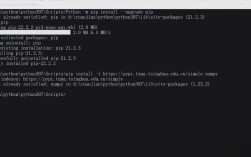
First, you need to install the library. Open a command prompt or PowerShell in Windows and run:
pip install pycryptodome
Step 2: Choosing the Right AES Mode
AES is a symmetric block cipher, meaning it encrypts data in fixed-size blocks (128 bits). To encrypt data longer than a single block, you need a "mode of operation." The choice of mode is critical for security.
| Mode | Security on Windows/Python | Recommendation | Notes |
|---|---|---|---|
| ECB (Electronic Codebook) | INSECURE | AVOID | Encrypts identical blocks of plaintext into identical blocks of ciphertext. Patterns in the data are preserved, making it very weak. |
| CBC (Cipher Block Chaining) | Good | Acceptable | Requires an Initialization Vector (IV). The IV does not need to be secret but must be unique for every encryption with the same key. |
| CTR (Counter) | Good | Excellent | Turns AES into a stream cipher. Requires a Nonce (Number used once). Very fast and allows parallel encryption. |
| GCM (Galois/Counter Mode) | Excellent | HIGHLY RECOMMENDED | The modern standard. It provides both confidentiality (encryption) and authenticity (integrity checking via a tag). Requires a Nonce. |
For this guide, we'll focus on AES-GCM, as it's the most secure and practical choice for new applications.
Step 3: AES-GCM Example (Recommended)
AES-GCM is an Authenticated Encryption with Associated Data (AEAD) cipher. This means it not only encrypts the data but also produces a "tag" that you can use to verify the data hasn't been tampered with.
Key Concepts:
- Key (32 bytes): A secret value used for encryption and decryption. It must be kept secret. For high security, it should be 256 bits (32 bytes).
- Nonce (12 bytes): A value that must be unique for every single encryption performed with the same key. It does not need to be secret. 12 bytes is the standard and recommended size.
- Tag (16 bytes): An authentication code generated during encryption. You must store this tag and provide it during decryption to verify the data's integrity.
Complete Example: Encrypt and Decrypt a String
This script demonstrates how to encrypt a string and then decrypt it back.
from Crypto.Cipher import AES
from Crypto.Random import get_random_bytes
import base64
# --- ENCRYPTION ---
# 1. Define your secret key.
#    In a real application, load this from a secure location (e.g., environment variable, key management service).
#    NEVER hardcode a key in production code. This key is for demonstration only.
key = get_random_bytes(32) # 256-bit key (32 bytes)
# 2. Define the data you want to encrypt
data_to_encrypt = b"This is a secret message that needs to be protected."
# 3. Generate a unique Nonce (Number used once)
#    The nonce must be unique for every encryption with the same key.
nonce = get_random_bytes(12) # 12 bytes is standard for GCM
# 4. Create the AES-GCM cipher object
cipher = AES.new(key, AES.MODE_GCM, nonce=nonce)
# 5. Encrypt the data and get the authentication tag
#    The encrypt_and_digest method performs encryption and returns the ciphertext and the tag.
ciphertext, tag = cipher.encrypt_and_digest(data_to_encrypt)
# For storage or transmission, it's common to combine nonce, tag, and ciphertext
# We'll encode them in base64 for easy handling (e.g., saving to a file or sending over JSON)
encrypted_data = {
    'nonce': base64.b64encode(nonce).decode('utf-8'),
    'tag': base64.b64encode(tag).decode('utf-8'),
    'ciphertext': base64.b64encode(ciphertext).decode('utf-8')
}
print("--- Encryption Successful ---")
print(f"Original Data: {data_to_encrypt.decode('utf-8')}")
print(f"Key (hex): {key.hex()}")
print(f"Nonce (hex): {nonce.hex()}")
print(f"Tag (hex): {tag.hex()}")
print(f"Ciphertext (hex): {ciphertext.hex()}")
print(f"Combined Encrypted Data: {encrypted_data}")
print("\n" + "="*50 + "\n")
# --- DECRYPTION ---
# To decrypt, you need the key, nonce, tag, and ciphertext.
# We'll use the variables from the encryption step.
# In a real app, you would load these from storage.
# 1. Decode the base64 data back to bytes
nonce_decoded = base64.b64decode(encrypted_data['nonce'])
tag_decoded = base64.b64decode(encrypted_data['tag'])
ciphertext_decoded = base64.b64decode(encrypted_data['ciphertext'])
# 2. Create a new AES-GCM cipher object for decryption
#    You MUST use the same key and nonce.
cipher_decrypt = AES.new(key, AES.MODE_GCM, nonce=nonce_decoded)
# 3. Decrypt the data and verify the tag
#    The decrypt_and_verify method will decrypt the data.
#    If the tag is incorrect, it will raise a ValueError, indicating the data is corrupt or tampered with.
try:
    decrypted_data = cipher_decrypt.decrypt_and_verify(ciphertext_decoded, tag_decoded)
    print("--- Decryption Successful ---")
    print(f"Decrypted Data: {decrypted_data.decode('utf-8')}")
except (ValueError, KeyError) as e:
    print("--- DECRYPTION FAILED ---")
    print("Error: The message is corrupted or the authentication tag is invalid.")
    print(f"Exception: {e}")
Step 4: Encrypting and Decrypting a File
The process is very similar, but instead of working with in-memory strings, you'll read from and write to files.
from Crypto.Cipher import AES
from Crypto.Random import get_random_bytes
import os
# --- FILE ENCRYPTION ---
def encrypt_file(file_path, key):
    """Encrypts a file using AES-GCM."""
    # Generate a nonce for this specific encryption
    nonce = get_random_bytes(12)
    # Create cipher object
    cipher = AES.new(key, AES.MODE_GCM, nonce=nonce)
    # Read the file data
    with open(file_path, 'rb') as f:
        file_data = f.read()
    # Encrypt and get the tag
    ciphertext, tag = cipher.encrypt_and_digest(file_data)
    # Create output file path
    output_path = file_path + '.enc'
    # Write nonce, tag, and ciphertext to the new file
    with open(output_path, 'wb') as f:
        [f.write(x) for x in (nonce, tag, ciphertext)]
    print(f"File encrypted successfully: {output_path}")
    return output_path
# --- FILE DECRYPTION ---
def decrypt_file(encrypted_file_path, key):
    """Decrypts a file encrypted with AES-GCM."""
    # Read nonce, tag, and ciphertext from the encrypted file
    with open(encrypted_file_path, 'rb') as f:
        nonce, tag, ciphertext = [f.read(x) for x in (12, 16, -1)]
    # Create cipher object for decryption
    cipher = AES.new(key, AES.MODE_GCM, nonce=nonce)
    try:
        # Decrypt and verify
        decrypted_data = cipher.decrypt_and_verify(ciphertext, tag)
        # Create output file path
        output_path = encrypted_file_path.replace('.enc', '.dec')
        # Write the decrypted data to a new file
        with open(output_path, 'wb') as f:
            f.write(decrypted_data)
        print(f"File decrypted successfully: {output_path}")
        return output_path
    except (ValueError, KeyError) as e:
        print(f"Decryption failed: {e}")
        return None
# --- USAGE EXAMPLE ---
if __name__ == "__main__":
    # 1. Generate or load your secret key
    #    For this example, we generate a new one each time.
    #    In a real app, you would load it securely.
    SECRET_KEY = get_random_bytes(32)
    # 2. Create a dummy file to encrypt
    original_file = "my_secret_data.txt"
    with open(original_file, "w") as f:
        f.write("This is a secret file for AES encryption on Windows.\nIt contains sensitive information.")
    print(f"Created dummy file: {original_file}\n")
    # 3. Encrypt the file
    encrypted_file = encrypt_file(original_file, SECRET_KEY)
    # 4. Decrypt the file
    decrypted_file = decrypt_file(encrypted_file, SECRET_KEY)
    # 5. Clean up (optional)
    # os.remove(original_file)
    # os.remove(encrypted_file)
    # if decrypted_file:
    #     os.remove(decrypted_file)
Important Security Considerations for Windows
-
Key Management is 90% of the Security: The
pycryptodomelibrary is excellent at the crypto itself, but it can't help you manage your keys. Storing a secret key in your source code is a major security risk.- Bad:
key = b'my-super-secret-key-that-is-too-short' - Better: Load the key from an environment variable.
- Best: Use a dedicated Key Management Service (KMS) like Azure Key Vault, AWS KMS, or a self-hosted solution like HashiCorp Vault.
- Bad:
-
Use
os.urandomfor Nonces/IVs: WhileCrypto.Random.get_random_bytes()is excellent, Python's built-inos.urandom()is also cryptographically secure and is often used for generating nonces and salts.import os nonce = os.urandom(12) # Equivalent to get_random_bytes(12)
-
Error Handling is Crucial: Notice the
try...except ValueErrorblock in the decryption examples. If the authentication tag doesn't match, it means the data was tampered with. Your application must handle this case securely, for example, by not trusting any part of the decrypted data and potentially logging the security event. -
File Permissions: When creating encrypted files on Windows, be mindful of file permissions. Ensure that only authorized users or services can read the encrypted files.