Of course! This is a fundamental concept in Java programming, and understanding it is crucial for writing robust, internationalized applications.
Let's break down the relationship between String, Java, and UTF-8.
The Core Idea: A Perfect Match
In short, Java's internal String representation is based on UTF-16, but it has excellent, built-in support for UTF-8 for all input and output operations. You don't need to do any special encoding/decoding for most modern applications.
Java String (The Internal Representation)
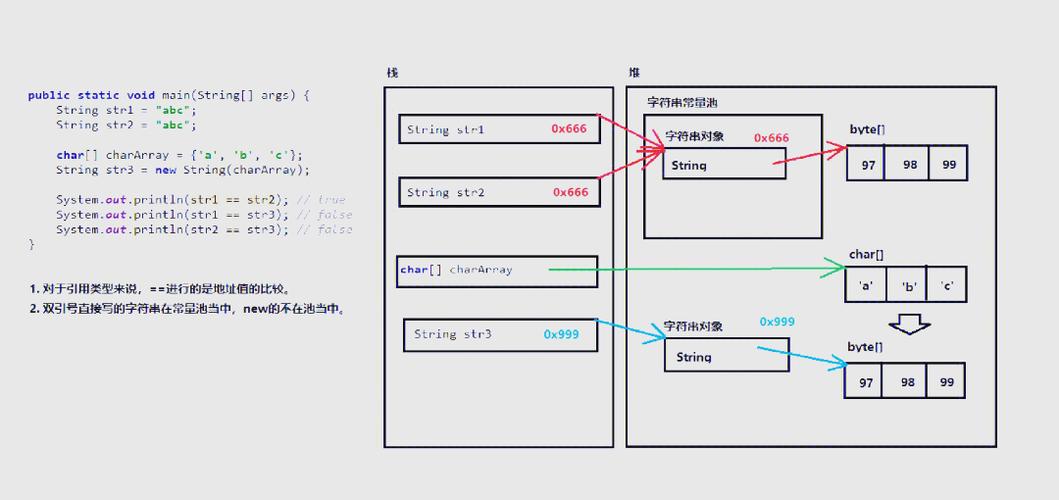
When you create a String object in Java, it doesn't store the characters as ASCII bytes. Instead, it stores them as an array of char values.
- Internal Encoding: The
chartype in Java is a fixed-width, 16-bit unsigned integer (UTF-16 code unit). - Why UTF-16? This was a design decision made in the mid-1990s to efficiently represent the vast majority of common characters (including those from Latin, Cyrillic, Greek, and many Asian scripts) using a single 16-bit value.
- The Complexity (Surrogate Pairs): Some characters, like emojis (😊) or rare CJK ideographs, fall outside the Basic Multilingual Plane (BMP). To represent these, Java uses a "surrogate pair"—a pair of
charvalues. The firstcharis a "high surrogate," and the second is a "low surrogate."
Example:
String smile = "😊"; // This is a single character, but it uses TWO char values internally.
// smile.length() returns 1 (logical character count)
// smile.codePointCount(0, smile.length()) returns 1 (code point count)
// smile.toCharArray().length returns 2 (internal char count)
Key Takeaway: You should almost never interact with the raw char[] of a String. Always use methods like length(), codePointCount(), or streams that operate on logical characters (code points).
UTF-8 (The External Representation)
UTF-8 is a variable-width character encoding. It uses:
- 1 byte to represent ASCII characters (0-127).
- 2, 3, or 4 bytes to represent other characters from the Unicode standard.
UTF-8 is the dominant encoding on the web, in Linux/macOS systems, and is the recommended default for modern applications because it's compact for ASCII text but can represent the full Unicode set.
The Bridge: How Java Handles UTF-8
This is the most important part. While Java's String is UTF-16 internally, it seamlessly converts to and from UTF-8 when you interact with the outside world (files, network, databases, etc.). This is handled by character streams.
a) Reading UTF-8 Data (e.g., from a file)
When you read text from a source that is encoded in UTF-8, you must use a Reader that is configured to decode the bytes using the UTF-8 charset.
The Old Way (Error-Prone):
// BAD! This uses the platform's default charset, which can be anything (e.g., Cp1252 on Windows).
// It will fail or produce "mojibake" (�) if the file is actually UTF-8.
try (FileReader fr = new FileReader("my-utf8-file.txt");
     BufferedReader br = new BufferedReader(fr)) {
    String line = br.readLine();
    System.out.println(line);
}
The Correct Way (Explicit UTF-8):
You wrap a FileInputStream (reads bytes) in an InputStreamReader that specifies the StandardCharsets.UTF_8 decoder.
import java.io.*;
import java.nio.charset.StandardCharsets;
// GOOD! This explicitly tells Java to read bytes and decode them as UTF-8.
try (InputStream is = new FileInputStream("my-utf8-file.txt");
     InputStreamReader isr = new InputStreamReader(is, StandardCharsets.UTF_8);
     BufferedReader br = new BufferedReader(isr)) {
    String line;
    while ((line = br.readLine()) != null) {
        // 'line' is now a proper Java String (UTF-16)
        System.out.println(line);
    }
} catch (IOException e) {
    e.printStackTrace();
}
b) Writing UTF-8 Data (e.g., to a file)
When you write a String to a destination, you must use a Writer that is configured to encode the characters into UTF-8 bytes.
The Old Way (Error-Prone):
// BAD! Uses the platform's default charset. The file might not be readable on other systems.
try (FileWriter fw = new FileWriter("output.txt");
     BufferedWriter bw = new BufferedWriter(fw)) {
    bw.write("Hello, 世界!"); // "World" in Chinese
}
The Correct Way (Explicit UTF-8):
You wrap a FileOutputStream (writes bytes) in an OutputStreamWriter that specifies the StandardCharsets.UTF_8 encoder.
import java.io.*;
import java.nio.charset.StandardCharsets;
// GOOD! This explicitly tells Java to take the String and encode it as UTF-8 bytes.
try (OutputStream os = new FileOutputStream("output-utf8.txt");
     OutputStreamWriter osw = new OutputStreamWriter(os, StandardCharsets.UTF_8);
     BufferedWriter bw = new BufferedWriter(osw)) {
    String text = "Hello, 世界! 😊";
    bw.write(text);
} catch (IOException e) {
    e.printStackTrace();
}
Java 9+: StandardCharsets is King
Since Java 7, StandardCharsets has provided UTF_8, UTF_16, and ISO_8859_1 as constants. Always use these constants instead of string literals like "UTF-8". This prevents typos and makes your code more efficient (the JVM can optimize better with constants).
- Good:
StandardCharsets.UTF_8 - Bad:
"UTF-8"(can throwUnsupportedCharsetExceptionif mistyped)
Practical Examples
Example 1: Creating a String and Printing it
The System.out.println() method is smart. It takes your UTF-16 String and encodes it using the platform's default console encoding to display it. This usually works fine for basic ASCII but can fail for complex characters if the console isn't configured correctly.
String java = "Java";
String world = "世界"; // World in Chinese
String emoji = "😊";
System.out.println(java + " " + world + " " + emoji);
// The JVM handles the conversion to the console's encoding for you.
Example 2: Reading from a Network Request (e.g., with an HTTP Client)
Modern HTTP libraries (like the one in Java 11+) handle this for you. When you get the response body as a string, the library has already read the bytes from the network (which are typically UTF-8 per the HTTP Content-Type header) and decoded them into a Java String for you.
// This is a conceptual example using Java 11's HttpClient
import java.net.URI;
import java.net.http.HttpClient;
import java.net.http.HttpRequest;
import java.net.http.HttpResponse;
HttpClient client = HttpClient.newHttpClient();
HttpRequest request = HttpRequest.newBuilder()
        .uri(URI.create("https://example.com/api/data"))
        .build();
HttpResponse<String> response = client.send(request, HttpResponse.BodyHandlers.ofString());
// The 'body()' is already a proper Java String!
// The HttpClient automatically used the charset from the "Content-Type" header,
// or defaulted to UTF-8. You don't have to worry about the byte-to-char conversion.
System.out.println(response.body());
Summary Table
| Context | Internal Representation | External Representation | How Java Bridges the Gap |
|---|---|---|---|
String Object |
UTF-16 (array of char) |
N/A | The String class is an immutable sequence of UTF-16 code units. |
| File I/O | N/A | UTF-8 bytes | Use InputStreamReader(..., StandardCharsets.UTF_8) to read. Use OutputStreamWriter(..., StandardCharsets.UTF_8) to write. |
| Console Output | UTF-16 | Platform-dependent | System.out encodes the String using the console's default encoding. |
| Network I/O (HTTP) | UTF-16 | UTF-8 bytes | HTTP libraries (like java.net.http) handle decoding from the Content-Type header and encoding transparently. |
| Database | UTF-16 | Varies | The JDBC driver handles the conversion based on the connection's characterEncoding property. |
Best Practices
- Be Explicit: Always specify
StandardCharsets.UTF_8when doing I/O. Never rely on the platform's default. - Don't Touch the
char[]: Treat the internalchar[]of aStringas a black box. Use methods that operate on code points (likecodePointAt(),codePointCount()) if you need to iterate over characters correctly. - Use Modern Java: If you're using Java 11+, the built-in
HttpClientandFiles.readString()/Files.writeString()make this even easier as they handle UTF-8 by default. - Validate: If you receive data from an untrusted source (e.g., user input), validate it to prevent encoding attacks. Libraries like Apache Commons Lang's
StringEscapeUtilscan help.