Of course! The term "Channel File" in Python isn't a standard, built-in concept like a CSV or JSON file. Instead, it's a general term for a file that stores information about a communication channel.
The exact structure and purpose of a "channel file" depend entirely on the context. Let's break down the most common scenarios and how to handle them in Python.
Scenario 1: A Simple Text-Based Channel List (e.g., for a Bot)
This is the most straightforward interpretation. Imagine you have a bot that needs to manage a list of chat channels (like Slack channels, Discord servers, or Telegram groups). A simple text file is a perfect way to store this list.
File: channels.txt
# My Bot's Channels
general
random-questions
announcements
dev-help
Python Code to Read the File:
def get_channels_from_file(filename):
    """Reads a list of channels from a text file, ignoring comments and empty lines."""
    channels = []
    try:
        with open(filename, 'r') as f:
            for line in f:
                # Strip whitespace from the beginning and end of the line
                line = line.strip()
                # Ignore empty lines and lines that start with a comment character
                if line and not line.startswith('#'):
                    channels.append(line)
    except FileNotFoundError:
        print(f"Error: The file '{filename}' was not found.")
        return []
    return channels
# --- Usage ---
channel_list = get_channels_from_file('channels.txt')
print(f"Channels to join: {channel_list}")
Output:
Channels to join: ['general', 'random-questions', 'announcements', 'dev-help']Scenario 2: A Configuration File for a Channel (e.g., YAML or JSON)
Here, each channel has more complex information: its name, purpose, notification settings, access level, etc. A structured format like JSON or YAML is much better than plain text.
Example using JSON
File: channel_config.json
{
  "channels": [
    {
      "name": "general",
      "purpose": "General discussion for the team",
      "notifications_enabled": true,
      "access_level": "all"
    },
    {
      "name": "dev-help",
      "purpose": "For developers to ask and answer technical questions",
      "notifications_enabled": true,
      "access_level": "dev"
    },
    {
      "name": "announcements",
      "purpose": "Official announcements from the leadership team",
      "notifications_enabled": false,
      "access_level": "all"
    }
  ]
}
Python Code to Read and Parse the JSON File:

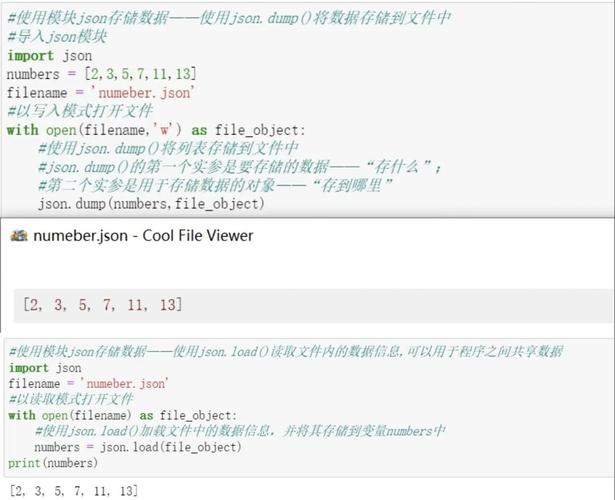
import json
def get_channel_configs(filename):
    """Loads channel configurations from a JSON file."""
    try:
        with open(filename, 'r') as f:
            data = json.load(f)
        return data['channels']
    except FileNotFoundError:
        print(f"Error: The file '{filename}' was not found.")
        return []
    except json.JSONDecodeError:
        print(f"Error: Could not decode JSON from '{filename}'.")
        return []
# --- Usage ---
channel_configs = get_channel_configs('channel_config.json')
for config in channel_configs:
    print(f"Channel: {config['name']}")
    print(f"  Purpose: {config['purpose']}")
    print(f"  Notifications: {'On' if config['notifications_enabled'] else 'Off'}")
    print("-" * 20)
Output:
Channel: general
  Purpose: General discussion for the team
  Notifications: On
--------------------
Channel: dev-help
  Purpose: For developers to ask and answer technical questions
  Notifications: On
--------------------
Channel: announcements
  Purpose: Official announcements from the leadership team
  Notifications: Off
--------------------
Scenario 3: A Channel's Data Log (e.g., Chat Messages)
In this case, the "channel file" isn't a configuration, but a log of data associated with that channel. For example, a file containing all the messages sent to a specific channel.
File: general_channel.log
[2025-10-27 10:00:01] Alice: Hello everyone!
[2025-10-27 10:01:15] Bob: Hey Alice, how's it going?
[2025-10-27 10:05:30] Alice: Pretty good! Just working on the new project.
Python Code to Parse the Log File:
This example shows how to parse each line into a structured object.
import re
from datetime import datetime
def parse_channel_log(filename):
    """Parses a channel log file into a list of message objects."""
    messages = []
    # Regex to capture timestamp, user, and message content
    # Format: [YYYY-MM-DD HH:MM:SS] User: Message
    pattern = re.compile(r"\[(.*?)\] (.*?): (.*)")
    try:
        with open(filename, 'r') as f:
            for line in f:
                match = pattern.match(line.strip())
                if match:
                    timestamp_str, user, content = match.groups()
                    # Convert string to a datetime object
                    timestamp = datetime.strptime(timestamp_str, '%Y-%m-%d %H:%M:%S')
                    messages.append({
                        "timestamp": timestamp,
                        "user": user,
                        "content": content
                    })
    except FileNotFoundError:
        print(f"Error: The file '{filename}' was not found.")
        return []
    return messages
# --- Usage ---
messages = parse_channel_log('general_channel.log')
for msg in messages:
    # Format the datetime object for a nice printout
    print(f"[{msg['timestamp'].strftime('%H:%M')}] {msg['user']}: {msg['content']}")
Output:
[10:00] Alice: Hello everyone!
[10:01] Bob: Hey Alice, how's it going?
[10:05] Alice: Pretty good! Just working on the new project.
Scenario 4: Using a Database as a "Channel File"
For large-scale applications, a simple file is not efficient. A database is the professional way to manage channel data. You would use a library like sqlite3 (for simple, file-based databases) or psycopg2/mysql-connector-python (for client-server databases).
Here's a quick example using SQLite, which is perfect for this kind of task.
import sqlite3
# 1. Create a database and a table for channels
def setup_database(db_name='channels.db'):
    conn = sqlite3.connect(db_name)
    cursor = conn.cursor()
    cursor.execute('''
        CREATE TABLE IF NOT EXISTS channels (
            id INTEGER PRIMARY KEY AUTOINCREMENT,
            name TEXT UNIQUE NOT NULL,
            purpose TEXT,
            notifications_enabled INTEGER DEFAULT 1
        )
    ''')
    # Add some sample data if the table is empty
    cursor.execute("SELECT COUNT(*) FROM channels")
    if cursor.fetchone()[0] == 0:
        cursor.execute("INSERT INTO channels (name, purpose) VALUES (?, ?)", ('general', 'General chat'))
        cursor.execute("INSERT INTO channels (name, purpose) VALUES (?, ?)", ('dev-help', 'Technical support'))
    conn.commit()
    conn.close()
# 2. Read channel data from the database
def get_channels_from_db(db_name='channels.db'):
    conn = sqlite3.connect(db_name)
    cursor = conn.cursor()
    cursor.execute("SELECT name, purpose, notifications_enabled FROM channels")
    # Fetch all results and convert to a list of dictionaries
    columns = [description[0] for description in cursor.description]
    channels = [dict(zip(columns, row)) for row in cursor.fetchall()]
    conn.close()
    return channels
# --- Usage ---
setup_database() # Run this once to create the DB
channel_data = get_channels_from_db()
print(f"Channels from database: {channel_data}")
Output:
Channels from database: [
    {'name': 'general', 'purpose': 'General chat', 'notifications_enabled': 1},
    {'name': 'dev-help', 'purpose': 'Technical support', 'notifications_enabled': 1}
]
Summary: Which one should you use?
| Use Case | Recommended File Format | Python Tools |
|---|---|---|
| Simple list of channel names | Plain Text (.txt) |
open(), for line in f, str.strip() |
| Complex configuration per channel | JSON (.json) |
json module |
| Logging or storing message history | Plain Text (.log) |
open(), re (regex), datetime |
| Large-scale, searchable, or frequently updated data | SQLite/PostgreSQL/MySQL | sqlite3, psycopg2, mysql-connector-python |