Of course! Java is one of the most popular, robust, and versatile programming languages in the world. It's been a cornerstone of enterprise-level software for decades and continues to be a top choice for new projects.
Here's a comprehensive guide to Java development, broken down into key areas.
What is Java and Why is it So Popular?
Java is a high-level, class-based, object-oriented programming language designed to have as few implementation dependencies as possible. It's often called "write once, run anywhere" (WORA) because of its platform independence.
Key Reasons for its Popularity:
- Platform Independence (JVM): Java code is compiled into an intermediate form called "bytecode," which can run on any device that has a Java Virtual Machine (JVM). This makes it incredibly portable.
- Object-Oriented (OOP): Java is built around the principles of OOP (Encapsulation, Inheritance, Polymorphism), which promotes modular, reusable, and maintainable code.
- Rich Ecosystem & Libraries: The Maven and Gradle build tools, along with the vast Maven Central repository, mean you can find a library for almost any task imaginable.
- Strong Community & Support: With millions of developers worldwide, you'll find countless tutorials, forums (like Stack Overflow), and extensive documentation.
- Performance & Scalability: The JVM is highly optimized for performance. Technologies like the Spring Framework make it easy to build large, scalable, and high-performance applications.
- Robustness & Security: Features like automatic garbage collection and strong type checking help prevent common programming errors. It also has a strong security model.
Core Concepts of Java
To start with Java, you need to grasp its fundamental building blocks:
- Syntax: C-style syntax with curly braces . It's clean and relatively easy to read.
- Object-Oriented Programming (OOP):
- Class: A blueprint for creating objects.
- Object: An instance of a class.
- Inheritance: A class can inherit fields and methods from another class.
- Polymorphism: An object can take many forms.
- Encapsulation: Bundling data (attributes) and methods that operate on the data into a single unit (a class) and restricting direct access to some of an object's components.
- Data Types:
- Primitive:
int,double,char,boolean,long,float,short,byte. - Reference/Object:
String,Arrays, and any custom class you create.
- Primitive:
- Control Flow:
if-else,switch,for,while,do-whileloops. - Methods (Functions): Blocks of code that perform a specific task and can be called multiple times.
- Exception Handling: Using
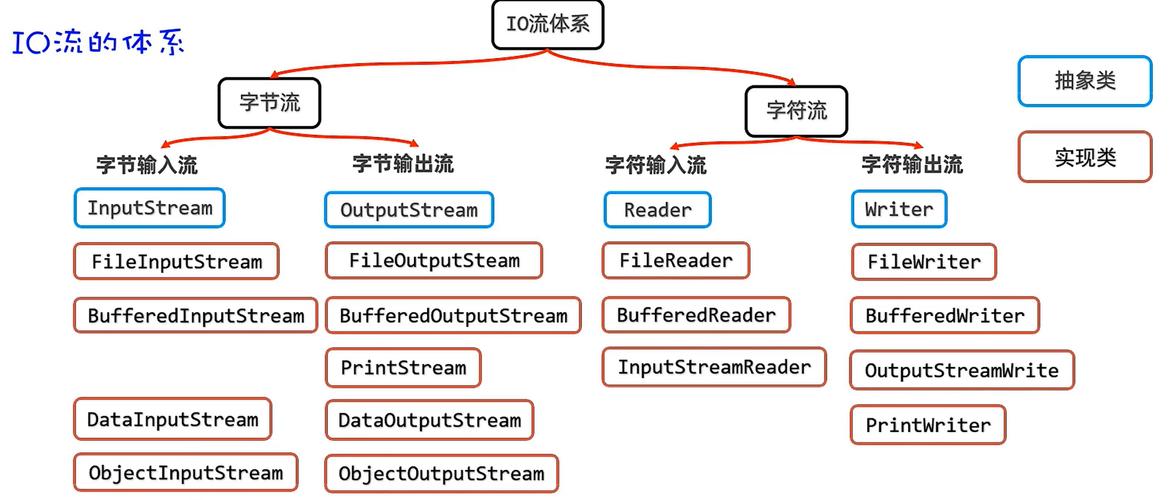
try,catch, andfinallyblocks to handle runtime errors gracefully. - Collections Framework: A powerful set of classes and interfaces for storing and manipulating groups of objects. Key interfaces are
List,Set, andMap. Common implementations includeArrayList,HashSet, andHashMap.
The Java Development Kit (JDK) & Tools
You can't write Java code without the right tools.
-
JDK (Java Development Kit): This is the core. It includes:
- JRE (Java Runtime Environment): Contains the JVM and libraries needed to run Java applications.
- Compiler (
javac): Translates your.javasource files into.classbytecode. - JVM (
java): Executes the bytecode. - Debugger, Documentation Generator (
javadoc), etc. - Popular JDKs: Oracle JDK, OpenJDK (the open-source version), Amazon Corretto, Azul Zulu.
-
IDE (Integrated Development Environment): A software application that provides comprehensive facilities for software development.
- IntelliJ IDEA: The gold standard for Java development. The Community Edition is free and incredibly powerful.
- Eclipse: A very popular, open-source IDE with a huge plugin ecosystem.
- VS Code: A lightweight, fast editor with excellent Java support via extensions (like the Extension Pack for Java).
-
Build Tools: Automate the process of compiling, testing, and packaging your code.
- Maven: The classic choice. Uses a central
pom.xmlfile to define project structure, dependencies, and build lifecycle. - Gradle: A more modern and flexible alternative. It uses a
build.gradlefile (based on Groovy or Kotlin DSL) and is known for its performance and power.
- Maven: The classic choice. Uses a central
-
Version Control: Essential for managing code changes.
- Git: The de-facto standard. Use a platform like GitHub, GitLab, or Bitbucket to host your repositories.
The Modern Java Ecosystem
Java is not a static language. Here are the key modern concepts and frameworks you need to know.
Modern Java Features (Java 8+)
- Lambda Expressions: Allow you to treat functionality as a method argument, or as a piece of code. This enables more concise and readable functional-style programming.
- Example:
(a, b) -> a + b
- Example:
- Stream API: Provides a powerful and declarative way to process sequences of elements (collections). It allows for operations like
filter,map,reduce, andforEach. Optional<T>: A container object that may or may not contain a non-null value. It's used to avoidNullPointerExceptionelegantly.varKeyword (Java 10+): Allows for local variable type inference, making code cleaner in some cases.- Example:
var list = new ArrayList<String>();
- Example:
Major Frameworks and Libraries
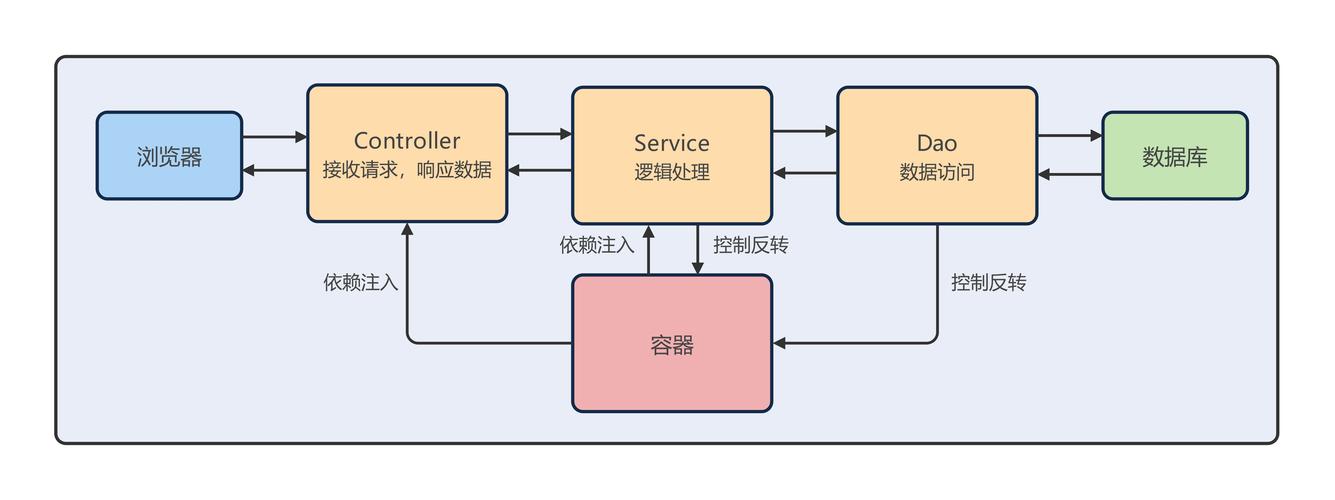
- Spring Framework: The most dominant framework in the Java ecosystem. It's a comprehensive platform for creating enterprise-grade applications.
- Spring Boot: Makes it incredibly easy to create stand-alone, production-grade Spring-based applications with minimal configuration. It uses "convention over configuration" and an embedded server (like Tomcat) so you can run your app with a simple
java -jarcommand. This is the #1 choice for new Java projects today. - Spring Data: Simplifies database access.
- Spring Security: Provides comprehensive security for your applications.
- Spring Boot: Makes it incredibly easy to create stand-alone, production-grade Spring-based applications with minimal configuration. It uses "convention over configuration" and an embedded server (like Tomcat) so you can run your app with a simple
- Jakarta EE (formerly Java EE): A set of specifications for building large-scale, multi-tiered, reliable, and secure network applications. It includes APIs for things like web services, messaging, and persistence (JPA). It's more of a specification than a single framework.
- Microservices: An architectural style where a large application is built as a suite of small, independent services. Spring Boot is the perfect technology for building microservices.
- Testing:
- JUnit 5: The standard unit testing framework.
- Mockito: A popular mocking framework for creating test doubles.
- Testcontainers: A library for integration testing that uses Docker containers to provide real dependencies (like a real database).
Learning Path for a Java Developer
Beginner
- Learn Core Java: Master syntax, OOP, data types, control flow, and collections.
- Set up your Environment: Install a JDK, an IDE (IntelliJ IDEA), and Git.
- Practice: Build small command-line applications (e.g., a calculator, a to-do list manager).
Intermediate
- Learn a Build Tool: Choose either Maven or Gradle and learn how to manage dependencies and build your project.
- Dive into Spring Boot: Build a simple REST API. This is the most practical and in-demand skill.
- Learn a Database: Understand how to connect your application to a database using JDBC or, more commonly, Spring Data JPA (which uses Hibernate under the hood).
- Learn Unit Testing: Write tests for your code using JUnit and Mockito.
Advanced
- Master Spring: Deepen your knowledge of Spring Security, Spring Cloud for microservices, and reactive programming with Spring WebFlux.
- Explore Other Paradigms: Learn about functional programming in Java.
- Performance Tuning: Understand the JVM, garbage collection, and how to profile and optimize your application's performance.
- DevOps & Deployment: Learn how to containerize your Java application with Docker and deploy it to a cloud platform like AWS, Azure, or Google Cloud.
Popular Use Cases
- Enterprise Web Applications: Large-scale backend systems (e.g., banking, e-commerce, insurance).
- Microservices: The backbone of many modern cloud-native architectures.
- Big Data: Frameworks like Apache Hadoop, Apache Spark, and Kafka are primarily written in Java and have Java APIs.
- Android Development: Java was the official language for Android for many years (though Kotlin is now preferred, Java is still widely used).
- Scientific Computing & Data Science: Libraries like Weka and Deeplearning4j use Java.
- Desktop Applications: While less common now, Swing and JavaFX can be used to build cross-platform desktop apps.
Getting Started: Your First "Hello World"
-
Install JDK and IntelliJ IDEA.
-
Create a new project in IntelliJ (select "Maven" or "Gradle" as the build system).
-
Create a
Main.javafile with the following code:public class Main { public static void main(String[] args) { // This is a comment System.out.println("Hello, World!"); } } -
Run the
mainmethod. You should see "Hello, World!" in the console.
Congratulations, you've written your first Java program! From here, the journey is all about building more complex applications and learning the powerful frameworks that make Java development so efficient.