Of course! This is a fundamental topic in Java networking. Let's break down the concepts of HTTP and Sockets in Java, from the low-level to the high-level.
The Core Relationship: Sockets vs. HTTP
Think of it like making a phone call:
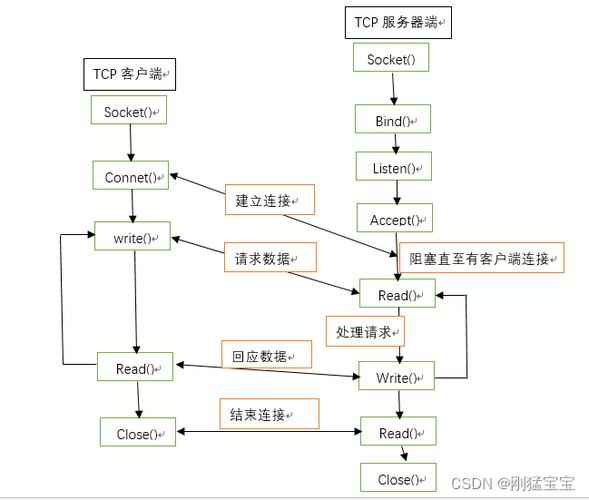
- Socket: This is the telephone. It's a low-level, two-way communication channel between two programs (a client and a server). It handles the raw data transmission (bytes) over the network. It doesn't care about the content of the data, only how to send and receive it.
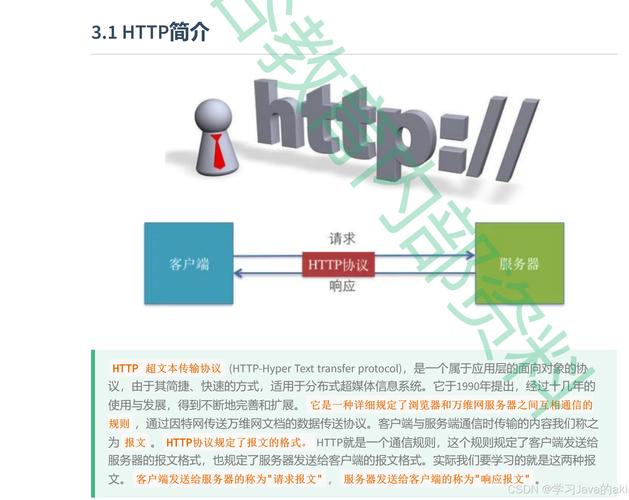
- HTTP (Hypertext Transfer Protocol): This is the language you speak on the phone. It's a high-level protocol that defines a set of rules for how a client (like a web browser) and a server should structure their messages (requests and responses). For example, an HTTP request must have a method (GET, POST), a path (
/index.html), and headers (Host: example.com).
In short: HTTP is an application protocol that often runs on top of the TCP/IP protocol suite, which uses Sockets as its fundamental endpoint for communication.
Java Sockets (The Low-Level Approach)
Java provides a robust set of classes for socket programming in the java.net package. This gives you full control but requires you to handle all the details manually, like reading/writing data streams and parsing protocols.
Key Classes:
java.net.Socket: Represents the client-side socket. It's the endpoint for communication.java.net.ServerSocket: Used by the server to listen for incoming client connections.java.net.InetAddress: Represents an IP address.java.io.InputStream/java.io.OutputStream: Used to read and write raw bytes to and from the socket.java.io.BufferedReader/java.io.PrintWriter: Wrappers around streams to make it easier to work with text (lines of strings).
Java HTTP (The High-Level Approach)
For most HTTP tasks, you don't want to manually build the request string or parse the response headers. Java provides high-level libraries that handle the HTTP protocol for you.
Key Packages & Libraries:
-
java.net.HttpURLConnection(Built-in, Standard):- The standard, built-in way to make HTTP requests since Java 1.1.
- It's a bit verbose and can be clunky to use for complex tasks, but it requires no external libraries.
- Good for simple GET and POST requests.
-
java.net.http(Java 11+, Modern):- A modern, clean, and powerful HTTP client introduced in Java 11.
- It supports HTTP/1.1 and HTTP/2, is asynchronous, and has a much more user-friendly API.
- This is the recommended approach for new applications.
-
Third-Party Libraries (Very Popular):
- Apache HttpClient: A very mature, feature-rich, and widely used library. It's the de facto standard in many enterprise applications.
- OkHttp: A modern, efficient HTTP client for Android and Java. It's known for its simplicity and performance.
Code Examples
Let's see these concepts in action.
Example 1: Low-Level Socket Server & Client
This example demonstrates a simple server that echoes back any message it receives, and a client that sends a message.
The Server (SimpleSocketServer.java)
import java.io.BufferedReader;
import java.io.IOException;
import java.io.InputStreamReader;
import java.io.PrintWriter;
import java.net.ServerSocket;
import java.net.Socket;
public class SimpleSocketServer {
    public static void main(String[] args) {
        int port = 6789; // A custom port number
        try (ServerSocket serverSocket = new ServerSocket(port)) {
            System.out.println("Server is listening on port " + port);
            // The server waits here for a client to connect
            Socket clientSocket = serverSocket.accept();
            System.out.println("Client connected: " + clientSocket.getInetAddress());
            // Set up streams to communicate with the client
            PrintWriter out = new PrintWriter(clientSocket.getOutputStream(), true);
            BufferedReader in = new BufferedReader(new InputStreamReader(clientSocket.getInputStream()));
            String inputLine;
            // Read from the client until "bye" is sent
            while ((inputLine = in.readLine()) != null) {
                System.out.println("Received from client: " + inputLine);
                if ("bye".equalsIgnoreCase(inputLine)) {
                    out.println("Goodbye!");
                    break;
                }
                // Echo the message back to the client
                out.println("Server: " + inputLine);
            }
            System.out.println("Client disconnected.");
        } catch (IOException e) {
            System.out.println("Server exception: " + e.getMessage());
            e.printStackTrace();
        }
    }
}
The Client (SimpleSocketClient.java)
import java.io.BufferedReader;
import java.io.IOException;
import java.io.InputStreamReader;
import java.io.PrintWriter;
import java.net.Socket;
import java.net.UnknownHostException;
public class SimpleSocketClient {
    public static void main(String[] args) {
        String hostname = "localhost"; // or "127.0.0.1"
        int port = 6789;
        try (Socket socket = new Socket(hostname, port);
             PrintWriter out = new PrintWriter(socket.getOutputStream(), true);
             BufferedReader in = new BufferedReader(new InputStreamReader(socket.getInputStream()));
             BufferedReader stdIn = new BufferedReader(new InputStreamReader(System.in))) {
            System.out.println("Connected to the server. Type messages (type 'bye' to exit).");
            String userInput;
            // Read from user input and send to server
            while ((userInput = stdIn.readLine()) != null) {
                out.println(userInput);
                System.out.println("Server response: " + in.readLine());
                if ("bye".equalsIgnoreCase(userInput)) {
                    break;
                }
            }
        } catch (UnknownHostException e) {
            System.err.println("Don't know about host " + hostname);
            e.printStackTrace();
        } catch (IOException e) {
            System.err.println("Couldn't get I/O for the connection to " + hostname);
            e.printStackTrace();
        }
    }
}
How to Run:
- Run
SimpleSocketServer. It will wait. - Run
SimpleSocketClient. You can now type messages in the client's console, and the server will echo them back.
Example 2: High-Level HTTP Client (Modern Java 11+)
This is how you should typically make HTTP requests in modern Java.
Using java.net.http.HttpClient
import java.net.URI;
import java.net.http.HttpClient;
import java.net.http.HttpRequest;
import java.net.http.HttpResponse;
import java.time.Duration;
public class ModernHttpClientExample {
    public static void main(String[] args) {
        // 1. Create an HttpClient
        HttpClient client = HttpClient.newBuilder()
                .version(HttpClient.Version.HTTP_2) // Use HTTP/2 if possible
                .connectTimeout(Duration.ofSeconds(10)) // Set a timeout
                .build();
        // 2. Create an HttpRequest
        HttpRequest request = HttpRequest.newBuilder()
                .uri(URI.create("https://jsonplaceholder.typicode.com/posts/1"))
                .header("Accept", "application/json")
                .GET() // This is the default, but good to be explicit
                .build();
        try {
            // 3. Send the request and get the response
            // The .send() method is synchronous (blocks until the response is received)
            HttpResponse<String> response = client.send(request, HttpResponse.BodyHandlers.ofString());
            // 4. Process the response
            System.out.println("Status Code: " + response.statusCode());
            System.out.println("Response Headers: " + response.headers());
            System.out.println("Response Body: " + response.body());
        } catch (Exception e) {
            System.err.println("Request failed: " + e.getMessage());
            e.printStackTrace();
        }
    }
}
Asynchronous Example with java.net.http
// ... (same HttpClient and HttpRequest setup as above)
        try {
            // 3. Send the request asynchronously
            // .sendAsync() returns a CompletableFuture, which is non-blocking
            client.sendAsync(request, HttpResponse.BodyHandlers.ofString())
                    .thenApply(HttpResponse::body) // Process the body when it arrives
                    .thenAccept(System.out::println) // Print the body
                    .join(); // Wait for the asynchronous operation to complete (for demo purposes)
        } catch (Exception e) {
            // ...
        }
Summary: Which One to Use?
| Scenario | Recommended Approach | Why? |
|---|---|---|
| Learning Networking Concepts | java.net.Socket |
Forces you to understand the fundamentals of streams, ports, and raw data transmission. |
| Building a Custom Protocol (e.g., a game) | java.net.Socket |
You have full control to define your own message format, not be limited by HTTP. |
| Making simple HTTP requests (quick & dirty) | java.net.HttpURLConnection |
Built-in, no dependencies. Good for simple scripts or older Java versions. |
| Building a modern application (Java 11+) | java.net.http.HttpClient |
Modern, clean, asynchronous, supports HTTP/2. The official, future-proof standard. |
| Enterprise/Complex HTTP needs | Apache HttpClient or OkHttp | More features (connection pooling, retries, interceptors), better community support, battle-tested. |