Of course! The term "Java Object Map" can refer to a few related but distinct concepts. I'll cover them all, starting with the most common one.
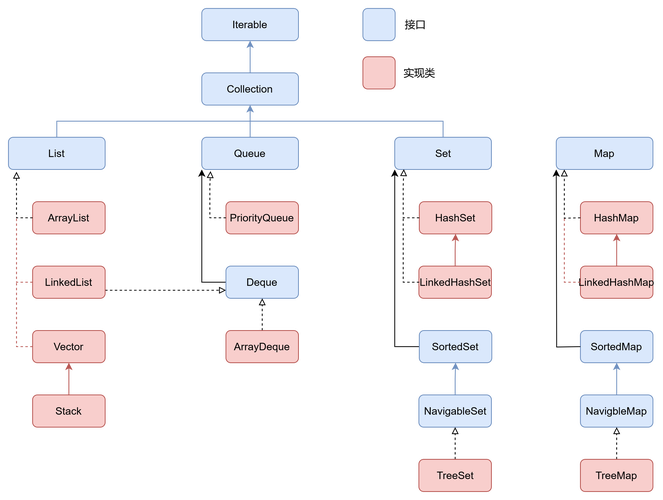
The Map Interface and its Implementations (Most Common Meaning)
This is what most developers mean when they say "object map" in Java. A Map is a collection that stores key-value pairs. It's like a dictionary or a hash map in other languages. You use a key to look up a value.
Key Characteristics of a Map:
- Key-Value Pairs: Each element is a pair: a key and a value.
- Unique Keys: Keys must be unique. If you add a value with a key that already exists, the old value is replaced.
- Fast Lookups: Maps are optimized for quickly finding a value based on its key.
Core Interfaces and Classes in the Java Collections Framework
| Interface/Class | Description | Key Characteristics | When to Use |
|---|---|---|---|
Map<K, V> |
Interface | The root interface for all map types. It defines the core methods like put(), get(), remove(), containsKey(). |
You always use this interface as the type of your map variable for flexibility. |
HashMap<K, V> |
Class | The most common implementation. Stores data in a hash table. | Default choice. Use when you need fast, unordered key-value storage. Not thread-safe. |
LinkedHashMap<K, V> |
Class | Extends HashMap. Maintains the insertion order of its elements. |
When you need the performance of a HashMap but also care about the order in which items were added. |
TreeMap<K, V> |
Class | Stores data in a tree structure (Red-Black Tree). Keys are kept in sorted order (natural order or via a Comparator). |
When you need the map's keys to be sorted. Slower than HashMap for insertions and lookups. |
Hashtable<K, V> |
Class | A legacy, thread-safe implementation. | Avoid in new code unless you need thread-safety without using ConcurrentHashMap. ConcurrentHashMap is a better modern alternative. |
ConcurrentHashMap<K, V> |
Class | A highly efficient, thread-safe implementation for concurrent applications. | Use in multi-threaded environments where multiple threads will read and write to the map. |
Basic Operations with HashMap
Here's a simple, practical example of using a Map to store User objects.
Define a simple User class:
// A simple POJO (Plain Old Java Object)
public class User {
    private int id;
    private String name;
    private String email;
    public User(int id, String name, String email) {
        this.id = id;
        this.name = name;
        this.email = email;
    }
    // Getters
    public int getId() { return id; }
    public String getName() { return name; }
    public String getEmail() { return email; }
    @Override
    public String toString() {
        return "User{" +
                "id=" + id +
                ", name='" + name + '\'' +
                ", email='" + email + '\'' +
                '}';
    }
}
Use a Map to store User objects:
The key is the User's id, and the value is the User object itself.
import java.util.HashMap;
import java.util.Map;
public class Main {
    public static void main(String[] args) {
        // 1. Create a HashMap
        // The key is an Integer (the user ID), the value is a User object.
        Map<Integer, User> userMap = new HashMap<>();
        // 2. Add elements to the map using put()
        userMap.put(101, new User(101, "Alice", "alice@example.com"));
        userMap.put(102, new User(102, "Bob", "bob@example.com"));
        userMap.put(103, new User(103, "Charlie", "charlie@example.com"));
        System.out.println("Initial map: " + userMap);
        // 3. Get an element from the map using get()
        User user = userMap.get(102);
        System.out.println("\nUser with ID 102: " + user.getName()); // Outputs: Bob
        // 4. Check if a key exists using containsKey()
        if (userMap.containsKey(101)) {
            System.out.println("\nUser with ID 101 exists.");
        }
        // 5. Replace a value for an existing key
        userMap.put(102, new User(102, "Robert", "robert@example.com"));
        System.out.println("\nMap after updating user 102: " + userMap.get(102).getName()); // Outputs: Robert
        // 6. Remove an element using remove()
        userMap.remove(103);
        System.out.println("\nMap after removing user 103: " + userMap);
    }
}
Mapping an Object to a Map (Object to Map Conversion)
Sometimes, you need to convert the fields of an object into a key-value map. This is useful for serialization, logging, or dynamic data access.
Manual Conversion (Using Reflection)
This is a common interview question and a good way to understand how it works under the hood.
import java.lang.reflect.Field;
import java.util.HashMap;
import java.util.Map;
public class ObjectToMapper {
    public static Map<String, Object> objectToMap(Object obj) {
        Map<String, Object> map = new HashMap<>();
        if (obj == null) {
            return map;
        }
        // Get all fields of the object, including private ones
        Field[] fields = obj.getClass().getDeclaredFields();
        for (Field field : fields) {
            field.setAccessible(true); // Allow access to private fields
            try {
                // Get the field's name and value, then put them in the map
                map.put(field.getName(), field.get(obj));
            } catch (IllegalAccessException e) {
                e.printStackTrace();
            }
        }
        return map;
    }
    public static void main(String[] args) {
        User user = new User(101, "Alice", "alice@example.com");
        Map<String, Object> userAsMap = objectToMap(user);
        System.out.println("User object as Map: " + userAsMap);
        // Output: User object as Map: {id=101, name=Alice, email=alice@example.com}
    }
}
Using a Library (Recommended for Production)
In real-world applications, you should use a well-tested library like Jackson or Gson. They are safer, more robust, and handle complex scenarios (like nested objects, collections, and ignoring certain fields) effortlessly.
Example with Jackson:
First, add the Jackson dependency to your project (e.g., in Maven's pom.xml):
<dependency>
    <groupId>com.fasterxml.jackson.core</groupId>
    <artifactId>jackson-databind</artifactId>
    <version>2.15.2</version> <!-- Use the latest version -->
</dependency>
Then, you can use ObjectMapper:
import com.fasterxml.jackson.databind.ObjectMapper;
import java.util.Map;
public class JacksonMapperExample {
    public static void main(String[] args) throws Exception {
        User user = new User(101, "Alice", "alice@example.com");
        ObjectMapper objectMapper = new ObjectMapper();
        Map<String, Object> userAsMap = objectMapper.convertValue(user, Map.class);
        System.out.println("User object as Map (Jackson): " + userAsMap);
        // Output: User object as Map (Jackson): {id=101, name=Alice, email=alice@example.com}
    }
}
Mapping a Map to an Object (Map to Object Conversion)
This is the reverse process: creating an object from a map. This is very common when deserializing JSON or configuration data.
Manual Conversion (Using a Constructor or Setters)
public class MapToObjectMapper {
    public static User mapToUser(Map<String, Object> map) {
        if (map == null || map.isEmpty()) {
            return null;
        }
        // Extract values from the map
        int id = (int) map.get("id");
        String name = (String) map.get("name");
        String email = (String) map.get("email");
        // Create and return a new User object
        return new User(id, name, email);
    }
    public static void main(String[] args) {
        Map<String, Object> mapData = new HashMap<>();
        mapData.put("id", 201);
        mapData.put("name", "David");
        mapData.put("email", "david@example.com");
        User user = mapToUser(mapData);
        System.out.println("Map converted back to User: " + user);
        // Output: Map converted back to User: User{id=201, name='David', email='david@example.com'}
    }
}
Using a Library (Recommended)
Again, libraries like Jackson make this incredibly simple and type-safe.
import com.fasterxml.jackson.databind.ObjectMapper;
import java.util.Map;
public class JacksonMapToObjectExample {
    public static void main(String[] args) throws Exception {
        Map<String, Object> mapData = new HashMap<>();
        mapData.put("id", 201);
        mapData.put("name", "David");
        mapData.put("email", "david@example.com");
        ObjectMapper objectMapper = new ObjectMapper();
        User user = objectMapper.convertValue(mapData, User.class);
        System.out.println("Map converted back to User (Jackson): " + user);
        // Output: Map converted back to User (Jackson): User{id=201, name='David', email='david@example.com'}
    }
}
Summary
| Concept | Description | Key Java Types | Best Practice |
|---|---|---|---|
| Object Map (Collection) | A data structure that stores key-value pairs. | Map, HashMap, LinkedHashMap, TreeMap |
Use HashMap for general purpose, LinkedHashMap for order, TreeMap for sorted keys. |
| Object to Map | Converting an object's fields into a map. | Manual reflection, Jackson/Gson libraries | Use a library like Jackson. It's safer, more robust, and handles edge cases. |
| Map to Object | Creating an object from a map's key-value pairs. | Manual setters/constructors, Jackson/Gson libraries | Use a library like Jackson. It's type-safe and automates the process. |