Of course! Let's break down the range() function in Python, with a special focus on its step argument.

The Short Answer
The step argument in Python's range() function determines the increment between consecutive numbers in the sequence.
- If
stepis positive, the sequence counts up. - If
stepis negative, the sequence counts down. - If
stepis omitted, it defaults to 1.
The range() Function: A Quick Refresher
The range() function generates a sequence of numbers. It's most commonly used in for loops to repeat a block of code a specific number of times.
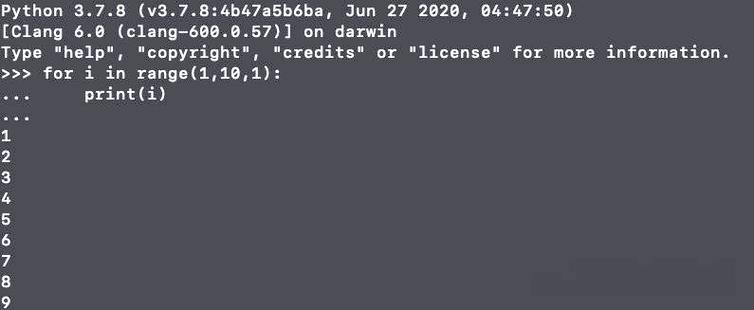
There are three ways to use range():
range(stop): Generates numbers from0up to (but not including)stop.range(start, stop): Generates numbers fromstartup to (but not including)stop.range(start, stop, step): Generates numbers fromstartup tostop, incrementing bystepeach time.
The step argument is the third, optional parameter.
Using the step Argument
Positive step (Counting Up)
This is the most common use case. You provide a start, stop, and a positive step.
Syntax: range(start, stop, step)
Example: Generate even numbers from 2 up to 10.
# Start at 2, go up to 11 (so 10 is included), increment by 2
for number in range(2, 11, 2):
    print(number)
# Output:
# 2
# 4
# 6
# 8
# 10
Key Point: The sequence stops before it reaches or passes the stop value. In this case, the next number would be 12, which is greater than 10, so the loop stops.
Negative step (Counting Down)
To count down, you must provide a negative step. You also need to make sure your start value is greater than your stop value.
Syntax: range(start, stop, step) where step is negative.
Example: Count down from 10 to 1.
# Start at 10, go down to 0 (so 1 is included), decrement by -1
for number in range(10, 0, -1):
    print(number)
# Output:
# 10
# 9
# 8
# 7
# 6
# 5
# 4
# 3
# 2
# 1
Common Pitfall: If your start is not greater than your stop when using a negative step, you will get an empty sequence.
# This will produce no output because 1 is not greater than 10 when stepping down.
for number in range(1, 10, -1):
    print(number)
# Output: (nothing)
Common Use Cases for step
Iterating Over Every Nth Item in a List
This is a very practical application. You can use range with a step to get the indices of every Nth item.
my_list = ['a', 'b', 'c', 'd', 'e', 'f', 'g', 'h', 'i', 'j']
# Get every 3rd item (starting from index 0)
for i in range(0, len(my_list), 3):
    print(f"Index {i}: {my_list[i]}")
# Output:
# Index 0: a
# Index 3: d
# Index 6: g
# Index 9: j
Creating Custom Number Sequences
You can create any arithmetic sequence you like.
# A sequence of multiples of 5
print("Multiples of 5:")
for i in range(0, 51, 5):
    print(i, end=" ") # Prints on the same line
print("\n") # New line
# A sequence counting down by 7
print("Counting down by 7:")
for i in range(30, -1, -7):
    print(i, end=" ")
print("\n")
# Output:
# Multiples of 5:
# 0 5 10 15 20 25 30 35 40 45 50
#
# Counting down by 7:
# 30 23 16 9 2 -5
Important Details and "Gotchas"
range() Returns a range Object, Not a List
In Python 3, range() is a smart, memory-efficient object. It doesn't generate all the numbers at once. Instead, it generates them one by one as you iterate over it. This is great for performance, especially with large ranges.
You can convert it to a list to see all the values at once.
# This range object is very small in memory
big_range = range(0, 1_000_000, 2)
print(type(big_range))
# Output: <class 'range'>
# Convert to a list (this will consume a lot of memory!)
# big_list = list(big_range) # Be careful with this on large ranges!
step Cannot Be Zero
This will raise a ValueError because a step of zero doesn't make sense. You'd be stuck on the same number forever.
# This will cause an error!
try:
    for number in range(1, 10, 0):
        print(number)
except ValueError as e:
    print(f"Error: {e}")
# Output:
# Error: range() arg 3 must not be zero
Summary Table
| Argument(s) | Description | Example | Output |
|---|---|---|---|
range(10) |
Numbers from 0 to 9 (default start=0, step=1) |
list(range(10)) |
[0, 1, 2, 3, 4, 5, 6, 7, 8, 9] |
range(2, 8) |
Numbers from 2 to 7 (default step=1) |
list(range(2, 8)) |
[2, 3, 4, 5, 6, 7] |
range(1, 10, 2) |
Numbers from 1 to 9, stepping by 2 |
list(range(1, 10, 2)) |
[1, 3, 5, 7, 9] |
range(10, 0, -2) |
Numbers from 10 down to 2, stepping by -2 |
list(range(10, 0, -2)) |
[10, 8, 6, 4, 2] |
range(5, 20, 5) |
Numbers from 5 to 19, stepping by 5 |
list(range(5, 20, 5)) |
[5, 10, 15] |