服务器端 - 提供文件下载接口
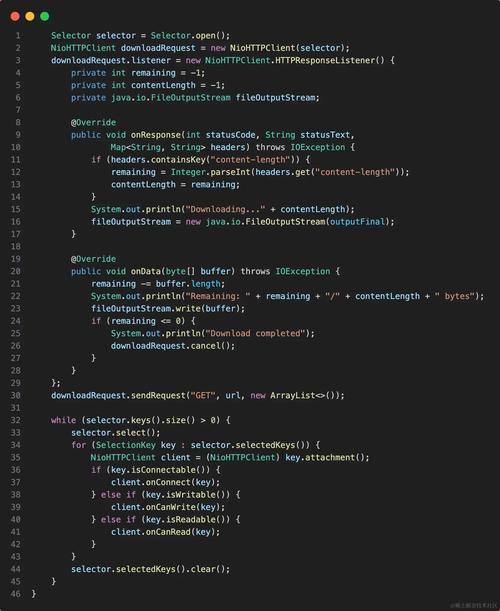
当你的 Java 应用(例如一个 Web 服务)需要向客户端(浏览器或其他程序)提供文件下载时,你需要设置正确的 HTTP 响应头。
(图片来源网络,侵删)
核心响应头
Content-Type: 指定文件的 MIME 类型,浏览器会根据这个类型决定如何处理文件(image/jpeg会直接显示图片,application/octet-stream会触发下载)。Content-Disposition: 这是最关键的头,它告诉浏览器如何处理响应内容。attachment: 表示这是一个附件,浏览器应该下载它。filename="...": 指定下载时建议的文件名,如果文件名包含非 ASCII 字符,最好使用filename*并进行 URL 编码。
Content-Length: 指定文件的大小(以字节为单位),这有助于浏览器显示下载进度条。
示例 1:使用原生 Servlet API
这是最基础的方式,不依赖任何框架。
import javax.servlet.ServletException;
import javax.servlet.annotation.WebServlet;
import javax.servlet.http.HttpServlet;
import javax.servlet.http.HttpServletRequest;
import javax.servlet.http.HttpServletResponse;
import java.io.File;
import java.io.FileInputStream;
import java.io.IOException;
import java.net.URLEncoder;
@WebServlet("/download/file")
public class FileDownloadServlet extends HttpServlet {
    @Override
    protected void doGet(HttpServletRequest request, HttpServletResponse response) throws ServletException, IOException {
        // 1. 设置要下载的文件路径
        String filePath = "C:\\path\\to\\your\\file.pdf"; // Windows 示例
        // String filePath = "/var/www/files/document.docx"; // Linux 示例
        File downloadFile = new File(filePath);
        FileInputStream inStream = new FileInputStream(downloadFile);
        // 2. 设置响应头
        // 设置 Content-Type,application/octet-stream 是通用二进制流,会触发下载
        response.setContentType("application/octet-stream");
        // 设置 Content-Disposition
        String headerKey = "Content-Disposition";
        // 获取文件名,并进行 URL 编码以处理中文或特殊字符
        String fileName = URLEncoder.encode(downloadFile.getName(), "UTF-8").replaceAll("\\+", "%20");
        String headerValue = String.format("attachment; filename=\"%s\"; filename*=utf-8''%s", downloadFile.getName(), fileName);
        response.setHeader(headerKey, headerValue);
        // 3. 设置 Content-Length (可选,但推荐)
        response.setContentLengthLong(downloadFile.length());
        // 4. 将文件内容写入响应输出流
        byte[] buffer = new byte[4096];
        int bytesRead;
        while ((bytesRead = inStream.read(buffer)) != -1) {
            response.getOutputStream().write(buffer, 0, bytesRead);
        }
        inStream.close();
    }
}
示例 2:使用 Spring Boot (更常用)
Spring Boot 提供了更简洁、更强大的方式来处理文件下载。
方式 A:返回 ResponseEntity (推荐)
这种方式最灵活,可以完全控制响应头和状态码。
import org.springframework.core.io.ClassPathResource;
import org.springframework.core.io.Resource;
import org.springframework.http.HttpHeaders;
import org.springframework.http.MediaType;
import org.springframework.http.ResponseEntity;
import org.springframework.stereotype.Controller;
import org.springframework.web.bind.annotation.GetMapping;
import java.io.IOException;
import java.net.URLEncoder;
import java.nio.charset.StandardCharsets;
@Controller
public class FileDownloadController {
    @GetMapping("/download/spring")
    public ResponseEntity<Resource> downloadFile() throws IOException {
        // 1. 准备文件资源
        // ClassPathResource 适用于从 classpath 下加载文件 (如 src/main/resources/)
        // FileSystemResource 适用于从文件系统加载
        Resource resource = new ClassPathResource("templates/sample.pdf");
        if (!resource.exists()) {
            return ResponseEntity.notFound().build();
        }
        // 2. 构建响应头
        String filename = resource.getFilename();
        String encodedFilename = URLEncoder.encode(filename, StandardCharsets.UTF_8)
                .replaceAll("\\+", "%20");
        HttpHeaders headers = new HttpHeaders();
        headers.add(HttpHeaders.CONTENT_DISPOSITION, "attachment; filename=\"" + filename + "\"; filename*=utf-8''" + encodedFilename);
        headers.add(HttpHeaders.CONTENT_TYPE, MediaType.APPLICATION_PDF_VALUE);
        headers.add(HttpHeaders.CONTENT_LENGTH, String.valueOf(resource.contentLength()));
        // 3. 返回 ResponseEntity
        // ok() 表示 200 状态码
        // body(resource) 将资源作为响应体
        return ResponseEntity.ok()
                .headers(headers)
                .body(resource);
    }
}
方式 B:返回 byte[] 或 InputStreamResource
已经在内存中,或者你想手动控制流,可以返回字节数组或输入流资源。
(图片来源网络,侵删)
import org.springframework.core.io.InputStreamResource;
import org.springframework.http.MediaType;
import org.springframework.http.ResponseEntity;
import org.springframework.web.bind.annotation.GetMapping;
import org.springframework.web.bind.annotation.RestController;
import java.io.FileInputStream;
import java.io.IOException;
@RestController
public class ByteDownloadController {
    @GetMapping("/download/bytes")
    public ResponseEntity<InputStreamResource> downloadFileAsBytes() throws IOException {
        String filePath = "C:\\path\\to\\your\\file.zip";
        FileInputStream fileInputStream = new FileInputStream(filePath);
        InputStreamResource resource = new InputStreamResource(fileInputStream);
        return ResponseEntity.ok()
                .header(HttpHeaders.CONTENT_DISPOSITION, "attachment; filename=\"" + new File(filePath).getName() + "\"")
                .contentType(MediaType.APPLICATION_OCTET_STREAM)
                .contentLength(new File(filePath).length())
                .body(resource);
    }
}
客户端 - 发起下载请求并保存文件
当你的 Java 应用需要从一个 URL 下载文件时,可以使用多种 HTTP 客户端库。
示例 1:使用 java.net.HttpURLConnection (JDK 内置)
这是最原始的方式,不需要任何外部依赖,但代码相对繁琐。
import java.io.FileOutputStream;
import java.io.IOException;
import java.io.InputStream;
import java.net.HttpURLConnection;
import java.net.URL;
public class HttpClientDownload {
    public static void downloadFile(String fileURL, String saveDir) throws IOException {
        URL url = new URL(fileURL);
        HttpURLConnection httpConn = (HttpURLConnection) url.openConnection();
        int responseCode = httpConn.getResponseCode();
        // 检查 HTTP 响应码是否为 200 (OK)
        if (responseCode == HttpURLConnection.HTTP_OK) {
            String fileName = "";
            String disposition = httpConn.getHeaderField("Content-Disposition");
            String contentType = httpConn.getContentType();
            int contentLength = httpConn.getContentLength();
            // 从 Content-Disposition 头中提取文件名
            if (disposition != null) {
                //  attachment; filename="filename.jpg"
                int index = disposition.indexOf("filename=");
                if (index > 0) {
                    fileName = disposition.substring(index + 9, disposition.length());
                }
            } else {
                // 如果没有 Content-Disposition,从 URL 中提取文件名
                fileName = fileURL.substring(fileURL.lastIndexOf("/") + 1);
            }
            System.out.println("Content-Type = " + contentType);
            System.out.println("Content-Disposition = " + disposition);
            System.out.println("Content-Length = " + contentLength);
            System.out.println("fileName = " + fileName);
            // 打开输入流
            InputStream inputStream = httpConn.getInputStream();
            String saveFilePath = saveDir + File.separator + fileName;
            // 打开输出流
            FileOutputStream outputStream = new FileOutputStream(saveFilePath);
            int bytesRead;
            byte[] buffer = new byte[4096];
            System.out.println("开始下载文件...");
            while ((bytesRead = inputStream.read(buffer)) != -1) {
                outputStream.write(buffer, 0, bytesRead);
            }
            System.out.println("文件下载完成!");
            outputStream.close();
            inputStream.close();
        } else {
            System.out.println("服务器返回 HTTP 响应码: " + responseCode);
        }
        httpConn.disconnect();
    }
    public static void main(String[] args) {
        String fileURL = "http://example.com/files/sample.pdf";
        String saveDir = "C:\\downloads";
        try {
            downloadFile(fileURL, saveDir);
        } catch (IOException e) {
            e.printStackTrace();
        }
    }
}
示例 2:使用 Apache HttpClient (功能强大,推荐)
Apache HttpClient 是业界标准的 HTTP 客户端库,功能更强大,API 更友好。
添加依赖 (Maven):
(图片来源网络,侵删)
<dependency>
    <groupId>org.apache.httpcomponents.client5</groupId>
    <artifactId>httpclient5</artifactId>
    <version>5.3.1</version> <!-- 使用最新版本 -->
</dependency>
下载代码:
import org.apache.hc.client5.http.classic.methods.HttpGet;
import org.apache.hc.client5.http.impl.classic.CloseableHttpClient;
import org.apache.hc.client5.http.impl.classic.CloseableHttpResponse;
import org.apache.hc.client5.http.impl.classic.HttpClients;
import org.apache.hc.core5.http.HttpEntity;
import org.apache.hc.core5.io.CloseMode;
import java.io.File;
import java.io.FileOutputStream;
import java.io.IOException;
import java.io.InputStream;
public class ApacheHttpClientDownload {
    public static void downloadFile(String fileURL, String saveDir) {
        // 创建 HttpClient 实例
        try (CloseableHttpClient httpClient = HttpClients.createDefault()) {
            HttpGet request = new HttpGet(fileURL);
            try (CloseableHttpResponse response = httpClient.execute(request)) {
                // 检查响应状态
                if (response.getCode() == 200) {
                    HttpEntity entity = response.getEntity();
                    if (entity != null) {
                        // 从响应头获取文件名
                        String fileName = getFileNameFromResponse(response, fileURL);
                        String saveFilePath = saveDir + File.separator + fileName;
                        System.out.println("开始下载文件: " + fileName);
                        // 使用 try-with-resources 确保 InputStream 和 OutputStream 被正确关闭
                        try (InputStream inputStream = entity.getContent();
                             FileOutputStream outputStream = new FileOutputStream(saveFilePath)) {
                            byte[] buffer = new byte[4096];
                            int bytesRead;
                            while ((bytesRead = inputStream.read(buffer)) != -1) {
                                outputStream.write(buffer, 0, bytesRead);
                            }
                        }
                        System.out.println("文件下载完成,已保存至: " + saveFilePath);
                    }
                } else {
                    System.out.println("服务器返回 HTTP 响应码: " + response.getCode());
                }
            }
        } catch (IOException e) {
            e.printStackTrace();
        }
    }
    private static String getFileNameFromResponse(CloseableHttpResponse response, String fileURL) {
        String fileName = "";
        // 1. 尝试从 Content-Disposition 头获取
        String disposition = response.getFirstHeader("Content-Disposition");
        if (disposition != null && disposition.contains("filename=")) {
            int index = disposition.indexOf("filename=");
            // 处理带引号的文件名
            fileName = disposition.substring(index + 9).replace("\"", "");
        } else {
            // 2. 如果没有,从 URL 获取
            fileName = fileURL.substring(fileURL.lastIndexOf("/") + 1);
        }
        return fileName;
    }
    public static void main(String[] args) {
        String fileURL = "http://example.com/files/sample.zip";
        String saveDir = "C:\\downloads";
        // 确保保存目录存在
        new File(saveDir).mkdirs();
        downloadFile(fileURL, saveDir);
    }
}
示例 3:使用 OkHttp (现代、简洁)
OkHttp 是另一个非常流行的 HTTP 客户端,以其简洁的 API 和高效的性能著称。
添加依赖 (Maven):
<dependency>
    <groupId>com.squareup.okhttp3</groupId>
    <artifactId>okhttp</artifactId>
    <version>4.12.0</version> <!-- 使用最新版本 -->
</dependency>
下载代码:
import okhttp3.*;
import java.io.File;
import java.io.FileOutputStream;
import java.io.IOException;
import java.io.InputStream;
public class OkHttpDownload {
    public static void downloadFile(String fileURL, String saveDir) throws IOException {
        OkHttpClient client = new OkHttpClient();
        Request request = new Request.Builder()
                .url(fileURL)
                .build();
        try (Response response = client.newCall(request).execute()) {
            if (!response.isSuccessful()) {
                throw new IOException("服务器返回错误: " + response);
            }
            // 从响应头获取文件名
            String fileName = getFileNameFromResponse(response, fileURL);
            String saveFilePath = saveDir + File.separator + fileName;
            System.out.println("开始下载文件: " + fileName);
            // 获取响应体
            try (ResponseBody responseBody = response.body();
                 InputStream inputStream = responseBody.byteStream();
                 FileOutputStream outputStream = new FileOutputStream(saveFilePath)) {
                byte[] buffer = new byte[4096];
                int bytesRead;
                while ((bytesRead = inputStream.read(buffer)) != -1) {
                    outputStream.write(buffer, 0, bytesRead);
                }
            }
            System.out.println("文件下载完成,已保存至: " + saveFilePath);
        }
    }
    private static String getFileNameFromResponse(Response response, String fileURL) {
        String fileName = "";
        // 1. 尝试从 Content-Disposition 头获取
        String disposition = response.header("Content-Disposition");
        if (disposition != null && disposition.contains("filename=")) {
            int index = disposition.indexOf("filename=");
            fileName = disposition.substring(index + 9).replace("\"", "");
        } else {
            // 2. 如果没有,从 URL 获取
            fileName = fileURL.substring(fileURL.lastIndexOf("/") + 1);
        }
        return fileName;
    }
    public static void main(String[] args) {
        String fileURL = "http://example.com/files/image.png";
        String saveDir = "C:\\downloads";
        // 确保保存目录存在
        new File(saveDir).mkdirs();
        try {
            downloadFile(fileURL, saveDir);
        } catch (IOException e) {
            e.printStackTrace();
        }
    }
}
总结与对比
| 场景 | 技术 | 优点 | 缺点 | 适用情况 |
|---|---|---|---|---|
| 服务器端 | 原生 Servlet | 无需框架,基础 | 代码繁琐,耦合度高 | 学习 Servlet 原理,或在不使用框架的旧项目中 |
| Spring Boot | 推荐,代码简洁,功能强大,类型安全 | 依赖 Spring Boot 生态 | 所有基于 Spring Boot 的现代 Web 应用 | |
| 客户端 | HttpURLConnection | JDK 内置,无外部依赖 | API 过时,功能有限,代码冗长 | 简单脚本,或不能添加第三方依赖的受限环境 |
| Apache HttpClient | 功能最全面,稳定可靠,高度可配置 | API 相对复杂,依赖较大 | 企业级应用,需要复杂 HTTP 功能(如重试、代理) | |
| OkHttp | API 简洁现代,性能高效(支持 HTTP/2) | 功能相比 Apache HttpClient 稍少 | Android 开发(官方推荐),以及大多数现代 Java 应用 |
建议:
- 服务器端文件下载:优先选择 Spring Boot 的
ResponseEntity方式,它既优雅又功能强大。 - 客户端文件下载:
- 如果项目已经使用 OkHttp,继续用它。
- 如果是新项目,OkHttp 是一个非常好的选择,简洁高效。
- 如果项目需要非常复杂的企业级 HTTP 客户端功能,或者已经在使用 Apache Commons 生态,Apache HttpClient 是稳妥的选择。