Of course! Sorting a Python dictionary is a common task. Since Python 3.7, standard dictionaries maintain insertion order. This means when we "sort" a dictionary, we are typically creating a new dictionary where the key-value pairs are in a specific order (e.g., by key or by value).
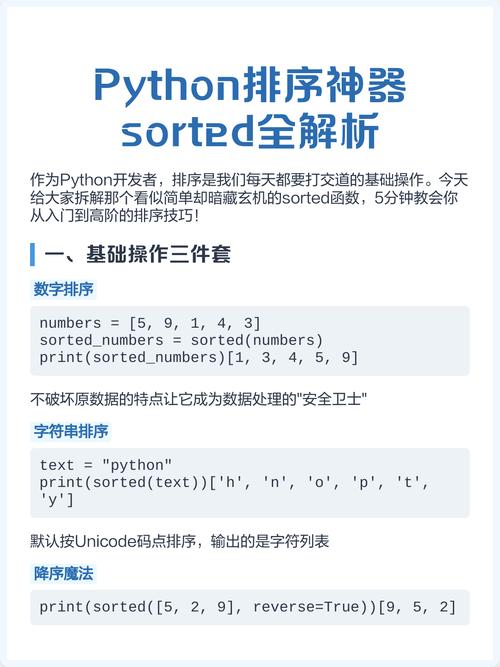
Here’s a complete guide covering the best methods, from the most common to more advanced use cases.
The Short Answer (Python 3.7+)
The most Pythonic and recommended way to sort a dictionary is with the built-in sorted() function combined with a dictionary comprehension.
To sort by key (most common):
my_dict = {'banana': 3, 'apple': 1, 'pear': 2, 'orange': 4}
# Sort by key and create a new dictionary
sorted_dict_by_key = {k: v for k, v in sorted(my_dict.items())}
print(sorted_dict_by_key)
# Output: {'apple': 1, 'banana': 3, 'orange': 4, 'pear': 2}
To sort by value:
my_dict = {'banana': 3, 'apple': 1, 'pear': 2, 'orange': 4}
# Sort by value and create a new dictionary
sorted_dict_by_value = {k: v for k, v in sorted(my_dict.items(), key=lambda item: item[1])}
print(sorted_dict_by_value)
# Output: {'apple': 1, 'pear': 2, 'banana': 3, 'orange': 4}
Detailed Explanation
Let's break down how this works.
The dict.items() Method
First, you need to get the key-value pairs from the dictionary. The my_dict.items() method returns a view object that displays a list of a given dictionary's key-value tuple pairs.
my_dict = {'banana': 3, 'apple': 1}
print(my_dict.items())
# Output: dict_items([('banana', 3), ('apple', 1)])
The sorted() function can work directly on this list of tuples.
The sorted() Function
The sorted() function takes any iterable and returns a new sorted list.
By default, sorted() sorts based on the first element of the tuple (the key).
my_dict = {'banana': 3, 'apple': 1, 'pear': 2}
items = my_dict.items()
# sorted() sorts by the first element of the tuple (the key) by default
sorted_items = sorted(items)
print(sorted_items)
# Output: [('apple', 1), ('banana', 3), ('pear', 2)]
Sorting by Value using the key Argument
To sort by the value (the second element of the tuple), you need to tell sorted() how to compare the items. You do this with the key argument.
The key argument expects a function that is called on each element before making comparisons. A lambda function is perfect for this. lambda item: item[1] tells sorted(): "For each item (which is a tuple like ('key', value)), use the element at index 1 (the value) for sorting."
my_dict = {'banana': 3, 'apple': 1, 'pear': 2}
items = my_dict.items()
# Use a lambda to sort by the second element of the tuple (the value)
sorted_items_by_value = sorted(items, key=lambda item: item[1])
print(sorted_items_by_value)
# Output: [('apple', 1), ('pear', 2), ('banana', 3)]
Rebuilding the Dictionary with a Comprehension
The sorted() function gives you a list of tuples, not a dictionary. To get your ordered dictionary back, the most efficient and readable way is a dictionary comprehension.
{k: v for k, v in iterable} is a compact way to create a dictionary.
Putting it all together gives the solutions from the "Short Answer" section.
Advanced Sorting Scenarios
What if values are equal?
If values are equal, Python's sort is "stable," meaning it will maintain the original relative order of those items.
my_dict = {'a': 2, 'b': 1, 'c': 2}
# 'a' comes before 'c' in the original dict
sorted_dict = {k: v for k, v in sorted(my_dict.items(), key=lambda item: item[1])}
print(sorted_dict)
# Output: {'b': 1, 'a': 2, 'c': 2} # 'a' is still before 'c'
Sorting in Reverse Order
Use the reverse=True argument.
my_dict = {'banana': 3, 'apple': 1, 'pear': 2}
# Sort by key in descending order
sorted_desc_key = {k: v for k, v in sorted(my_dict.items(), reverse=True)}
print(sorted_desc_key)
# Output: {'pear': 2, 'orange': 4, 'banana': 3, 'apple': 1}
# Sort by value in descending order
sorted_desc_value = {k: v for k, v in sorted(my_dict.items(), key=lambda item: item[1], reverse=True)}
print(sorted_desc_value)
# Output: {'orange': 4, 'banana': 3, 'pear': 2, 'apple': 1}
Sorting by Multiple Keys
You can sort by one key first, and then by another. For example, sort by value (ascending) and then by key (ascending).
my_dict = {'apple': 2, 'ant': 2, 'banana': 1, 'bat': 1}
# Sort by value (item[1]) first, then by key (item[0])
sorted_multi_key = {k: v for k, v in sorted(my_dict.items(), key=lambda item: (item[1], item[0]))}
print(sorted_multi_key)
# Output: {'ant': 2, 'apple': 2, 'bat': 1, 'banana': 1}
# Explanation:
# 1. 'ant' and 'apple' both have value 2. They are sorted by key: 'ant' < 'apple'.
# 2. 'bat' and 'banana' both have value 1. They are sorted by key: 'banana' < 'bat'.
Important: Before Python 3.7
In versions of Python before 3.7, standard dictionaries were unordered. The techniques above would still create a list of sorted items, but if you tried to put them back into a dict, the order would be lost.
The standard solution was to use collections.OrderedDict.
# For Python 3.6 and earlier
from collections import OrderedDict
my_dict = {'banana': 3, 'apple': 1, 'pear': 2}
# Sort by value and create an OrderedDict
sorted_ordered_dict = OrderedDict(sorted(my_dict.items(), key=lambda item: item[1]))
print(sorted_ordered_dict)
# Output: OrderedDict([('apple', 1), ('pear', 2), ('banana', 3)])
# You can still convert it to a regular dict, but the order is not guaranteed
# to be preserved in all subsequent operations.
regular_dict = dict(sorted_ordered_dict)
print(regular_dict)
# Output: {'apple': 1, 'pear': 2, 'banana': 3} (Order might be lost)
Summary: Which Method to Use?
| Scenario | Recommended Method | Why? |
|---|---|---|
| Python 3.7+ | {k: v for k, v in sorted(my_dict.items(), key=...)} |
It's the most modern, readable, and Pythonic way. It leverages the guaranteed insertion order of standard dicts. |
| Sorting by Key | {k: v for k, v in sorted(my_dict.items())} |
Simple and efficient. The default sort for tuples is on the first element. |
| Sorting by Value | {k: v for k, v in sorted(my_dict.items(), key=lambda item: item[1])} |
The lambda function is the standard way to tell sorted() to use a non-default element for comparison. |
| Python < 3.7 | OrderedDict(sorted(my_dict.items(), key=...)) |
Necessary to preserve order, as standard dicts were unordered. Still useful if you need dictionary-like objects with specific ordering behaviors. |