Of course! This is a fundamental concept in network programming with Python sockets. Let's break it down in detail.
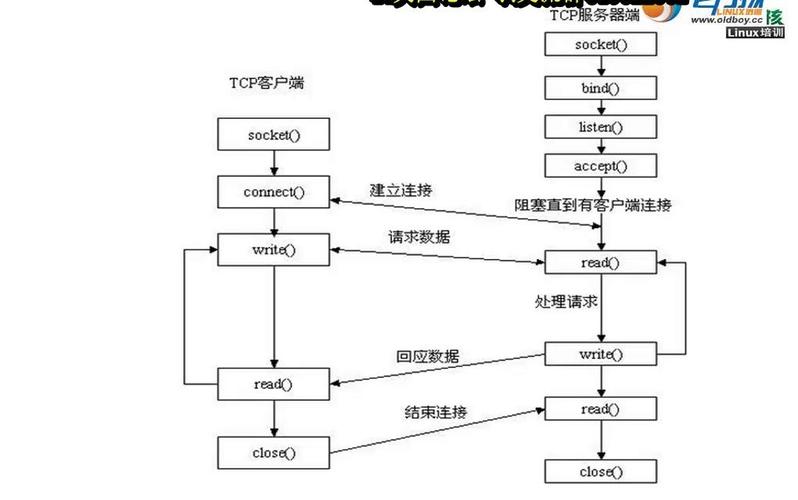
The Core Idea: Sockets and Bytes
At its lowest level, a network socket sends and receives a continuous stream of bytes. It doesn't know about Python's high-level data types like strings, integers, lists, or dictionaries.
Think of a socket like a garden hose. You can push water (bytes) through it, but you can't just push a "plant" (a Python object). You have to first turn the plant into a form that can flow through the hose (like water and nutrients), and then you have to know how to reassemble the plant from the water that comes out.
This process is called serialization (converting to bytes) and deserialization (converting back from bytes).
Key Concepts and Methods
Here are the most important methods for handling bytes with Python sockets:
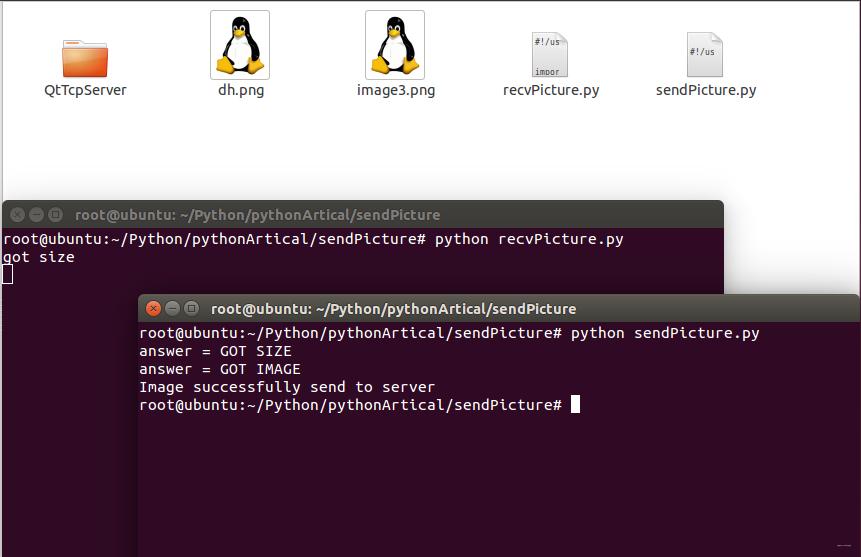
socket.send(bytes_data)
Sends data through the socket. The argument must be a bytes object. It returns the number of bytes actually sent.
socket.recv(buffer_size)
Receives data from the socket. It always returns a bytes object. The buffer_size is the maximum number of bytes to receive at once.
socket.sendall(bytes_data)
A convenient method that sends all the data in the bytes_data object. It continues to send from the buffer until all data has been sent or an error occurs. It's less error-prone than a manual loop with send().
The Problem: Converting Python Types to Bytes
You can't do socket.send("Hello, world!") or socket.send(123). You must convert them to bytes first.
Here's how to handle common data types:
Strings (str)
You must encode a string into bytes using a specific character encoding. UTF-8 is the standard and recommended choice.
my_string = "Hello, Python!"
# Encode the string to bytes using UTF-8
my_bytes = my_string.encode('utf-8')
print(my_string)       # Output: Hello, Python!
print(my_bytes)        # Output: b'Hello, Python!'
print(type(my_bytes))  # Output: <class 'bytes'>
Integers (int)
You can't just convert an integer to its string representation and encode it, because you lose information about the integer's size (e.g., is 255 one byte or three bytes?).
The standard solution is to convert the integer into a fixed-size sequence of bytes using the .to_bytes() method.
length: The number of bytes.byteorder:'big'for big-endian or'little'for little-endian. Big-endian is more common and human-readable.
Example: Sending the integer 12345
my_int = 12345
# Convert to 4 bytes, big-endian format
my_bytes = my_int.to_bytes(4, 'big')
print(my_int)         # Output: 12345
print(my_bytes)       # Output: b'\x00\x30\x39'
print(type(my_bytes)) # Output: <class 'bytes'>
To convert back:
received_int = int.from_bytes(my_bytes, 'big')
print(received_int) # Output: 12345
Complex Data (Lists, Dictionaries, Objects)
For complex data, you need a standard way to serialize it. The most common formats are JSON and Pickle.
- JSON (JavaScript Object Notation): The standard for data interchange. It's human-readable and language-independent. It works well with basic Python types (
dict,list,str,int,float,bool,None). - Pickle: A Python-specific protocol. It can serialize almost any Python object (including custom classes and functions), but it is not secure and not portable to other languages.
Example with JSON:
import json
data = {
    "name": "Alice",
    "score": 95,
    "is_active": True
}
# Serialize the dictionary to a JSON string, then encode to bytes
json_string = json.dumps(data)
message_bytes = json_string.encode('utf-8')
print(message_bytes)
# Output: b'{"name": "Alice", "score": 95, "is_active": true}'
# To deserialize:
# received_bytes = b'{"name": "Alice", "score": 95, "is_active": true}'
# received_string = received_bytes.decode('utf-8')
# received_data = json.loads(received_string)
# print(received_data) # {'name': 'Alice', 'score': 95, 'is_active': True}
The "Message Boundary" Problem
A critical issue with sockets is that recv() doesn't know how many bytes to expect for one complete message. It reads whatever data is currently in the network buffer, which might be:
- The entire message.
- Only part of a message.
- Multiple messages crammed together.
You need a protocol to tell the receiver how many bytes to read for one complete message. Here are two common solutions:
Solution 1: Prefix with Length (Most Common)
Before sending the actual message data, you first send the length of that data.
Protocol:
- Calculate the length of your message in bytes.
- Convert that length to a fixed-size number of bytes (e.g., 4 bytes).
- Send the 4-byte length prefix.
- Send the actual message bytes.
Client Example (Sending a JSON message):
import socket
import json
HOST = '127.0.0.1'
PORT = 65432
# 1. Create the data
data = {"message": "This is a test", "value": 42}
# 2. Serialize data to a JSON string and then to bytes
json_string = json.dumps(data)
message_bytes = json_string.encode('utf-8')
# 3. Create the length prefix (4 bytes, big-endian)
length_prefix = len(message_bytes).to_bytes(4, 'big')
# 4. Send the prefix, then the message
with socket.socket(socket.AF_INET, socket.SOCK_STREAM) as s:
    s.connect((HOST, PORT))
    s.sendall(length_prefix)      # Send the length first
    s.sendall(message_bytes)      # Then send the actual data
    print(f"Sent message of length: {len(message_bytes)}")
Server Example (Receiving the message):
import socket
import json
HOST = '127.0.0.1'
PORT = 65432
with socket.socket(socket.AF_INET, socket.SOCK_STREAM) as s:
    s.bind((HOST, PORT))
    s.listen()
    print("Server listening on", (HOST, PORT))
    conn, addr = s.accept()
    with conn:
        print(f"Connected by {addr}")
        # 1. Receive the length prefix (first 4 bytes)
        length_bytes = conn.recv(4)
        if not length_bytes:
            print("Client disconnected before sending length.")
            exit()
        # 2. Unpack the length from the bytes
        message_length = int.from_bytes(length_bytes, 'big')
        print(f"Expecting message of length: {message_length}")
        # 3. Receive the actual message data
        received_data = b''
        while len(received_data) < message_length:
            # Receive data in chunks
            chunk = conn.recv(1024)  # 1024 is a common chunk size
            if not chunk:
                # Connection broken before all data was received
                raise ConnectionError("Socket connection broken")
            received_data += chunk
        # 4. Deserialize the data
        json_string = received_data.decode('utf-8')
        data = json.loads(json_string)
        print(f"Received data: {data}")
Solution 2: Use a Delimiter
You can define a special byte sequence (a delimiter) that marks the end of a message.
Protocol:
- Create your message bytes.
- Append the delimiter to the end.
- Send the combined bytes.
Example with a simple delimiter b'\n':
# Client
message = b"Hello, this is message one."
delimiter = b'\n'
s.sendall(message + delimiter)
message = b"And this is message two."
s.sendall(message + delimiter)
Server
# Server
buffer = b''
while True:
    chunk = conn.recv(1024)
    if not chunk:
        break
    buffer += chunk
    # Check if the delimiter is in the buffer
    while delimiter in buffer:
        # Split the buffer into messages and the remaining part
        message, buffer = buffer.split(delimiter, 1)
        print(f"Received message: {message.decode('utf-8')}")
This method can be simpler but more error-prone if your message data can accidentally contain the delimiter.
Summary: Best Practices
- Always work with
byteswhen sending/receiving. - Encode strings using
.encode('utf-8')and decode them using.decode('utf-8'). - Use a length-prefixed protocol for sending structured data. It's the most robust and common solution.
- Use a standard serialization format like JSON for dictionaries and lists. It's portable and widely understood.
- Handle partial receives. Never assume one
recv()call will give you a complete message. Use a loop to read until you have all the bytes you expect.