Of course! Let's dive deep into the Python list object. It's one of the most fundamental and versatile data structures in Python.
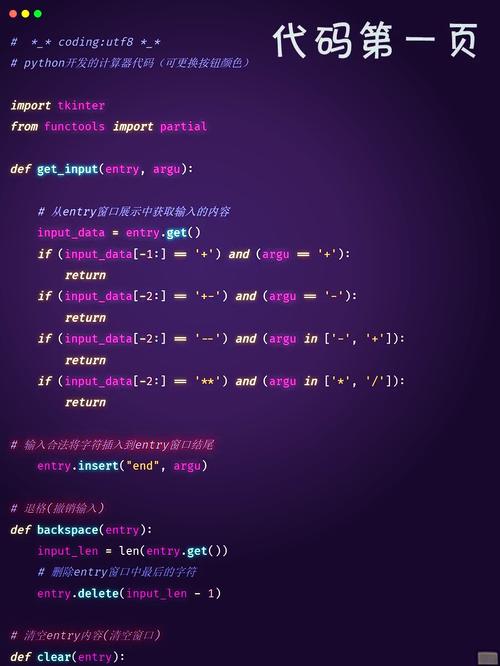
What is a Python List?
A list is an ordered, mutable (changeable) collection of items. Think of it as a dynamic array or a sequence that can hold items of different data types (numbers, strings, other lists, etc.).
The key characteristics are:
- Ordered: The items have a defined order, and that order will not change unless you modify the list. You can access items by their position (index).
- Mutable: You can change the contents of a list after it's been created. You can add, remove, or replace items.
- Heterogeneous: A single list can contain items of different data types.
- Dynamic: Its size can change automatically.
How to Create a List
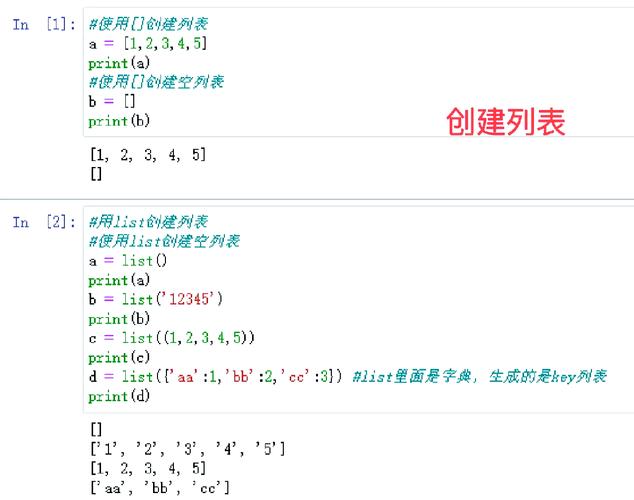
You create a list by placing comma-separated items inside square brackets [].
# An empty list
empty_list = []
# A list of integers
numbers = [1, 2, 3, 4, 5]
# A list of strings
fruits = ['apple', 'banana', 'cherry']
# A heterogeneous list (mixed data types)
mixed_data = [10, 'hello', 3.14, True]
# A list of lists (a nested list)
matrix = [[1, 2, 3], [4, 5, 6], [7, 8, 9]]
# You can also use the list() constructor
another_list = list(('a', 'b', 'c')) # Note the double parentheses
print(another_list) # Output: ['a', 'b', 'c']
How to Access List Items (Indexing and Slicing)
Since lists are ordered, you can access individual items or a range of items using indices.
Indexing
Python uses zero-based indexing, meaning the first item is at index 0.
fruits = ['apple', 'banana', 'cherry', 'orange']
# Get the first item
print(fruits[0])  # Output: 'apple'
# Get the third item
print(fruits[2])  # Output: 'cherry'
# Get the last item (using negative indexing)
print(fruits[-1]) # Output: 'orange'
# Get the second-to-last item
print(fruits[-2]) # Output: 'cherry'
Slicing
You can get a sublist by specifying a start and end index. The syntax is list[start:end]. The end index is exclusive.
fruits = ['apple', 'banana', 'cherry', 'orange', 'grape']
# Get items from index 1 up to (but not including) index 3
print(fruits[1:3]) # Output: ['banana', 'cherry']
# Get items from the beginning up to index 3
print(fruits[:3])  # Output: ['apple', 'banana', 'cherry']
# Get items from index 2 to the end
print(fruits[2:])  # Output: ['cherry', 'orange', 'grape']
# Get a copy of the entire list
print(fruits[:])   # Output: ['apple', 'banana', 'cherry', 'orange', 'grape']
How to Modify a List (List Methods)
Lists are mutable, so you can change them in-place.
Adding Items
list.append(item): Adds an item to the end of the list.list.insert(index, item): Inserts an item at a specific position.list.extend(iterable): Adds all items from an iterable (e.g., another list) to the end of the list.
my_list = [1, 2, 3]
my_list.append(4)       # my_list is now [1, 2, 3, 4]
my_list.insert(1, 'a') # my_list is now [1, 'a', 2, 3, 4]
another_list = [5, 6]
my_list.extend(another_list) # my_list is now [1, 'a', 2, 3, 4, 5, 6]
Removing Items
list.remove(item): Removes the first occurrence of a specific item. Raises aValueErrorif the item is not found.list.pop(index): Removes the item at a given index and returns it. If no index is given, it removes and returns the last item.list.clear(): Removes all items from the list.
my_list = [1, 'a', 2, 3, 4, 5, 6]
my_list.remove('a') # my_list is now [1, 2, 3, 4, 5, 6]
last_item = my_list.pop() # last_item is 6, my_list is now [1, 2, 3, 4, 5]
first_item = my_list.pop(0) # first_item is 1, my_list is now [2, 3, 4, 5]
my_list.clear() # my_list is now []
Other Useful Methods
list.reverse(): Reverses the order of the list in-place.list.sort(): Sorts the list in-place (ascending by default).list.copy(): Returns a shallow copy of the list.
numbers = [3, 1, 4, 1, 5, 9]
numbers.sort() # numbers is now [1, 1, 3, 4, 5, 9]
numbers.reverse() # numbers is now [9, 5, 4, 3, 1, 1]
# Shallow copy vs assignment
original = [1, 2, 3]
shallow_copy = original.copy() # or original[:]
# Modifying the copy does NOT affect the original
shallow_copy.append(4)
print(original)    # Output: [1, 2, 3]
print(shallow_copy) # Output: [1, 2, 3, 4]
# Assignment creates a reference, not a copy
reference = original
reference.append(5)
print(original)    # Output: [1, 2, 3, 5] (It changed!)
Common List Operations
Getting Information
len(list): Returns the number of items in the list.item in list: Checks if an item exists in the list (returnsTrueorFalse).list.count(item): Returns the number of times an item appears in the list.list.index(item): Returns the index of the first occurrence of an item. Raises aValueErrorif not found.
fruits = ['apple', 'banana', 'cherry', 'apple']
print(len(fruits))        # Output: 4
print('banana' in fruits) # Output: True
print(fruits.count('apple')) # Output: 2
print(fruits.index('cherry')) # Output: 2
Iterating Over a List
You can loop through the items in a list using a for loop.
fruits = ['apple', 'banana', 'cherry']
# Standard loop
for fruit in fruits:
    print(fruit)
# Output:
# apple
# banana
# cherry
# Loop with index and item (using enumerate)
for index, fruit in enumerate(fruits):
    print(f"Index {index}: {fruit}")
# Output:
# Index 0: apple
# Index 1: banana
# Index 2: cherry
Key Differences: List vs. Tuple vs. Set vs. Dictionary
It's helpful to understand how lists compare to other Python collections.
| Feature | list |
tuple |
set |
dict |
|---|---|---|---|---|
| Type | Ordered, Mutable Sequence | Ordered, Immutable Sequence | Unordered, Mutable Set of Unique Items | Unordered, Collection of Key-Value Pairs |
| Syntax | [1, 'a', 3.14] |
(1, 'a', 3.14) |
{1, 'a', 3.14} |
{'key': 'value', 'num': 123} |
| Mutable? | Yes | No | Yes | Yes |
| Duplicates? | Yes | Yes | No (only unique items) | Keys must be unique, values can be |
| Use Case | When you need a collection that can change (e.g., a list of users). | When data should not change (e.g., coordinates, days of the week). | When you need to store unique items and perform fast membership tests. | When you need to store data associated with a key (e.g., a user's profile). |
Summary
The Python list is an incredibly powerful and flexible tool. Its mutability and ordered nature make it the go-to choice for:
- Storing sequences of data.
- Building queues and stacks.
- Holding the results of operations.
- As a general-purpose container for any number of items.
Mastering lists is a fundamental step to becoming proficient in Python.